Whether you're an FPS player chasing every millisecond, a tech enthusiast fascinated by customisation, or a professional seeking ultimate typing comfort, choosing a mechanical gaming keyboard can often be overwhelming. Between the different form factors, switch types, and a myriad of features, it's easy to get lost. This guide is here to cut through the noise and help you find the keyboard that meets your needs—without the marketing fluff.
How to Choose the Right Mechanical Keyboard?
Before you dive in, let's review the key points that will help you make the right choice.
1. Form Factor: A Matter of Space and Ergonomics
The size of your keyboard is more than just a detail: it dictates your desk setup and your gaming comfort.
- Full-size (100%): The classic layout with a number pad. Ideal if you juggle work and play, or if your applications require frequent access to numbers.
- TKL (Tenkeyless, 80%): Identical to a full-size but without the number pad. An excellent compromise that frees up valuable space for your mouse.
- 75% Layout: The hot layout right now. It condenses the function keys and arrow keys for a minimal footprint, without sacrificing essential commands. A perfect balance between compactness and functionality.
- 60% Layout: The most minimalist option. Say goodbye to function keys, the navigation cluster, and arrow keys (accessible via key combinations). This is the go-to choice for FPS gaming keyboard players who need maximum space for wide mouse movements.
2. The Switches: The Heart of Your Typing Experience
The switch is the mechanical component hidden under each keycap. It's what defines the feel, sound, and responsiveness of your keyboard.
- Linear (e.g., Red, Yellow, Silver): Smooth, direct, and quiet travel with no tactile feedback. Highly prized for their speed, they are ideal for games that demand rapid and repeated actions.
- Tactile (e.g., Brown): They offer a slight, noticeable bump halfway through the keypress, which signals actuation without the audible "click." The perfect compromise for those who switch between gaming and typing.
- Clicky (e.g., Blue): In addition to the tactile bump, they produce a very distinct audible "click." Satisfying for typing, but their noise can quickly become a nightmare for anyone around you.
- Hall Effect (Magnetic) Switches: The next generation. This technology, based on magnetic sensors, enables advanced features like Rapid Trigger (instant key reset) and an actuation point that's adjustable down to the millimetre. Everything you need to gain a decisive edge in shooters.
Many models today are hot-swappable, which means you can swap out switches on the fly, without any soldering. A must-have for custom keyboard enthusiasts.
3. Connectivity and Other Refinements
- Wired vs. Wireless: Wired ensures a rock-solid, latency-free connection. However, a good wireless keyboard (via a 2.4 GHz dongle) now offers near-zero latency and the benefit of a clean, clutter-free desk. Bluetooth remains a bonus for versatility across multiple devices.
- RGB Keyboard: Far more than just an aesthetic gimmick, customisable lighting can be a strategic advantage by highlighting specific key groups for your games.
- QWERTY Layout: Most gaming and customisation-oriented keyboards are offered in a QWERTY (US) layout. Adapting is a breeze via your operating system's settings, and many gamers and developers end up adopting it for certain shortcuts.
Our Top Mechanical Keyboard Picks
Now for our selection. We've chosen a few gems that stand out and cater to distinct player profiles.
Machenike KT84-B84W: The Tech-Savvy All-Rounder
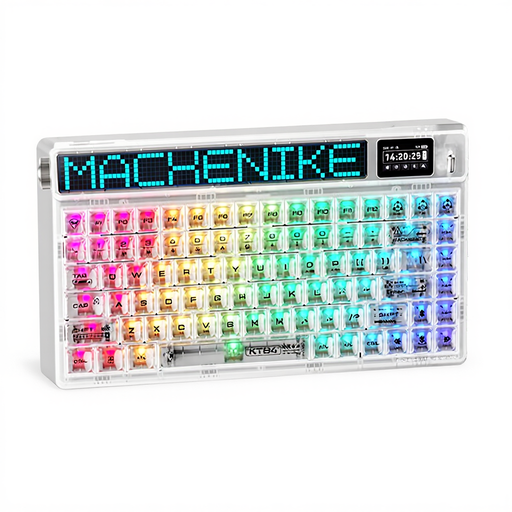
- Why it stands out: This keyboard stands out from the crowd with its HD TFT screen and customisable LED matrix, which can display system info, GIFs, or notifications. Its tri-mode connectivity (wired, 2.4 GHz, Bluetooth) gives it unbeatable versatility.
- Pros:
- Ultra-practical 75% compact layout.
- Gateron North Pole 2.0 Yellow (linear) switches for smooth and responsive typing.
- Hot-swappable PCB for limitless customisation.
- Gasket Mount structure for a more muted sound and feel.
- Who is it for? For the tech enthusiast who loves gadgets and is looking for a keyboard that performs as well for gaming as it does for productivity, with uncompromising connection flexibility.
Royalaxe E75: The Performance Edge for Competitive Gamers
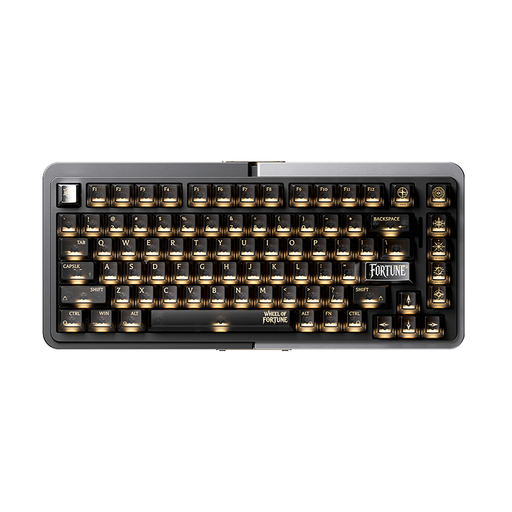
- Why it stands out: Here, everything is engineered for pure performance. The Royalaxe E75 features magnetic Hall Effect switches and features like Rapid Trigger and an adjustable actuation point (from 0.1 mm to 4.0 mm). It offers a level of responsiveness that traditional mechanical switches can hardly match.
- Pros:
- Cutting-edge technology for a decisive competitive advantage.
- Full CNC aluminium body for robustness and a premium finish.
- Advanced software customisation for each key's sensitivity.
- Game-optimised 75% layout.
- Who is it for? The competitive gamer playing titles like Valorant or CS2. If every millisecond counts and you want to optimise your hardware to win, this FPS gaming keyboard is a weapon of choice.
ET 60%: The Efficient and Accessible Minimalist
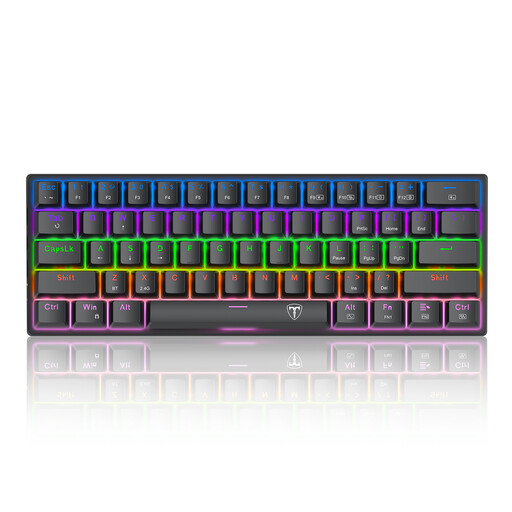
- Why it stands out: Its ultra-compact 60% form factor is its main selling point. It frees up considerable desk space, a major advantage for low-sensitivity gamers who make wide sweeps across their mousepad.
- Pros:
- Minimal size for maximum freedom of movement.
- Blue switches for tactile typing and very distinct audible feedback.
- Easy to transport, perfect for travel or LAN parties.
- An accessible price point to get started in the world of mechanical keyboards.
- Who is it for? The FPS player who prioritises mouse space above all else, or the nomadic user looking for an easy-to-carry mechanical keyboard. Be warned, Blue switches are very loud: something to consider if you're not alone!
Still Not Convinced?
The world of custom keyboards is as vast as it is exciting. If our suggestions don't check all your boxes, or if you're simply curious to explore other form factors, switches, and designs, the possibilities are endless.
? Discover our full collection of customisable keyboards to find your perfect match.
Frequently Asked Questions (FAQ)
1. Why do gamers prefer mechanical keyboards?
For three main reasons: responsiveness (each key is an independent switch, making it faster and more precise), durability (switches are rated for tens of millions of keystrokes), and customisation (choice of switches, keycaps, and even the case).
2. What type of switch is recommended for FPS games?
For fast-paced shooters (FPS), linear switches (like Reds or Yellows) are often highly favoured. Their smooth, unobstructed travel allows for rapid, successive actions without fatigue. However, the choice remains highly personal: some players swear by the tactile feedback of Brown switches to better feel the actuation.
3. Is a QWERTY keyboard difficult to use if you're used to another layout?
Not at all. It only takes a few seconds in your system's language settings (Windows or macOS) to have it treat a QWERTY keyboard as your native layout (like AZERTY or QWERTZ). The operating system handles everything, and each key will correspond to what you're used to typing. Besides, many gamers and developers end up adopting QWERTY directly, finding it more practical for certain gaming or coding shortcuts.


