Joybuy Insights

Mechanical Gaming Keyboard Buyer’s Guide: Top Picks

Navigating the vast landscape of layouts, technologies, and available options can make choosing a new mechanical keyboard a daunting task. Whether you're a gamer seeking ultimate responsiveness, a professional looking for the perfect typing comfort, or a customisation enthusiast, finding the ideal model is crucial. This guide is here to cut through the noise, giving you clear insights and practical advice to navigate the world of mechanical gaming keyboards. The goal: to help you make an informed choice, free from superfluous marketing jargon.

How to Choose Your Mechanical Gaming Keyboard?

Before we dive into our top picks, let's go over the key criteria to help you narrow down your search.

Layout: 100%, TKL, or 60%?

Your keyboard's layout isn't just an aesthetic detail: it directly impacts your ergonomics and the available space on your desk.

  • 100% (Full-Size) Layout: The classic, complete with its number pad. It's the most versatile, equally adept at gaming and productivity tasks that require frequent number entry.
  • TKL (Tenkeyless, 80%) Layout: By sacrificing the number pad, this layout becomes more compact. It frees up valuable desk real estate for your mouse, a major advantage for gamers who use wide, sweeping movements.
  • 60% Layout: Minimalism to the extreme. It does away with the function keys (F1-F12) and the navigation cluster (arrow keys, etc.). Access is handled via shortcuts and function layers. A highly sought-after layout for minimalist setups and on-the-go use.

Connectivity: Wired or Wireless?

The choice between wired and wireless comes down to your priorities.

  • Wired (USB): Guarantees a stable, zero-latency connection without ever having to worry about battery life. It's the go-to choice for esports and competitive gaming.
  • Wireless (Bluetooth / 2.4 GHz): A wireless gaming keyboard offers complete freedom of movement and a clutter-free desk. Modern 2.4 GHz technologies provide virtually imperceptible latency, ideal for gaming, while Bluetooth ensures universal compatibility with a myriad of devices.

Customisation: Switches, Keycaps, and Modularity

The true appeal of a mechanical keyboard lies in its vast customisation potential.

  • Switches: This is the core of the experience. The mechanism under each key defines the entire typing feel. There are three main families: Linear (smooth and fast), Tactile (with a noticeable bump at the actuation point), and Clicky (with a tactile bump and an audible click).
  • Keycaps: The caps can be swapped out to transform the look or feel of your keyboard. Models made of PBT (polybutylene terephthalate) are highly sought after for their durability and their textured finish that doesn't develop shine over time.
  • Modularity: The ultimate feature for tinkerers. A hot-swappable keyboard allows you to change switches without any soldering. It's ideal for experimenting with different typing feels or for replacing a faulty switch in seconds. This is the ultimate entry point into the world of custom mechanical keyboards.

Recommended Mechanical Keyboards to Consider

Let's get to the specifics with models that have caught our attention, each catering to different needs and budgets.
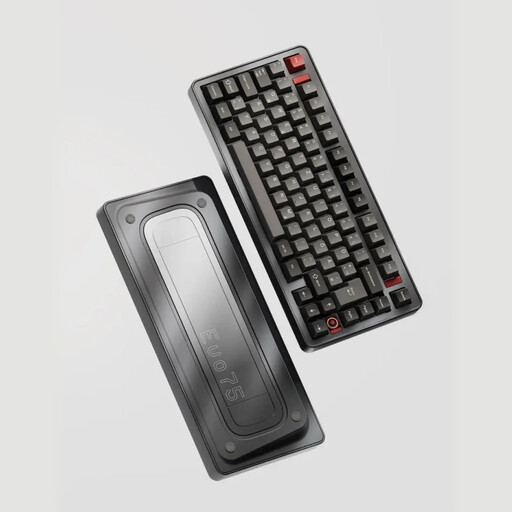
Ticktype EVO75: For Customisation Enthusiasts

Ticktype EVO75 Custom Tri-Mode Wireless Mechanical Keyboard

Why it stands out: The Ticktype EVO75 is aimed at purists and demanding users seeking a premium, 100% customisable experience. Its unibody aluminium chassis, internal leaf spring mounting structure, and compatibility with VIA software make it an exceptional foundation for building a bespoke keyboard.

  • Key features:

    • Triple-mode connectivity (2.4 GHz wireless, Bluetooth, wired USB-C)
    • 100% aluminium chassis for unwavering durability and stability
    • Hot-swappable functionality to change switches on the fly
    • High-capacity 8000 mAh battery
    • Customisable RGB keyboard lighting
  • Who is it for? For custom mechanical keyboard enthusiasts and professionals who want a wireless keyboard that is high-performance, durable, and where every detail—from the typing feel to key programming—is completely controllable.
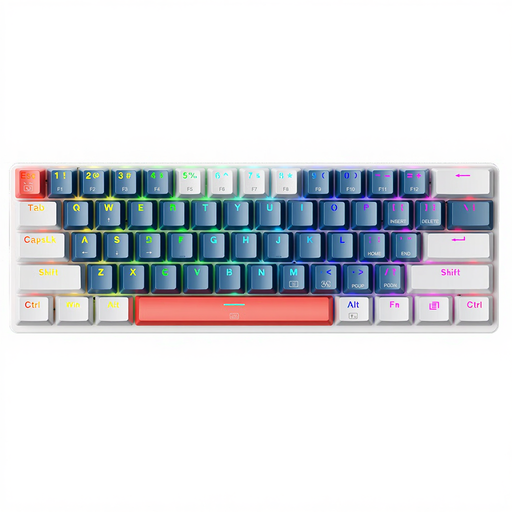
Machenike K500-B61: The Compact and Accessible Option

Machenike K500-B61 60% Mechanical Wired Keyboard

Why it stands out: The Machenike K500-B61 is an excellent entry point into the world of mechanical keyboards. Its ultra-compact 60% keyboard layout is perfect for optimising desk space and for gamers on the go.

  • Key features:

    • Compact layout that frees up maximum space for your mouse
    • Blue switches offering a distinct tactile and audible feedback
    • RGB keyboard lighting for a polished aesthetic touch
    • Standard QWERTY mechanical keyboard layout for maximum compatibility with games
  • Who is it for? Gamers with limited desk space, those looking for an easy-to-carry keyboard for LAN parties, or simply anyone who wants to experience the joy of mechanical keyboards without breaking the bank.
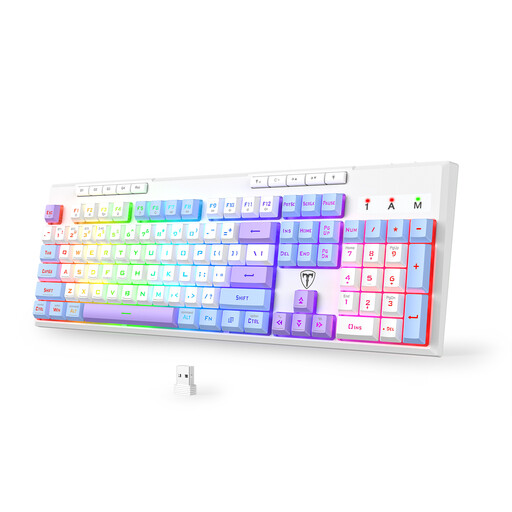
ET 100% Tri-Mode: Versatility Without Compromise

ET 100% Tri-Mode Gaming Keyboard QWERTY

Why it stands out: This model is the ultimate Swiss Army knife. It combines a full 100% layout with triple-mode connectivity, making it a champion of versatility. It packs advanced gaming features (macros, anti-ghosting) without compromising on everyday comfort.

  • Key features:

    • Triple-mode connectivity (2.4 GHz wireless, Bluetooth, wired USB-C)
    • Full-size layout with number pad
    • 6 programmable macro keys to execute complex commands with a single press
    • Durable and wear-resistant PBT keycaps
    • 4000 mAh battery providing excellent battery life
  • Who is it for? Users looking for the ultimate all-rounder keyboard, capable of switching from intense gaming to office work in a snap. Perfect for those who refuse to choose between the convenience of a number pad and the freedom of wireless.

Complete Your Gaming Setup

An RGB keyboard is good. A fully synchronised setup is even better! For total immersion, your environment's lighting plays a crucial role. To harmonise the lighting of your battlestation, check out our selection of RGB computer lights.

Frequently Asked Questions About Mechanical Keyboards

What's the difference between a mechanical keyboard and a membrane keyboard?

The fundamental difference lies in the technology beneath each key. A membrane keyboard relies on a rubber dome that collapses to make contact. A mechanical keyboard, on the other hand, uses an independent switch (the famous switch) for each key, equipped with a spring mechanism. The result? More precise keystrokes, better feedback, far superior durability, and a much wider choice of typing feels.

What type of switch should I choose for a mechanical gaming keyboard?

There's no one-size-fits-all answer, as the choice is primarily a matter of personal preference. However, we can identify a few general trends:

  • Linear (e.g., Red): Praised for their smooth, fast, and seamless travel. They are perfect for rapid successive actions (double-tapping) in fast-paced games.
  • Tactile (e.g., Brown): The middle ground. They offer a slight tactile bump that confirms key actuation without being noisy. An excellent compromise for both gaming and typing.
  • Clicky (e.g., Blue): The pleasure of sound and touch. They combine tactile feedback with a very distinct audible "click." Extremely satisfying for typing, but their noise can be a drawback for streaming or in a shared office.

Is a QWERTY keyboard suitable for use in France?

Even though the standard in France is AZERTY, many gamers and developers prefer the QWERTY mechanical keyboard. Why? Mainly for compatibility reasons. The majority of games and development software are designed for QWERTY, which greatly simplifies access to native shortcuts. Rest assured: operating systems like Windows allow you to switch between AZERTY and QWERTY layouts on the fly. You can therefore type perfectly in French on a physical QWERTY keyboard by simply configuring your OS.