
Livraison le jour même ou le lendemain

Qualité garantie

Débloquez vos offres de bienvenue: Livraison GRATUITE | Jusqu'à -80 % | 30 jours d'essai gratuits à JoyPlus
Téléchargez l'application
A mechanical gaming keyboard can improve typing comfort, command precision and desk organisation. But spec sheets often throw around impressive numbers without explaining what they actually mean for everyday use. A high polling rate, a dazzling RGB display or a large battery won't make up for an awkward layout or a key arrangement that doesn't suit your habits.
Before you place an order, keep three pitfalls in mind: responsiveness claims that are often hard to notice day-to-day, compact formats that require lots of key combinations, and models advertised as French when they actually use a QWERTY layout. Here are the criteria to consider when choosing a keyboard for gaming, remote work and your setup in the UK.
A gaming keyboard might boast a polling rate of 1,000 or 8,000 Hz. This figure indicates how often the keyboard reports its status to your computer. It can matter for competitive gamers, but it's not enough to judge the overall quality of the keyboard.
The type of switch, key stability, configuration software and connection method all influence the experience just as much. For most players, a keyboard with good anti-ghosting, a stable connection and clearly labelled keys provides a more solid foundation than a single impressive number.
A compact 65% mechanical keyboard frees up space for your mouse, but it usually removes the function row and some navigation keys. The 75% format keeps more controls in a smaller footprint. Without a number pad, the TKL format remains a very common compromise for both gaming and working.
Before you choose, check that the keyboard has the keys you need for your software, shortcuts and games. Functions accessed via the Fn key can take a little getting used to.
An AZERTY gaming keyboard makes typing in French easier and matches the habits of many users in France. However, some compact or customisable models are sold in US QWERTY. You can change the layout in your system settings, but the characters printed on the keys won't match what appears on screen.
So check carefully for "AZERTY" or "QWERTY" in the spec sheet – photos alone can be misleading.
Linear switches offer a smooth press, often favoured in games that require rapid keystrokes. Tactile switches provide a noticeable bump at the actuation point. Clicky switches produce a more pronounced sound and a stronger tactile feel.
For a quiet mechanical keyboard, go for pre-lubricated linear switches, a dampened structure and materials that reduce vibrations. No mechanical keyboard is completely silent – the noise level also depends on your typing force, the stabilisers and the desk it sits on.
Measure your desk and see where your mouse sits. A shorter keyboard isn't automatically more practical if you often use the keys that have been removed.
A wired USB-C gaming keyboard avoids charging and guarantees a constant connection. A wireless gaming keyboard can work on 2.4 GHz for gaming, Bluetooth for connecting to multiple devices, or both depending on the model. Bluetooth is handy with a laptop, tablet or second device. For gaming, the 2.4 GHz receiver is generally more comfortable and avoids unnecessary fiddling mid-game.
Hot-swap lets you replace switches without soldering, as long as you choose compatible models – depending on the PCB, you'll need to opt for 3-pin or 5-pin switches. This feature makes it easier to upgrade your keyboard, but it doesn't guarantee a better typing feel on its own.
Also check for software that allows key remapping, macro creation and lighting customisation. A programmable gaming keyboard can simplify repetitive tasks, as long as you follow the rules of the online games you play.
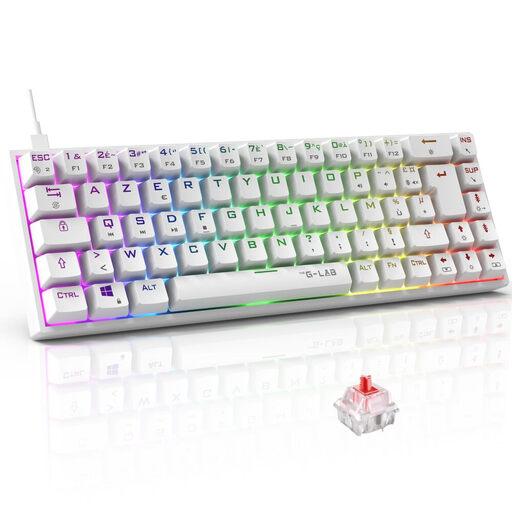
Why this suits this profile: Its 65% AZERTY layout works well for small desks and gamers who want to keep the arrow keys. The USB connection and compatibility with PC, PS4, PS5 and Xbox make it easy to get started.
The AZERTY layout is clearly stated, and the wired connection avoids battery or wireless pairing hassles.
Outemu Red switches rated at 45 g, programmable macros, customisable RGB and NKRO anti-ghosting.
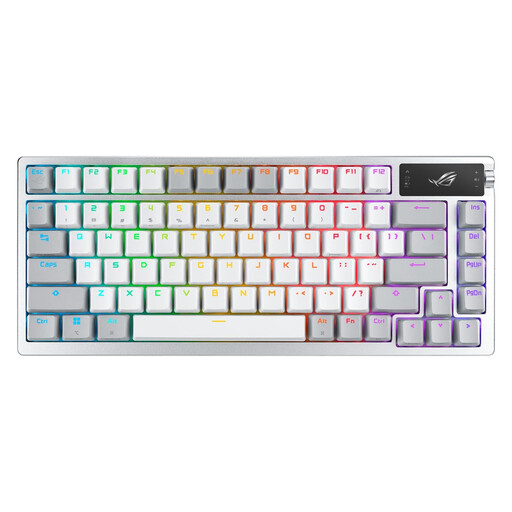
Why this suits this profile: This AZERTY RGB mechanical keyboard in a 75% format is aimed at users who want extensive customisation, multiple connection modes and integrated controls.
The OLED screen displays keyboard status and battery level. If needed, the wired connection takes over while charging.
2.4 GHz, Bluetooth 5.1 and USB connections, ROG NX switches, hot-swap function, control wheel and 2-inch OLED screen.
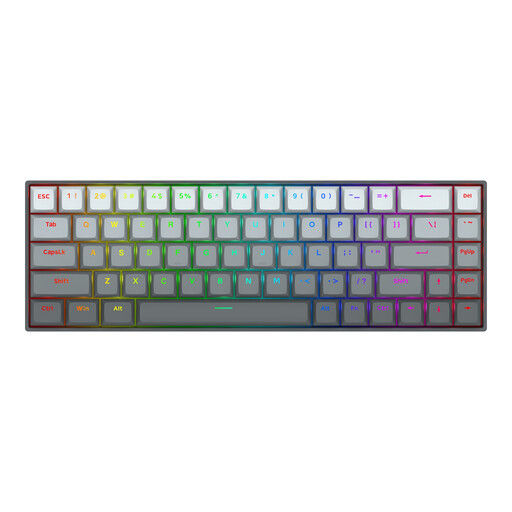
Why this suits this profile: Its 65% format and magnetic switches are designed for FPS players who want to adjust the actuation point while freeing up more space for their mouse.
The spec sheet states an adjustment range of 0.2 to 4.0 mm. You can check that this feature genuinely meets your needs before buying.
Magnetic switches, advertised Rapid Trigger function, 8,000 Hz polling rate and aluminium top plate.
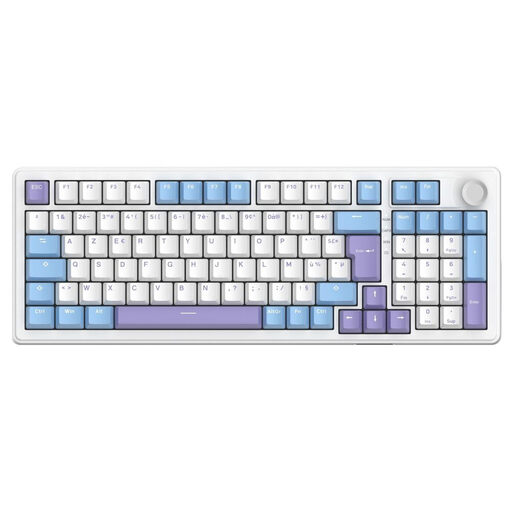
Why this suits this profile: The 96% AZERTY layout keeps most standard keys without taking up as much space as a full-size keyboard. Bluetooth makes work easy, while 2.4 GHz or USB-C takes over for gaming.
The AZERTY layout, triple connection and ability to use it while charging reduce everyday compromises.
Hot-swap linear switches, PBT keycaps, five-layer construction and advertised battery life of up to 80 hours without backlighting.
We've put together a comprehensive, real-time updated selection of products that meet these demanding criteria, while complying with European safety regulations.
Yes, as long as you choose a switch that suits your environment. Linear switches are versatile, while clicky models can quickly become annoying in a shared office. Keycap profile, adjustable tilt and acoustic dampening also play an important role during long sessions.
For a fixed setup, a wired USB-C gaming keyboard offers a simple connection and never needs charging. 2.4 GHz gives you more freedom while keeping a dedicated receiver. Bluetooth is best for laptops and secondary devices. A tri-mode model lets you switch easily between uses.
The lifespan depends on the switches, the quality of the stabilisers, maintenance and how intensively you use it. Some spec sheets claim tens of millions of keystrokes, but these figures are based on components tested under specific conditions. Regularly dusting your keyboard, keeping liquids away and replacing switches on a hot-swap model can all help extend its life.