
Livraison le jour même ou le lendemain

Qualité garantie

Débloquez vos offres de bienvenue: Livraison GRATUITE | Jusqu'à -80 % | 30 jours d'essai gratuits à JoyPlus
Téléchargez l'application
A mechanical gaming keyboard can improve typing comfort, command precision and desk organisation. But with RGB backlighting, different connection modes and marketing promises, product listings sometimes miss the essentials.
Before you take the plunge, check the key layout, form factor, connection type and whether the switches can be replaced. These criteria will help you avoid nasty surprises, whether you're gaming on PC or console, or planning to use the keyboard for everyday work.
A 60 % keyboard frees up plenty of desk space, but typically does away with the F1-F12 row, separate arrow keys and navigation keys. These functions are still accessible via the Fn key, but there's a learning curve involved.
The 65 % keyboard usually keeps the directional arrow keys, while the 75 % keyboard often adds the function row in a compact footprint. The TKL format, with its 87 keys, mainly removes the numeric keypad. For office work, strategy games or spreadsheets, a 96 % or full-size model will often be more practical.
An AZERTY mechanical keyboard makes typing French characters and using standard Windows shortcuts much easier. Conversely, a QWERTY mechanical keyboard can suit gamers, developers and users accustomed to the US layout, but the symbols won't be in the same places.
Always check for labels like "FR AZERTY", "US QWERTY" or "German QWERTZ". Keys that look similar don't guarantee the right physical layout or the correct software configuration.
A wireless mechanical keyboard can communicate via Bluetooth, 2.4 GHz or both. Bluetooth works well for mobile work, tablets and laptops. For gaming, the 2.4 GHz receiver is generally preferred because it offers a dedicated connection. The USB-C cable remains handy for charging the keyboard or using it in wired mode.
A tri-mode model combines all three options. However, take the time to check the stated battery life, charging time, whether the receiver is included, and compatibility with your console.
Measure the depth of your desk and the space you need for your mouse. A compact gaming keyboard can make wide movements easier, but losing the numeric keypad or certain dedicated keys must still work with how you use it.
Linear switches offer a smooth keystroke with no tactile bump. Tactile switches add a noticeable resistance at the point of actuation, while clicky switches produce a more distinct sound. In a shared space, a linear or silent model will generally be more pleasant for those around you.
A hot-swap mechanical keyboard lets you replace switches without soldering, provided the pins are compatible with the circuit board. This feature makes it easier to upgrade your keyboard, but it doesn't automatically make all switches compatible with each other.
The mechanical RGB keyboard offers, depending on the model, per-key lighting, preset effects, adjustable brightness or customisation software. These features are primarily aesthetic and shouldn't be confused with any latency advantage.
For competitive gaming, check the wired mode, the polling rate when stated, anti-ghosting and the ability to disable the Windows key. A volume wheel is particularly handy for quickly adjusting the sound of a game, video call or editing software.
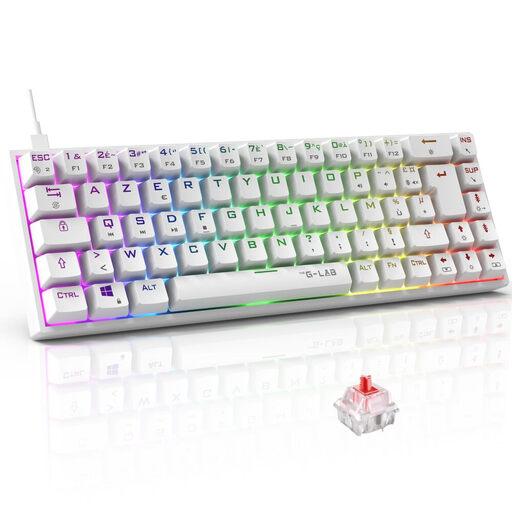
Why this choice suits this profile: its 65 % AZERTY format is ideal for French gamers who want to save space without losing the directional arrow keys.
The French layout is clearly stated and the USB connection avoids any uncertainty about battery life or a missing wireless receiver.
Red Outemu switches rated at 45 g, RGB backlighting with 18 modes, macros and compatibility with PC, PS4, PS5 and Xbox.

Why this choice suits this profile: its 98 % format keeps plenty of keys while adding tri-mode connectivity and a control wheel.
The listing details the wired, Bluetooth and 2.4 GHz modes, as well as the battery capacity depending on the version chosen, with or without a screen.
Hot-swap PCB, gasket mount structure, south-facing lighting, metal wheel and TFT screen depending on the configuration.
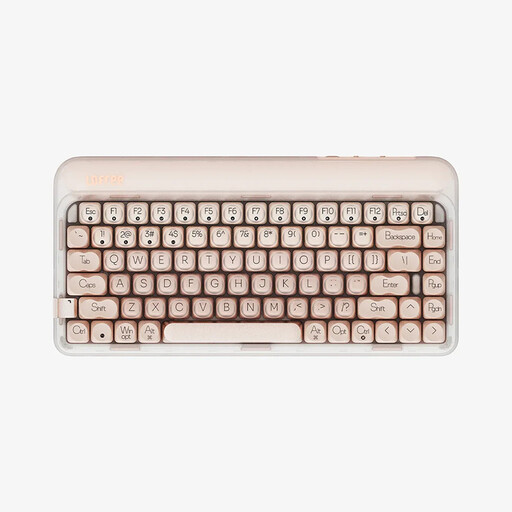
Why this choice suits this profile: its 75 % format, hot-swap system and three connection modes meet the needs of a workstation shared between gaming, study and remote work.
The listing clearly distinguishes between USB-C, Bluetooth 5.3 and 2.4 GHz modes, with a 4000 mAh battery and monochrome lighting.
84 keys, pre-lubricated linear switches, cushioned PORON and IXPE structure, stated 1000 Hz polling rate with compatible devices.

Why this choice suits this profile: its 61 keys and tri-mode connection are ideal for students, mobile gamers and desks where every centimetre counts.
The listing specifies the functions missing from the 60 % format and the Fn shortcuts to be aware of before buying.
61 US QWERTY keys, Bluetooth and 2.4 GHz, USB-C cable, RGB lighting with 16 modes and a 1600 mAh battery.
We've put together a comprehensive, real-time updated selection of products that meet these demanding criteria, while complying with European safety regulations.
Yes, provided you choose a switch and noise level that suit your environment. Linear switches are often quieter than clicky models. A 75 % or TKL format keeps more functions than a 60 % keyboard, while still freeing up desk space.
It depends on usage, maintenance and the keyboard's design. Some listings state several tens or even hundreds of millions of activations for the switches. However, these figures correspond to manufacturing specifications and don't constitute a guarantee of use in all conditions.
Avoid liquids, clean the keyboard with a dry cloth and unplug it before any maintenance or switch replacement.
Check the stated compatibility and the connection method. A mechanical keyboard listed as compatible with PC and Mac may work with both systems, but certain multimedia functions or customisation software may be limited depending on the platform.
On console, check the model's compatibility with your PS4, PS5 or Xbox. When the game demands it, opt for wired mode.