
Livraison le jour même ou le lendemain

Qualité garantie

Débloquez vos offres de bienvenue: Livraison GRATUITE | Jusqu'à -80 % | 30 jours d'essai gratuits à JoyPlus
Téléchargez l'application
Red, Brown, or Blue switches? 60%, 75%, or TKL layout? Choosing a mechanical gaming keyboard has become a real challenge. Don't panic! Whether you're an esports pro seeking absolute responsiveness or a mechanical enthusiast looking for the ultimate typing comfort, this guide is for you. We've broken everything down to help you make sense of it all and invest in the keyboard that will transform your gaming and work sessions.
Together, let's dissect the criteria that truly matter and discover a selection of models with an unbeatable price-to-performance ratio. Your future setup will thank you.
Before you jump into our top picks, it's essential to understand a few concepts that define the entire mechanical keyboard experience.
On a gamer's desk, every square inch counts. Compact mechanical keyboards are the ideal solution for optimising your gaming or workspace without sacrificing a shred of performance.
The switch is the mechanical component hidden under each keycap. It dictates the typing feel, sound, and responsiveness of your keyboard. Needless to say, this choice is crucial.
Beyond switches and form factor, certain technologies have become simply indispensable on a good mechanical gaming keyboard.
After hours of testing and comparison, here are the models that stood out to us.
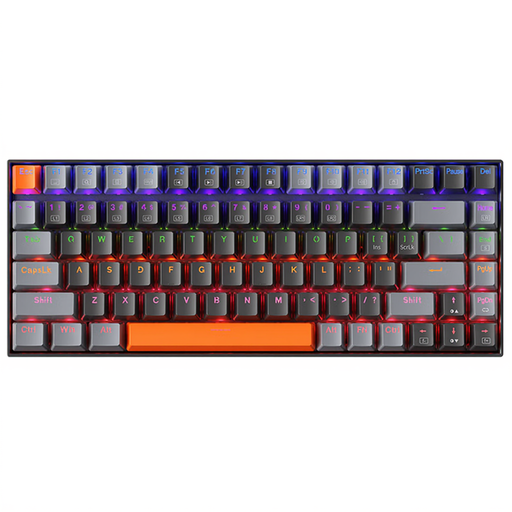
Why we love it: It's the quintessential do-it-all keyboard. Its Brown switches offer the perfect balance between in-game responsiveness and superb typing comfort for work. Its 75% keyboard layout is the ideal middle ground: compact, but with all the essential keys right at your fingertips.
Key features:
Who is it for? Hybrid users: gamers who are also developers, writers, or students and demand a keyboard that performs as well for work as it does for play.
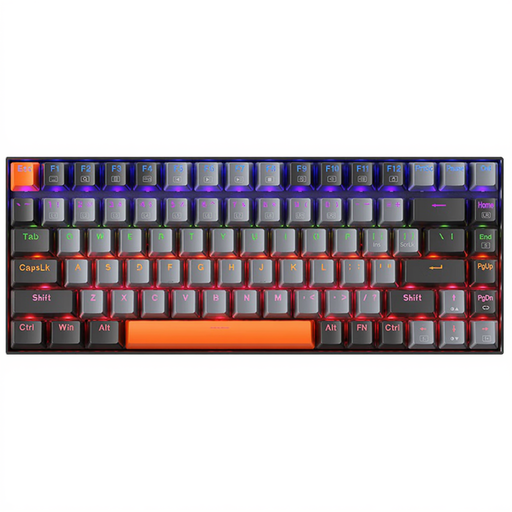
Why we love it: Its lightning-fast responsiveness. Equipped with Red switches, this keyboard is a true competitive weapon. The linear, friction-free travel of the keys allows for ultra-fast, repeated actions—a decisive advantage in fast-paced games.
Key features:
Who is it for? Competitors and players of fast-paced titles (FPS, MOBA) for whom speed of execution is the absolute priority.
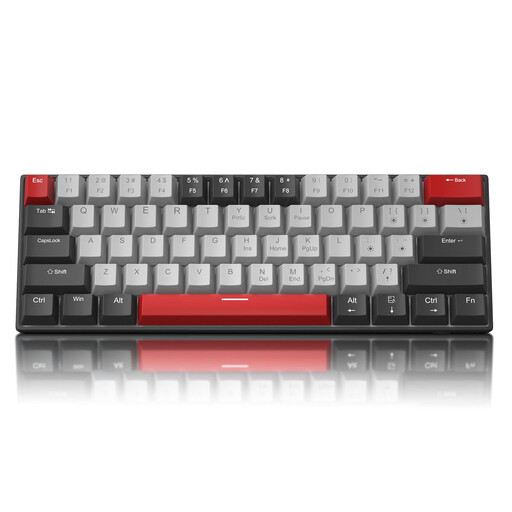
Why we love it: Its ultra-minimalist form factor. This 60% keyboard frees up an impressive amount of desk space, ideal for gamers who make large swipes across their mousepad. It makes no compromises on the essentials, with full anti-ghosting (NKRO) and a detachable USB-C cable, perfect for taking to LAN parties.
Key features:
Who is it for? Gaming purists and fans of clean setups who want maximum space for their mouse and love the crisp, audible typing feel of Blue switches.
A good keyboard is a start, but a proper gaming setup is a complete ecosystem. To create an immersive and unique atmosphere, consider your lighting. A well-placed LED strip can radically transform your desk.
Check out our selection of LED Light Strips to perfect your setup.
A membrane keyboard uses a rubber dome under each key, which often results in a mushy and imprecise feel. In contrast, a mechanical keyboard integrates an independent switch under each key. The result? Increased durability, surgical precision, and an unparalleled typing experience.
Even if AZERTY is the standard in France, the QWERTY keyboard is favoured by many gamers and developers. The reason? Its key layout is often considered more logical for gaming (access to number keys) and coding. Rest assured, switching from one to the other only requires a short adjustment period, and your operating system (Windows, macOS) can be configured to recognise QWERTY in just a few clicks.
It's the technology that's a lifesaver in-game! Anti-ghosting allows the keyboard to correctly interpret multiple simultaneous key presses. Without it, while running diagonally (W+A keys) while jumping (Space) and reloading (R), the keyboard might ignore one of your actions. With good anti-ghosting (especially N-Key Rollover), every command is registered, without exception.