
Livraison le jour même ou le lendemain

Qualité garantie

Débloquez vos offres de bienvenue: Livraison GRATUITE | Jusqu'à -80 % | 30 jours d'essai gratuits à JoyPlus
Téléchargez l'application
Navigating the dense jungle of mechanical gaming keyboards can quickly become a daunting task. Between the technical jargon, marketing promises, and a myriad of models, it's easy to make the wrong choice and regret your purchase. Our editorial mission is to cut through the noise for you and highlight the criteria that truly matter.
Before we unveil our top picks, let's break down the 3 pitfalls to avoid so you don't ruin your gaming or typing experience.
This is a classic trap, and the most common disappointment for French buyers. A keyboard is advertised as "French" or "AZERTY," but upon delivery, surprise: it's a QWERTY model. The result is a layout that disrupts all your habits, special characters that are nowhere to be found, and constant frustration. For gaming or simply typing in France, a true physical AZERTY keyboard isn't an option—it's a necessity.
Sure, an RGB keyboard and its dazzling light effects look impressive, but don't expect them to boost your responsiveness or precision. Some manufacturers don't hesitate to inflate the prices of average keyboards by betting everything on the light show. The quality of the switches and the sturdiness of the chassis are far more critical factors for a good gaming keyboard.
Marketing tends to establish the Red switch as the only valid option for gaming. While they are indeed highly prized for their smooth travel, they aren't for everyone. A gamer who also spends a lot of time writing might prefer tactile feedback, while another will swear by the characteristic sound of a "clicky" switch. The choice of switches is above all a personal one; don't let it be dictated by trends.
To avoid these pitfalls, focus on three pillars that define the quality of a mechanical keyboard and its relevance to your needs.
Beneath each key on a mechanical keyboard lies an independent switch. This is what dictates the typing feel, sound, and responsiveness. There are three main families:
The size of the keyboard directly impacts your comfort and desk setup.
Finally, a few options can make all the difference depending on your profile:
Rather than a simple list of features, let's see which keyboard fits which type of gamer.
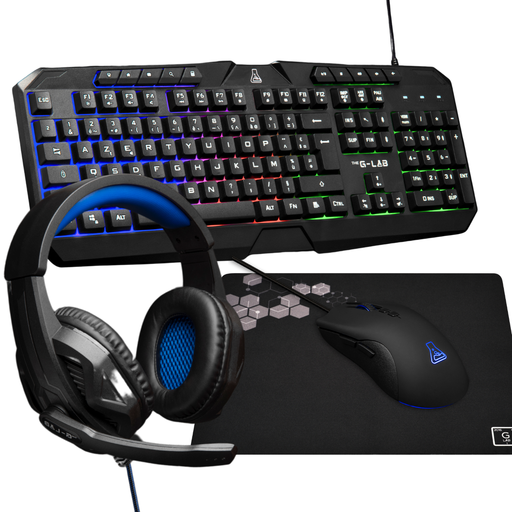
Why this choice: For a first setup, this gaming bundle is the ultimate turnkey solution. It combines a keyboard, mouse, headset, and mousepad to get you started with a cohesive setup without breaking the bank.
This keyboard comes in a proper French AZERTY layout, saving you the frustration of a QWERTY model. It sticks to the essentials without falling into the flashy RGB trap, focusing on a functional and affordable package.
Ready-to-play 4-in-1 solution. Simple and practical backlighting for late-night sessions.
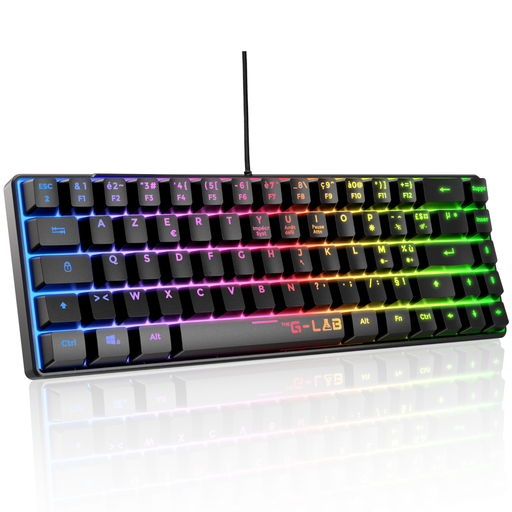
Why this choice: Built for FPS and esports players. Its TKL format frees up crucial space for the mouse, and its red mechanical switches ensure maximum responsiveness for lightning-fast actions.
It checks all the performance boxes: compact TKL format, linear Red switches, and a native AZERTY layout. No gimmicks here, just pure efficiency.
TKL format for maximum freedom of movement. Full anti-ghosting to ensure no keystroke is missed.
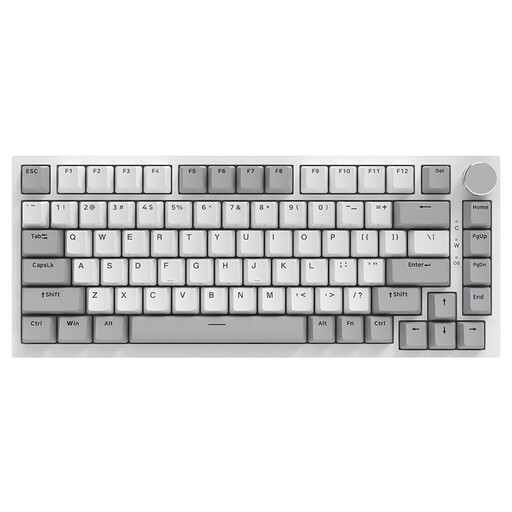
Why this choice: For those who love to get their hands dirty and shape their own gear. Its hot-swappable feature lets you change switches at will to create a tailor-made typing experience without having to buy a whole new keyboard.
It shatters the "one switch fits all" myth by giving you the power to choose and change. Be warned, however: this model comes in a US QWERTY layout, a crucial point to consider if you are not familiar with this arrangement.
Hot-swappable PCB. Very practical CNC metal volume knob and a 75% format that is as compact as it is unique.
Explore our full selection of products that meet our selection criteria and quality standards.
1. Is a mechanical keyboard really better for gaming?
Instead of "raw performance," let's talk about reliability, comfort, and feel. Mechanical switches offer more consistent travel and a much longer lifespan than membrane keyboards. The tactile or linear feedback allows you to better feel the key activation, which translates to greater precision and fewer mistakes in the heat of the moment.
2. How do I know if a keyboard is compatible with my PS5?
Most wired USB keyboards are recognised by the PS5 and Xbox for navigating menus or typing messages. However, their in-game use depends entirely on the developers. Titles like Final Fantasy XIV or Call of Duty are compatible, but many others are not. Always check the specific game you're interested in before buying.
3. AZERTY vs. QWERTY Keyboard: What's the difference?
It's simply the arrangement of the letters. AZERTY is the standard in France and Belgium, designed for the French language (direct access to accented characters, position of the letters A, Q, Z, W, M...). QWERTY is the English-language standard. Using a QWERTY keyboard in France will force you to relearn the key positions or juggle shortcuts for special characters, which is anything but practical for daily use.