
Livraison le jour même ou le lendemain

Qualité garantie

Débloquez vos offres de bienvenue: Livraison GRATUITE | Jusqu'à -80 % | 30 jours d'essai gratuits à JoyPlus
Téléchargez l'application
A mechanical gaming keyboard can improve your typing comfort, free up desk space and offer plenty of customisation options. But you still need to navigate the different sizes, technologies and marketing claims on product pages. Some buyers discover too late that their keyboard is QWERTY US, that its keys are particularly noisy, or that essential functions rely on awkward shortcuts.
Here are the key factors to check before you buy, along with a selection suited to different uses in the UK.
A 60% keyboard typically removes the F1-F12 row, arrow keys and navigation cluster. It frees up plenty of room for your mouse, but means you'll rely more on the Fn key. The 65% keyboard format usually keeps the arrow keys, while a 75% keyboard often adds the function row in a more compact chassis.
For work, check for the presence of arrow keys, the Delete key and any shortcuts you use daily. The 87-key keyboard format, also known as TKL, offers a good compromise for gaming and working without sacrificing the function row, while ditching the number pad.
Many mechanical models are sold as QWERTY US keyboards. The letter positions differ from a UK QWERTY layout, and some characters require an adjustment period or specific configuration in Windows or macOS. This layout can work perfectly for gamers, developers and users who are used to it, but it's best to check before placing your order.
Compatibility advertised with a PC and Mac doesn't automatically transform the physical layout into a UK QWERTY one. You can configure the operating system, but the keycaps will remain those of the keyboard you bought.
A mechanical RGB keyboard catches the eye, but its lighting says nothing about the quality of the stabilisers or typing comfort. Instead, look at the type of switches, whether they can be replaced, and the keyboard's internal construction.
A hot-swap model lets you change compatible switches without soldering. A gasket mount construction, which uses damping elements, can offer more flexibility and reduce certain resonances. In daily use, these features often matter more than a long list of lighting modes.
Also consider the depth of your desk and the space needed for your mouse. An XXL mouse mat measuring 900 × 400 mm can accommodate the keyboard and provide a continuous surface for movement.
For competitive gaming, a wired USB-C connection avoids relying on battery power or a wireless receiver. Tri-mode wireless typically combines USB, Bluetooth and 2.4 GHz transmission. Bluetooth makes it easy to switch between devices, while 2.4 GHz works with a supplied USB receiver.
Check which devices are actually compatible: PC, Mac, tablet, Android, Xbox or PlayStation. On PS5, support can also depend on the game and the adapter used. A keyboard compatible with Windows and macOS won't necessarily work in all applications on a console.
Linear switches offer a smooth keystroke, without a tactile click. 'Clicky' switches produce a more pronounced sound, which can quickly become annoying in a shared space. PBT keycaps generally resist shine better than ABS keycaps, although the result also depends on their finish and how intensively they're used.
The advertised lifespan — for example 50 million keystrokes — remains a figure provided by the manufacturer. It's not enough to predict the overall longevity of the keyboard. Always unplug the device before cleaning it and protect it from liquids, even when splash resistance is claimed.

Why this choice suits this profile: Its 61-key format works well for small desks and users who want to switch easily between a PC, tablet or phone using USB-C, Bluetooth and 2.4 GHz modes.
The listing clearly states the 60% format and QWERTY US layout. You can check both points before buying.
16 RGB modes, built-in 1,600 mAh battery and three connection modes.

Why this choice suits this profile: It's aimed at enthusiasts who want to customise their typing feel, lighting and controls across multiple devices.
The gasket mount structure, 5-pin hot-swap and PBT keycaps are all detailed. The presentation isn't limited to RGB.
Bluetooth, 2.4 GHz and Type-C connections, 4,000 mAh battery and programmable wheel.
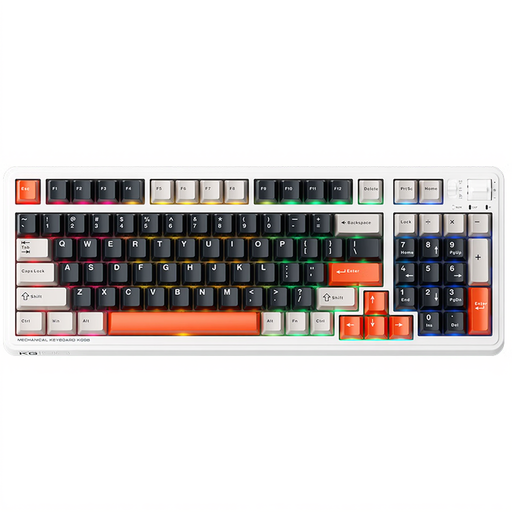
Why this choice suits this profile: Its 98-key format retains more functions for work, typing and gaming, while remaining more compact than a full-size keyboard.
The listing specifies the three connections, number of keys and the presence of Ice Cream Pro Max linear switches, which limits unpleasant surprises.
Wired, Bluetooth and 2.4 GHz modes, with compatibility claimed for Windows and macOS.
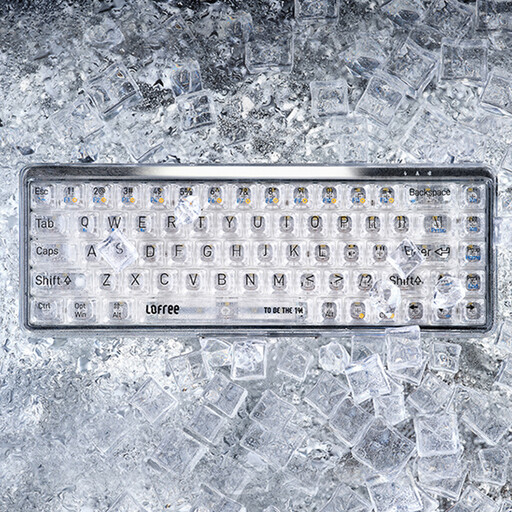
Why this choice suits this profile: Its 68-key format, Bluetooth 5.1 connection and USB-C port make it easy to use with a computer, tablet or mobile device.
The listing clearly distinguishes Bluetooth from wired mode and states the QWERTY US layout and macOS compatibility.
Transparent keycaps, 7-mode white lighting and a claimed 2,000 mAh battery.
We've put together a comprehensive, real-time updated list of products that meet these strict selection criteria and European safety regulations.
Yes, provided you choose switches with a noise level that suits your environment. Linear switches are generally quieter than clicky models, but the noise also depends on the keycaps, keyboard structure and typing force. In a shared office, check the acoustic information available and opt for a model with good damping.
Wired USB-C is suitable for fixed use and avoids having to recharge the keyboard. Bluetooth makes it easy to switch between several devices, while 2.4 GHz lets you game without a cable using a dedicated receiver. A tri-mode wireless keyboard offers more flexibility, but you'll need to keep an eye on battery life and check that the receiver is included.
It all depends on the switches, stabilisers, keycaps, maintenance and how intensively it's used. A hot-swap model is easier to keep in good condition, since faulty switches can be replaced. Avoid liquids, unplug the keyboard before cleaning it and store its accessories in a dry place.