
Livraison le jour même ou le lendemain

Qualité garantie

Débloquez vos offres de bienvenue: Livraison GRATUITE | Jusqu'à -80 % | 30 jours d'essai gratuits à JoyPlus
Téléchargez l'application
A mechanical gaming keyboard can improve typing comfort and command precision, but a product page doesn't always tell the full story. Spectacular RGB lighting, a promise of instant responsiveness or an ultra-compact format aren't enough to guarantee a purchase that suits your desk, your setup and your habits.
Before you place your order, make sure to check these three points:
Some models are based on a membrane that is marketed as having a mechanical feel. This technology may be sufficient for office work or occasional use, but it doesn't necessarily offer the same build quality as a genuine keyboard equipped with mechanical switches. Take the time to consult the technical specifications and look for a clear indication of the type of switch used.
A 60% mechanical keyboard typically removes the F-key row, dedicated arrow keys and the navigation cluster. A 65% mechanical keyboard usually keeps the arrow keys, while a 75% mechanical keyboard adds a more accessible function row. The TKL gaming format mainly removes the numeric keypad and remains close to a standard keyboard.
For development, spreadsheets or accounting, a 96% or full-size model will often be more practical. For FPS games, a 60%, 65% or TKL keyboard leaves more room for large mouse movements.
Red switches are generally linear, with no tactile click. They can suit players looking for a smooth keystroke, but the feel also depends on the actuation force, total travel distance and the overall design of the keyboard. Blue switches, on the other hand, produce an audible click that isn't always ideal in a shared office or bedroom.
On the THE G-LAB Keyz Mercury, the red switches are rated with an actuation force of 45 g, an actuation distance of 2 mm and a total travel of 4 mm. These figures allow you to compare models more objectively, without automatically assuming that a shorter actuation distance offers a better experience.
A hot-swap gaming keyboard lets you replace compatible switches without soldering. This is a useful feature if you want to switch from a linear feel to a more tactile sensation. However, check the number of pins supported, for example 3 or 5.
Anti-ghosting limits lost commands when multiple keys are pressed simultaneously. Terms like "NKRO" or "full anti-ghosting" should not be confused with limited support, such as 19 keys. For games that require rapid combinations, compare this feature carefully.
An RGB mechanical keyboard or a backlit mechanical keyboard can make it easier to read the keys in a dimly lit room. However, lighting effects are purely visual and won't compensate for a layout that's hard to read.
PBT keycaps generally resist shine better than ABS keycaps, depending on their formulation and finish. To keep your equipment in good condition, unplug it before cleaning, use a soft brush or dry cloth, and keep any liquid away from the USB port. Models with a battery should also be protected from heat, moisture and impacts.
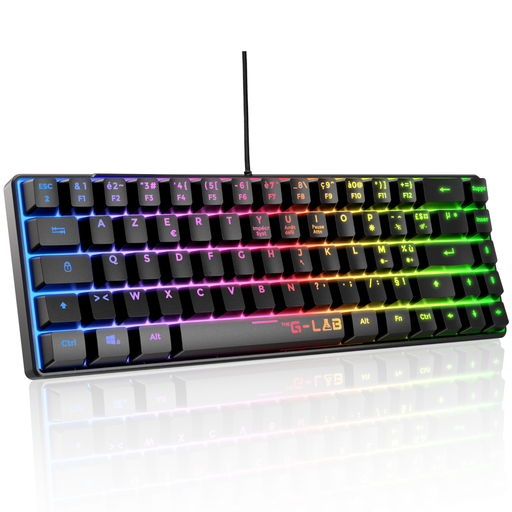
Why this choice suits this profile: This wired AZERTY keyboard gives you immediate access to essential functions, with no battery to recharge or pairing to set up. Its TKL format is ideal for gamers who want to keep the arrow keys and function keys.
The product page specifies a mechanical keyboard, red switches, full anti-ghosting and a USB connection that works straight away with PC and compatible consoles.
AZERTY layout, 87 keys, 20 lighting modes, 32 macros and a reinforced braided cable.
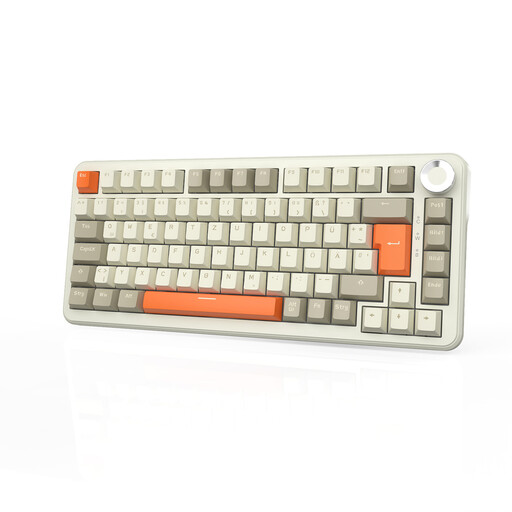
Why this choice suits this profile: Its 75% format, rotary dial and three connection modes are designed for those who switch between gaming, work and mobile devices.
The advertised 8,000 mAh battery and USB-C connection reduce the need for frequent recharging. However, note the QWERTZ layout, which differs from French AZERTY.
Bluetooth, 2.4 GHz and wired connections, hot-swap switches, PBT keycaps and a 75% layout with 82 keys.
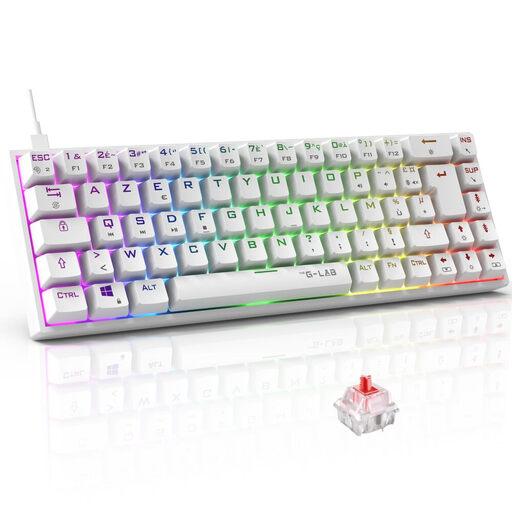
Why this choice suits this profile: The 65% format keeps the arrow keys while reducing the footprint. This makes it suitable for competitive gamers as well as smaller French office spaces.
The product page clearly states 100% NKRO anti-ghosting and Outemu red switches at 45 g, rather than relying on a vague promise of speed.
AZERTY layout, 18 RGB modes, programmable macros and compatibility with PC, PS4, PS5 and Xbox.
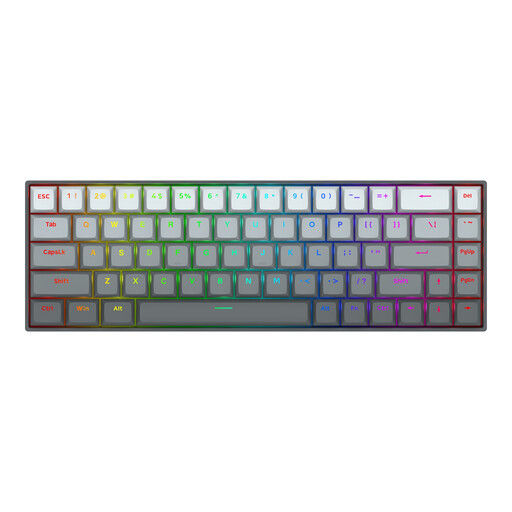
Why this choice suits this profile: PC FPS players can adjust the actuation point and benefit from a 65% format that frees up space for mouse movements.
The product page details an adjustable actuation travel from 0.2 to 4 mm as well as a Rapid Trigger function. These options should be verified in the software: they don't guarantee better in-game results on their own.
Hall effect switches, advertised polling rate of 8,000 Hz, aluminium top plate and detachable USB-C cable.
We've put together a comprehensive, real-time updated selection of products that meet these strict criteria and European safety requirements.
Yes, provided you choose a switch whose noise level suits your environment. Linear switches are often quieter than clicky models, but the noise also depends on the keycaps and the keyboard's construction. A wrist rest and adjustable tilt can also improve everyday comfort.
The advertised lifespan varies depending on the model and switch. Some product pages mention 30 or 50 million keystrokes, while others quote higher figures. These are manufacturer specifications, not a guaranteed lifespan for all uses. Dust, humidity, impacts and cable quality also affect the keyboard's longevity.
A wireless mechanical keyboard is a good option if you regularly switch between devices or want to reduce cables on your desk. For a fixed setup and competitive play, wired remains simple to use and requires no recharging. If you go wireless, check the Bluetooth, 2.4 GHz and USB-C modes, the battery life with RGB enabled, and the ability to continue playing while charging.