
Livraison le jour même ou le lendemain

Qualité garantie

Débloquez vos offres de bienvenue: Livraison GRATUITE | Jusqu'à -80 % | 30 jours d'essai gratuits à JoyPlus
Téléchargez l'application
A mechanical gaming keyboard can make typing more comfortable, improve the precision of your commands and help keep your desk organised. But product listings can be confusing, mixing technologies, formats and layouts. A keyboard described as “mechanical” might actually use a membrane, while a compact RGB model could sacrifice keys you use every day.
Before you order, check the key technology, French or US layout, connection type and compatibility with your devices. Here are the features to look at when choosing a model that suits the way you use it, rather than being swayed by its appearance or the number of colours on offer.
Some membrane keyboards imitate a firmer or louder typing feel. That doesn’t necessarily mean they use individual mechanical switches. If you want to change the switches, customise the typing feel or maintain your keyboard more easily, look for specific terms such as mechanical switches, hot-swappable or “hot-swappable keys”.
A compact gaming keyboard frees up space for your mouse, but 60% and 65% formats often leave out the function row, number pad and some navigation keys. A 75% keyboard generally keeps more controls while still taking up little space. For accounting, spreadsheets or work shortcuts, a 96% or full-size format will often be more practical.
An AZERTY keyboard suits French typing habits and has common accented characters printed directly on the keys. A QWERTY keyboard may suit gaming, programming or users familiar with that layout, but it takes some getting used to if your system and typing habits are based on AZERTY. Check the physical key layout too, not just the language stated in the title.
Linear switches have a smooth, consistent travel, while tactile switches give you a more noticeable bump at the actuation point. Clicky switches, such as blue switches, make an audible click. That can be satisfying at home, but quickly become irritating in a shared office or bedroom.
A hot-swappable keyboard lets you replace compatible switches without soldering. This makes it easier to upgrade your keyboard, but check compatibility with 3- or 5-pin switches, keycap height and the PCB layout.
Also look at the adjustable feet, keycap profile, weight and whether it has a volume wheel. A clearly documented layout helps avoid surprises when you set it up.
A wired USB or USB-C model is easy to set up and doesn’t need recharging. A Bluetooth wireless keyboard is more convenient with a laptop, tablet or phone, but you’ll need to consider battery life and charging time.
A tri-mode keyboard usually combines USB, Bluetooth and 2.4 GHz wireless connectivity. This versatility is useful if you switch between a PC, Mac or tablet. However, check how many devices it can remember, whether a USB receiver is included and whether it’s listed as compatible with Windows, macOS, Android, iOS or consoles.
A backlit keyboard, particularly an RGB mechanical model, makes the keys easier to see in a dimly lit room. However, lighting doesn’t necessarily mean you can customise each key individually. Check the number of modes, brightness levels and whether you may need to install software.
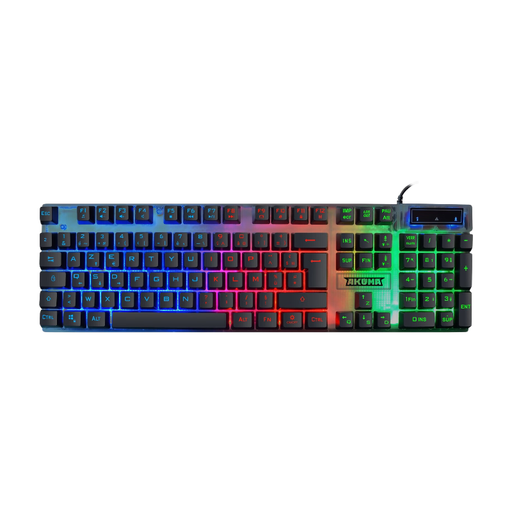
Why this is a good fit for this user: This wired AZERTY FR keyboard is a good choice for a first PC or console set-up, with a USB connection that’s ready to use straight away and stated compatibility with PC, PS4, PS5 and Xbox. It’s a membrane model, not a traditional mechanical keyboard.
The listing clearly states that it’s a membrane model, so you won’t pay for an ambiguous mechanical claim. The cable also means you don’t need to worry about recharging.
AZERTY FR layout, rainbow backlighting, anti-ghosting claimed across 19 keys and plug-and-play design.
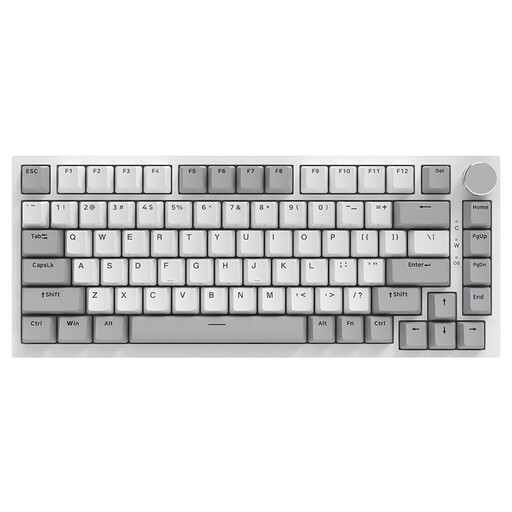
Why this is a good fit for this user: Its 75% format strikes a good balance between useful work functions and freeing up desk space. It’s designed for users who want to customise their keyboard over time, whether for gaming or typing.
The listing specifies the wired Type-C connection, 75% format and hot-swappable feature, rather than relying on lighting alone as a selling point.
PBT keycaps, gasket structure, volume wheel, RGB backlighting and stated compatibility with Windows and macOS.

Why this is a good fit for this user: Its 60% format suits small desks, travel and gamers who mainly use gaming keys. Tri-mode connectivity lets you switch between a cable, Bluetooth or a 2.4 GHz receiver.
The listing details the three connection modes, 1,600 mAh battery and lack of a number pad. That makes it clear what you’re getting before you buy.
61 keys, blue clicky switches, 16 RGB modes listed, USB-C and stated compatibility with PC, Mac, tablet, phone and Xbox.
We’ve put together a complete list, updated in real time, of products that meet these strict selection criteria and European safety regulations.
No. A membrane keyboard can be perfectly suitable for occasional use. Mechanical keyboards are worth considering if you’re looking for a particular typing feel, replaceable switches or more customisation options. For consoles, check that the keyboard and the games you want to play are compatible.
A 75% format is a practical compromise if you regularly use the function keys. A 60% model is suited to small desks and travel, but you’ll need to use Fn shortcuts. If you often enter numbers, choose a model with a number pad.
A wired model means you won’t need to replace or recharge a battery. To help your keyboard last longer, unplug it before cleaning, use a soft brush or dry air, and keep liquids away. For a wireless keyboard, check the battery capacity, included cable and whether a receiver is supplied before you order.