
Livraison le jour même ou le lendemain

Qualité garantie

Débloquez vos offres de bienvenue: Livraison GRATUITE | Jusqu'à -80 % | 30 jours d'essai gratuits à JoyPlus
Téléchargez l'application
A mechanical gaming keyboard can improve your typing comfort, free up desk space and offer plenty of customisation options. But you still need to navigate the spec sheets, which are often packed with terms that don't necessarily guarantee an experience suited to your needs.
Before you place an order, three common pitfalls keep cropping up:
The percentage roughly indicates the keyboard's size compared to a full-size model.
If you regularly work with spreadsheets, the number pad is a real comfort. For a gaming setup where your mouse needs plenty of room to move, a 75 % or 80 % keyboard leaves more space on your desk.
Linear switches offer a smooth, consistent travel with no noticeable bump. They're often favoured for games that require repeated presses, as well as for their fluid typing feel. Tactile switches add a perceptible bump under your finger, while clicky switches produce an audible click with every press.
The right choice depends mainly on your environment and habits:
A wired mechanical keyboard with USB Type-C saves you from having to recharge a battery and guarantees a stable connection. It's particularly well suited to desktop setups and gamers who value simplicity.
A wireless mechanical keyboard can offer several connection modes:
Check how many devices can be stored, the battery life and whether the USB receiver is included. For customising the keyboard, hot-swap lets you replace switches without soldering, as long as they're compatible with the 3-pin or 5-pin sockets. A programmable keyboard can also let you remap keys, macros, lighting or the function of a volume wheel.
The gasket mount structure, when combined with damping foam, changes the typing feel and resonance. It doesn't guarantee a silent keyboard, though: the switches, keycaps and the force you apply remain the deciding factors.
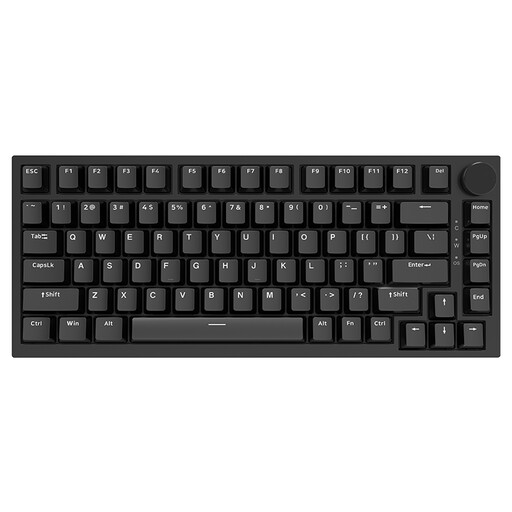
Why this choice suits this profile: its 75 % size and wired USB Type-C connection let you start with a compact setup without having to worry about battery life.
The size keeps the arrow keys and main function keys, while hot-swap means you don't have to replace the whole keyboard to change the typing feel.
Interchangeable linear switches, PBT keycaps, gasket mount structure, volume wheel and RGB backlighting with multiple modes.
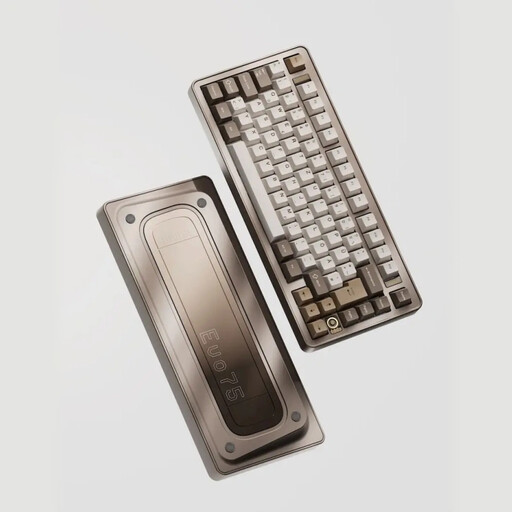
Why this choice suits this profile: its aluminium case, tri-mode connection and VIA compatibility appeal to enthusiasts who enjoy tailoring their keyboard to their workspace and gaming setup alike.
The spec sheet mentions a 75 % size, hot-swap and quick disassembly. That makes maintenance and modifications easier without having to get the soldering iron out straight away.
Wired, Bluetooth and 2.4 GHz connection, interchangeable switches, leaf spring mount, QWERTY US keycaps and a stated 8,000 mAh battery.
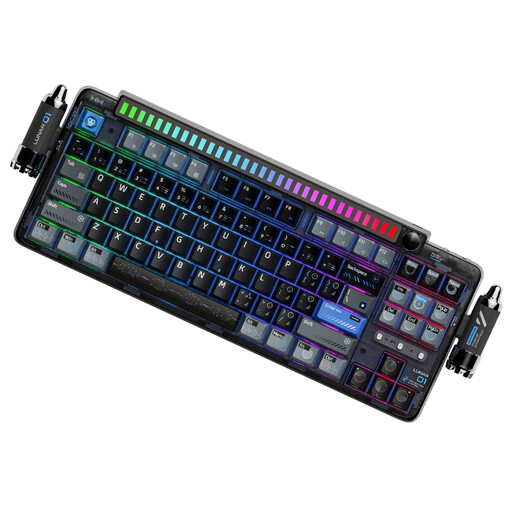
Why this choice suits this profile: it's aimed at users who regularly switch between a computer, tablet or smartphone, as well as those looking for a programmable keyboard with a distinctive style.
The three connection modes mean you're not tied to a single device, while hot-swap lets you upgrade the switches rather than replacing the whole keyboard to change the typing feel.
Bluetooth, 2.4 GHz and USB Type-C, 4,000 mAh battery, PBT keycaps, programmable wheel, customisation software and compatibility with Windows, macOS, iOS and Android.
We've put together a comprehensive, real-time selection of products that meet these demanding criteria and European safety standards.
Yes, as long as you choose switches whose noise level suits your environment. Linear or tactile models are generally quieter than clicky ones, but the noise also depends on the keycaps, the keyboard's structure and how hard you type. A Bluetooth connection can also make it easier to switch between a work computer and a personal device.
It depends on the switches, the circuit board, the stabilisers, how you use it and how you maintain it. The figures quoted by manufacturers, such as 50 million keystrokes, usually apply to switches under specific conditions. A hot-swap model is still easier to maintain, though: if a switch fails, the faulty one can be replaced without desoldering the whole board.
It may take some getting used to, particularly for accents, the position of certain keys and shortcuts. Windows and macOS let you select different layouts in the settings, but the legends printed on the keycaps remain those of the physical keyboard. So check this point carefully before buying, especially if you regularly write in French.