
Livraison le jour même ou le lendemain

Qualité garantie

Débloquez vos offres de bienvenue: Livraison GRATUITE | Jusqu'à -80 % | 30 jours d'essai gratuits à JoyPlus
Téléchargez l'application
Finding the perfect mechanical gaming keyboard can be a daunting task, given the overwhelming number of options available. Between the different switch types, form factors, and features, it's easy to get lost. This guide is here to cut through the noise and help you choose a high-performance, durable keyboard, whether you're a gamer, a developer, or simply an enthusiast of a superior typing experience.
Our mission: to provide you with objective insights and practical advice to make an informed decision, free from marketing jargon.
Before diving into our top picks, let's review the three essential criteria that will define your comfort and performance.
The size of the keyboard, or form factor, directly impacts your desk ergonomics and how you play.
Switches are the soul of your keyboard. These small mechanical components under each key dictate the typing feel, sound, and responsiveness.
For a PC gaming keyboard worthy of the name, two technologies are non-negotiable.
Here are a few models that caught our attention for their excellent price-to-performance ratio and features.
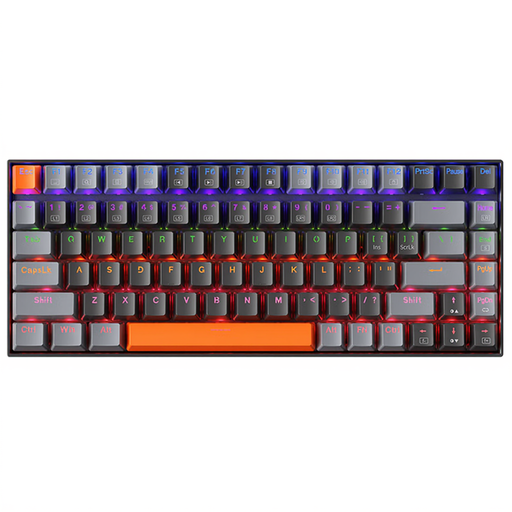
Why we love it: The K500A-B84 is a wired gaming keyboard in a 75% form factor that embodies the perfect balance between compactness and functionality. Its Brown switches offer a tactile and quiet typing experience, making it equally at home in Excel or in the middle of a game. Its clean design and understated white backlighting fit in anywhere.
Pros:
Who is it for?: For those looking for a do-it-all mechanical keyboard without sacrificing crucial mouse space. Ideal if you appreciate tactile feedback without the noise of Blue switches.
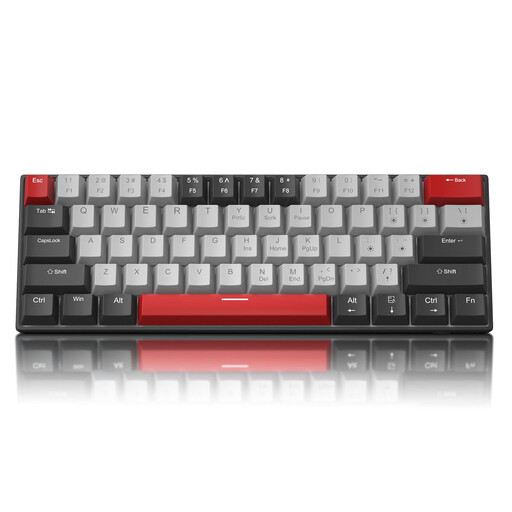
Why we love it: This 60% keyboard is built for competition and clean desk setups. With its Blue switches, it delivers crisp and satisfying clicky feedback. Its detachable USB-C cable makes it easy to transport to LAN parties, and its full anti-ghosting ensures flawless responsiveness in crucial moments.
Pros:
Who is it for?: For the competitive gamer or the minimalist setup enthusiast who wants an ultra-responsive and portable keyboard. Best suited for fans of the characteristic feel and sound of clicky switches.
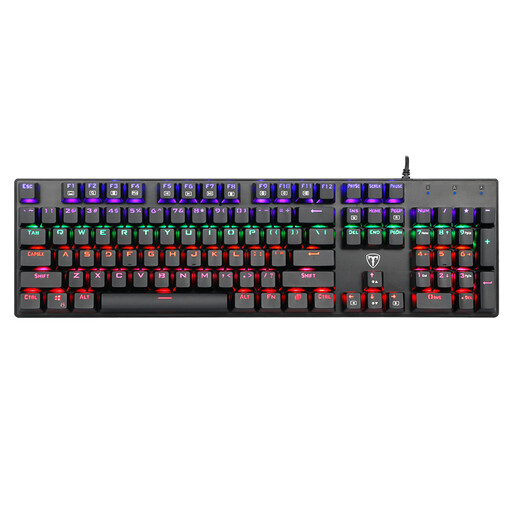
Why we love it: This full-size model makes no compromises. With its 104 keys and number pad, it's a powerful ally for productivity. Its Blue switches ensure precise and responsive typing, while its full anti-ghosting and 12 multimedia shortcuts make it a tool that's as high-performing for work as it is for gaming.
Pros:
Who is it for?: For users who need an ultra-versatile keyboard with a number pad for office tasks but don't want to sacrifice gaming performance. The all-in-one solution.
Your keyboard is the centrepiece, but don't underestimate lighting for creating an immersive setup. To perfect the atmosphere of your gaming station or office, take a look at our selection of LED strips.
It all comes down to what's under the keycap. A mechanical keyboard has an independent mechanical switch for each key, giving it superior durability, precision, and a distinct typing feel (tactile, linear, or clicky). A membrane keyboard relies on a rubber dome shared across all keys; the typing feel is mushier, less precise, and its lifespan is generally shorter.
Absolutely. All modern operating systems (Windows, macOS, Linux) allow you to switch the keyboard layout at the software level. This means you can plug in a physical QWERTY keyboard and type as if it were an AZERTY layout simply by choosing "French" in your OS settings. Many gamers and developers even prefer QWERTY, as it's more of an international standard for gaming and coding.