Finding the right mechanical gaming keyboard can be a daunting task given the jungle of options and technical jargon. Between the different switch types, compact or full-size layouts, and features like hot-swap, it's easy to get lost. Our mission: to cut through the noise and help you make an informed decision based on your actual needs and budget, without getting bogged down in marketing hype.
This guide breaks down the essential criteria to consider before you buy, then presents a selection of models that stand out from the crowd, whether you're a competitive gamer, a fan of beautiful setups, or a user looking for versatility.
Key Factors for Choosing Your Gaming Keyboard
Before diving into our selection, it's crucial to understand the three factors that will define your day-to-day experience.
1. Form Factor: A Matter of Space and Ergonomics
The size of your keyboard directly impacts the available space on your desk and the ergonomics of your setup.
- Full-size (100%): Includes the number pad, which is essential for those who use their PC gaming keyboard for both gaming and office work.
- Tenkeyless (TKL): By omitting the number pad, it frees up valuable space for mouse movement—a significant advantage in many games.
- Compact (60% or 75%): A 60% keyboard or 75% model takes this concept to the extreme by sacrificing the function keys (F1-F12) and sometimes the arrow keys for maximum compactness. It's the go-to choice for minimalist setups and gamers on the go.
2. Switches: The Heart of Your Typing Feel
The switches, hidden under each key, define the feel, sound, and responsiveness of your keyboard. There are three main families:
- Linear (e.g., Red Switches): These offer smooth, quiet travel with no tactile feedback. Their rapid actuation makes them a favourite for competitive gaming, where every millisecond counts.
- Tactile (e.g., Brown Switches): These have a slight, noticeable bump halfway through the keypress to confirm actuation, but without the audible "click." An excellent compromise between gaming and typing.
- Clicky (e.g., Blue Switches): In addition to the tactile bump, they produce a distinct audible "click" with every press. While the feel is satisfying for typing, the noise can quickly become unbearable for those around you!
3. Connectivity and Customisation
Modern features offer significant advantages in terms of convenience and options.
- Connectivity: A wired keyboard guarantees near-zero latency, a must-have for competitive play. On the other hand, a wireless mechanical keyboard (Bluetooth or 2.4 GHz) offers complete freedom and a clean, clutter-free desk.
- Backlighting: An RGB keyboard allows for per-key lighting customisation for a unique look, while single-colour backlit models opt for a more understated aesthetic.
- Hot-Swappable: A hot-swappable keyboard lets you change switches without any soldering. This is a highly sought-after feature for enthusiasts who love to experiment to find their ideal typing feel.
Recommended Mechanical Keyboards
Here are three models designed for distinct gamer profiles.
MageGee MK-Box 60% Wired Mechanical Keyboard
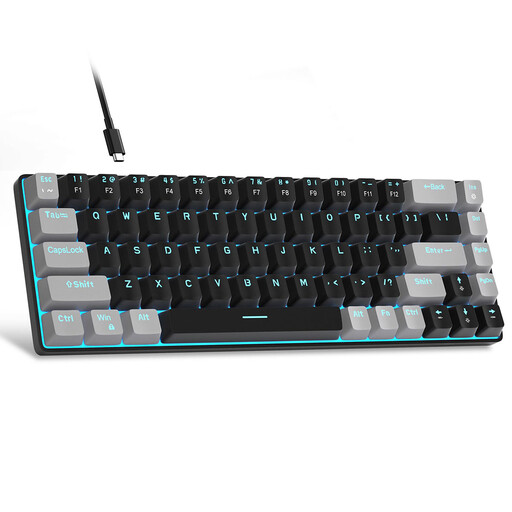
- Why it stands out: This keyboard successfully combines an ultra-compact 60% form factor while retaining dedicated arrow keys—a clever compromise between space-saving and practicality. Its understated design and affordable price make it an excellent entry point into the world of mechanical keyboards.
- Pros:
- Ultra-compact form factor: With 68 keys, it frees up maximum desk space.
- Tactile switches: Equipped with Brown switches, it offers a perfect balance between in-game responsiveness and typing comfort.
- Full anti-ghosting: All 68 keys are conflict-free, ensuring every command is registered, even during simultaneous presses.
- Blue LED backlighting: It offers about fifteen lighting modes to create a personalized atmosphere.
- Who is it for?: Ideal for gamers short on space, users looking for a budget-friendly mechanical keyboard that is still effective, or those who want a portable keyboard for their laptop.
ET 100% Wired Mechanical Gaming Keyboard
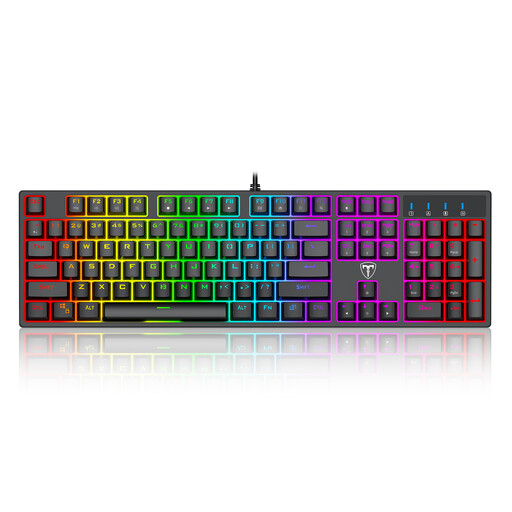
- Why it stands out: This model is a full-size gaming keyboard that focuses entirely on a typing experience with a distinctive character and customisable lighting. With its blue switches and 104-key layout, it makes no compromises.
- Pros:
- Clicky switches: The blue switches provide that satisfying tactile and audible feedback, highly valued by typists and some gamers.
- Full-size layout: The presence of the number pad makes it just as comfortable for work as it is for gaming.
- Customisable RGB keyboard: It features 20 lighting modes, including colour cycles and rainbow wave effects.
- Robust design: Its splash-resistant design and dedicated multimedia keys are welcome additions for daily use.
- Who is it for?: Perfect for users who need a number pad and love the characteristic feel and sound of clicky switches. A solid choice for a versatile setup that serves as both a gaming station and a workstation.
Lofree OE914 75% Mechanical Tri-Mode Keyboard
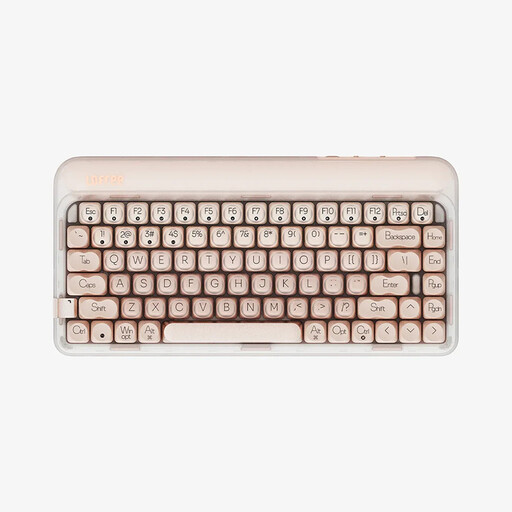
- Why it stands out: This keyboard stands out as the choice for versatility and deep customisation. Its triple connectivity, hot-swappable capability, and acoustically focused design make it a premium product for enthusiasts who appreciate high-end gear.
- Pros:
- Triple-mode connectivity: Switch in an instant between a wired USB-C, Bluetooth 5.3, and 2.4G wireless connection to juggle between your PC, Mac, and tablet.
- Fully hot-swappable: It allows you to change switches without soldering to custom-tailor your typing feel.
- Refined typing experience: It comes equipped with pre-lubricated Gateron linear switches and multiple layers of sound-dampening foam for a muted and remarkably quiet typing experience.
- Long battery life: Its 4000 mAh battery ensures excellent endurance when used as a wireless mechanical keyboard.
- Who is it for?: For customisation enthusiasts, users who switch between multiple devices (PC, Mac, tablet), and those seeking a premium, quiet, and smooth typing experience for both gaming and work.
Looking for Other Options?
Our selection focuses on specific use cases, but the world of mechanical keyboards is vast. If the lighting atmosphere of your setup is a top priority, know that many models offer highly advanced lighting options.
Discover our complete collection of keyboards with LED Backlighting to illuminate your gaming space.
Frequently Asked Questions
What's the difference between a QWERTY and AZERTY keyboard?
The difference lies in the layout of the keys. AZERTY is the standard in France, while the QWERTY keyboard is the international standard. For gaming, many players prefer QWERTY. The reason? Games are very often designed for the WASD layout (the equivalent of ZQSD on AZERTY), and even though controls are remappable, the position of surrounding keys can be more optimised on a QWERTY layout. The products in our selection use a US QWERTY layout.
Is a mechanical keyboard really better for gaming?
Absolutely. A mechanical gaming keyboard offers several tangible advantages: greater precision thanks to a clear actuation point, better responsiveness, and far superior durability compared to membrane keyboards. Since each key is independent, technologies like anti-ghosting are much more effective, ensuring all your actions are registered, even in the heat of the action.
How do I maintain a mechanical keyboard?
Maintenance is quite simple. For dust and crumbs, a blast from a can of compressed air works wonders. For a deeper clean, you can remove the keycaps with a keycap puller (often included) and clean them with soapy water. Then, simply wipe the keyboard chassis with a slightly damp cloth. Regular maintenance will extend its lifespan and keep the typing satisfaction intact.


