
Livraison le jour même ou le lendemain

Qualité garantie

Débloquez vos offres de bienvenue: Livraison GRATUITE | Jusqu'à -80 % | 30 jours d'essai gratuits à JoyPlus
Téléchargez l'application
A mechanical gaming keyboard can make typing more comfortable while freeing up space on your desk. But specifications do not always tell the whole story. Between compact layouts, RGB backlighting, wireless connections and interchangeable keys, certain details can make the difference between a successful purchase and an accessory that is frustrating to use every day.
Before placing your order, keep an eye out for three common pitfalls:
The keyboard size directly affects how much space it takes up and which functions are accessible.
On a narrow desk, or for games that require broad mouse movements, a 60% or 75% keyboard can be a smart choice. For spreadsheets, accounting and certain professional software, however, the number pad remains difficult to replace.
In France, AZERTY makes it easier to type accents and the most commonly used characters. A QWERTY keyboard can be perfectly suitable for gamers, programmers or users accustomed to this layout, but you should carefully check the legends printed on the keys.
The AJAZZ AK820 featured here has a German QWERTZ layout, so it should not be mistaken for an AZERTY keyboard. The operating system can change the software layout, but the physical markings on the keys will remain different.
Linear switches provide a consistent keystroke without a pronounced tactile bump. Tactile switches offer more noticeable feedback, while clicky models produce a sharper audible click.
A hot-swappable mechanical keyboard allows you to replace the switches without soldering, provided you follow the stated compatibility requirements, particularly the number of pins. This is a real advantage if you want to fine-tune the typing feel over time, but it does not automatically make the keyboard quiet.
In a shared room, student accommodation or open-plan office, it is therefore best to find out about the actual noise level. Blue switches, for example, are explicitly described as audible on some models.
A wireless gaming keyboard can work via Bluetooth, 2.4 GHz with a USB receiver, or both modes. Bluetooth focuses on versatility and compatibility with mobile devices. 2.4 GHz is more suited to PC gaming, while the USB-C cable lets you continue playing while charging or avoid any interruptions.
A tri-mode keyboard combines all three options: Bluetooth, 2.4 GHz and wired connectivity. Before buying, check:
A mechanical RGB keyboard offers appealing visual customisation, but its lighting can reduce battery life. A physical volume dial is also very convenient for gaming, attending meetings or editing video, without having to open your system’s audio mixer.
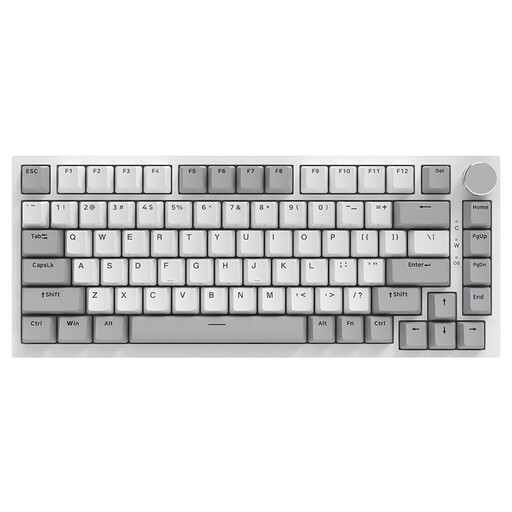
Why this choice suits this user: This mechanical PC keyboard features a 75% layout, USB-C connectivity, a volume dial and hot-swappable switches. It is a great first option for gaming and work, without having to keep an eye on the battery level.
The listing clearly states that this is a genuine wired mechanical model, rather than a simple membrane imitation. The advertised layout is US QWERTY: be sure to check this before ordering.
75% layout, 3- or 5-pin replaceable switches, PBT keycaps and RGB backlighting with south-facing LEDs.
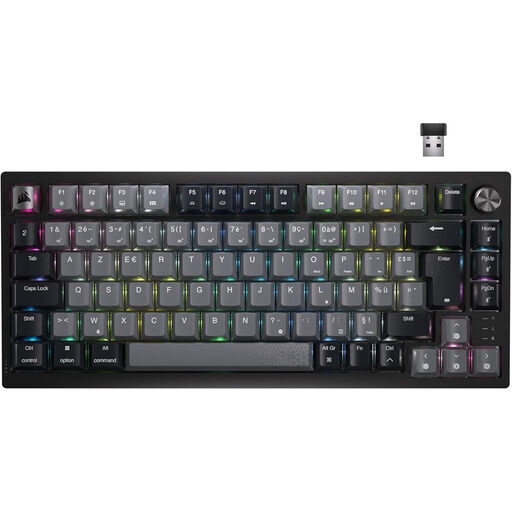
Why this choice suits this user: Its 75% AZERTY layout meets the needs of French gamers and remote workers who want a local layout, wireless connectivity and audio controls directly accessible from the keyboard.
The listing clearly states the AZERTY layout, as well as Bluetooth, USB-C and wireless connectivity. Battery life does, however, vary depending on how the RGB backlighting is used.
87 keys, Corsair MLX Red linear switches, per-key RGB and a dedicated volume dial.

Why this choice suits this user: With its 97 keys, this keyboard is designed for those who want to retain more functions than a TKL offers, while enjoying Bluetooth, 2.4 GHz and USB-C connectivity.
Connectivity is not limited to Bluetooth, and the hot-swappable PCB makes replacing switches easier. However, check the selected variant, particularly whether it includes a screen and the battery capacity.
Gasket-mounted construction, five damping layers, metal dial and 98% layout with 97 keys.
We have brought together a complete, real-time updated selection of products that meet these demanding criteria while complying with European safety regulations.
Yes, provided you choose a switch and size suited to your environment. Linear switches are generally quieter than clicky models. To type French characters easily, choose an AZERTY layout if you do not want to get used to a QWERTY keyboard.
It depends on the switches, build quality, usage and maintenance. Some product listings claim several tens of millions of keystrokes. However, this is a manufacturer specification and does not guarantee the actual lifespan of every component. Hot-swapping at least makes it easier to replace a faulty switch.
Backlighting increases the power consumption of a wireless gaming keyboard. The stated figures should therefore be examined carefully: battery life without lighting is often considerably longer than with RGB enabled. To extend the time between charges, reduce the brightness or switch off the lighting when you do not need it.