
Livraison le jour même ou le lendemain

Qualité garantie

Débloquez vos offres de bienvenue: Livraison GRATUITE | Jusqu'à -80 % | 30 jours d'essai gratuits à JoyPlus
Téléchargez l'application
A mechanical gaming keyboard can make typing more comfortable, improve command accuracy and help keep your desk well organised. However, you need to be able to navigate technical specifications, which sometimes combine several technologies and promise a similar experience even where the differences are significant. A keyboard described as ‘mechanical’ may actually use a membrane designed to imitate the feel of mechanical switches, while the battery life of a wireless model can vary considerably depending on how you use its RGB backlighting.
Before placing your order, three common pitfalls are worth bearing in mind:
The format has a direct impact on everyday comfort.
If you often enter figures, use numerous shortcuts in software or work with spreadsheets, the lack of a number pad can quickly become inconvenient.
Linear switches provide a smooth keypress without a pronounced click. They are often popular for gaming and relatively quiet typing, but the feel also depends on the actuation force, travel distance and the switch’s internal design.
Tactile switches add a noticeable bump beneath your finger. Clicky models, such as Blue Switches, produce a clearly audible click. They may appeal to people who enjoy a more decisive typing feel, but are less discreet in an open-plan office, library or shared bedroom.
A hot-swap keyboard allows you to remove and replace switches without soldering. However, you should check compatibility, particularly the difference between 3-pin and 5-pin models. This feature makes it easier to upgrade your keyboard, but does not guarantee that every switch available on the market will work automatically.
PBT keycaps generally resist developing a shiny finish better than standard ABS keycaps. Before buying a replacement keycap set, also check the keycap profile and the method used to print the characters.
A wired mechanical keyboard with USB-C does not rely on a battery and avoids interruptions in the middle of a game. It is a simple and reliable choice for a fixed workstation.
A wireless mechanical keyboard can connect via Bluetooth or a 2.4 GHz receiver. Bluetooth is convenient with a laptop, tablet or phone, while the 2.4 GHz band is generally preferred for a dedicated connection to a PC. A tri-mode keyboard combines all three options: Bluetooth, 2.4 GHz and wired USB.
Always check:
Finally, the term ‘water-resistant’ should be treated with caution. An IPX4-certified electronic board does not necessarily mean that the entire keyboard is washable or designed to be immersed. The USB port, case and battery may still be particularly vulnerable to liquids.
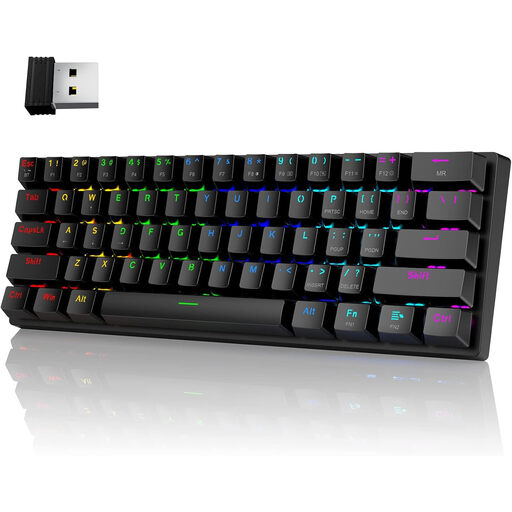
Why this choice suits this profile : with its 61 keys, this model frees up space on a small desk. Its three connection modes let you switch from a PC to a tablet or phone.
The product details clearly state that it uses a US QWERTY layout and indicate the presence of wired USB-C, Bluetooth and 2.4 GHz modes. This gives buyers a clear idea of what to expect from the shortcuts and connection.
Clicky blue switches, 16 RGB effects, a rechargeable 1600 mAh battery and stated compatibility with PC, Mac, iPad, phone and Xbox.
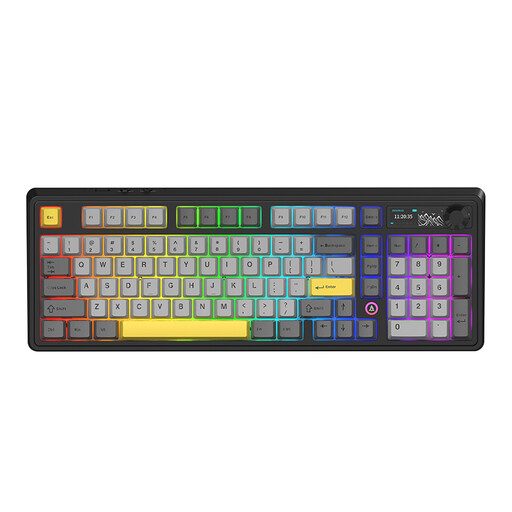
Why this choice suits this profile : its 97 keys, metal control knob and gasket-mount construction are aimed at users who want to fine-tune their keyboard’s feel while retaining additional controls.
The product details clearly distinguish between Bluetooth, 2.4 GHz and wired connections. Thanks to the hot-swap PCB, switches can be replaced without soldering, giving you more scope to upgrade the keyboard.
A TFT screen depending on the version, a control knob, RGB lighting, a gasket mount and a battery rated at 4,000 or 8,000 mAh depending on the configuration.
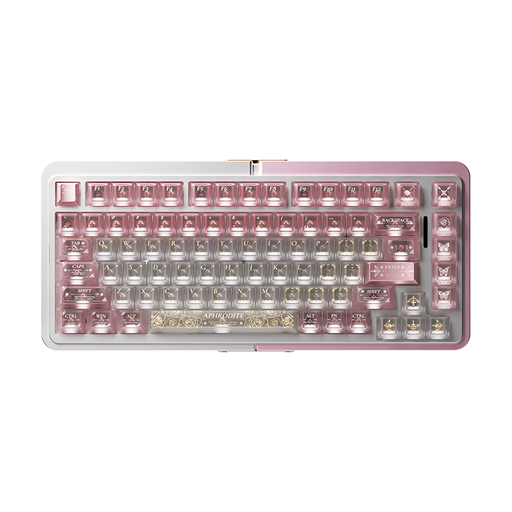
Why this choice suits this profile : its 75% format and advanced settings are aimed at gamers who want to fine-tune their controls precisely, particularly in shooting games.
The product details mention magnetic switches, adjustable actuation points, Rapid Trigger and SOCD. These features are entirely separate from simple RGB lighting.
A CNC-machined aluminium case, RGB keycaps and a US ANSI layout. However, check that the software is compatible with your system before buying.
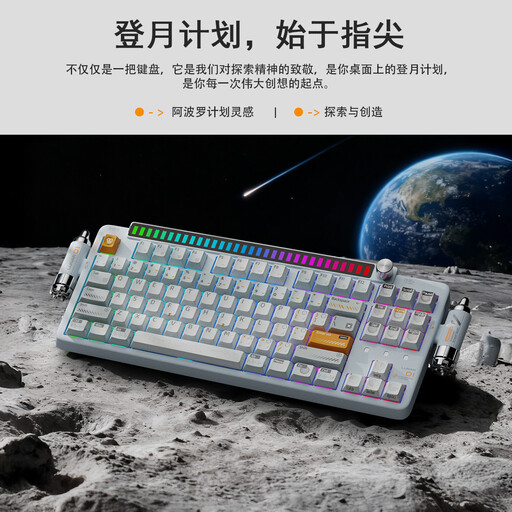
Why this choice suits this profile : its 87 keys, three connection modes and compatibility with Windows, macOS, iOS and Android make it easy to switch between work and gaming across several devices.
The 4,000 mAh battery is listed separately from the connection options. The 5-pin hot-swap design and PBT keycaps also provide a clear idea of the customisation options.
A gasket mount, PBT keycaps, a programmable knob, RGB lighting and a detachable light bar that responds to voice and music.
We have put together a complete, real-time updated selection of products that meet these demanding criteria while complying with European safety regulations.
On a US QWERTY keyboard, the A key is located where the Q key is found on a French AZERTY keyboard, while access to accented characters also changes. This layout may suit developers, gamers used to English-language controls or users who work across several systems. However, if you mainly write in French, check the physical key layout and the Windows or macOS software settings before ordering.
The wording ‘keyboard for PC and Mac’ indicates general compatibility, but some secondary keys and customisation software may behave differently from one system to another.
Yes, provided you choose a switch suited to your environment. A linear or moderately tactile model can be perfectly suitable for extended typing. Blue switches, on the other hand, are audible and may disturb colleagues or family members. To retain more functions than you would have with a 60% keyboard, choose a 75% or 80% format.
It depends on the switches, keycaps, battery and general maintenance. Some product specifications claim several tens of millions of keystrokes, but this figure generally applies to a component tested under specific conditions. Avoid liquids, unplug the keyboard before cleaning it and use a soft brush. On a wireless model, the rechargeable battery is a separate wear-and-tear component.
Yes. Backlighting can reduce the battery life of a wireless keyboard compared with use without lighting. The stated figures should therefore be interpreted according to the mode being used. With a Bluetooth keyboard featuring adjustable RGB, you can lower the brightness, disable the effects or switch to wired mode when the battery is running low.