
Livraison le jour même ou le lendemain

Qualité garantie

Débloquez vos offres de bienvenue: Livraison GRATUITE | Jusqu'à -80 % | 30 jours d'essai gratuits à JoyPlus
Téléchargez l'application
A mechanical gaming keyboard is about far more than RGB lighting or looks. Between compact formats, AZERTY and QWERTY layouts, linear switches and wireless models, an appealing specification sheet can conceal a few everyday limitations.
Three common pitfalls come up time and again:
Here are the criteria to check before buying, followed by a selection suited to different types of user.
A keyboard’s format directly determines how much desk space it takes up and how easily you can access its various functions.
For everyday use in France, also check for the AZERTY FR designation. A US QWERTY mechanical keyboard can be perfectly suitable for players who are used to that layout, but accented characters and certain symbols are found in different places.
Linear switches provide a smooth, consistent keypress, without tactile resistance or a pronounced click. They are often popular for games that require repeated key presses, as well as for their relatively quiet operation.
Tactile switches add feedback under your finger, while “clicky” switches produce an audible click. This noise can quickly become irritating in a shared office or during late-night gaming sessions.
You should also check:
A hot-swappable mechanical keyboard makes maintenance and customisation easier. However, you must use compatible components and handle the sockets carefully.
A wired USB-C model provides a stable connection and does not need recharging. A wireless mechanical keyboard gives you greater freedom, provided you check its battery life, charging time and whether it includes a 2.4 GHz receiver.
A tri-mode keyboard generally combines a wired USB connection, Bluetooth and 2.4 GHz wireless. This setup makes it easy to switch between a PC, laptop or tablet. To play on a console, check the compatibility stated by the manufacturer: it may vary depending on the console and the connection mode used.
The anti-ghosting function indicates how many keys can be pressed simultaneously without commands being lost. “12-key”, “19-key” and “NKRO” do not indicate the same capacity. Finally, RGB generally increases battery consumption, so compare the stated battery life with and without the lighting enabled.
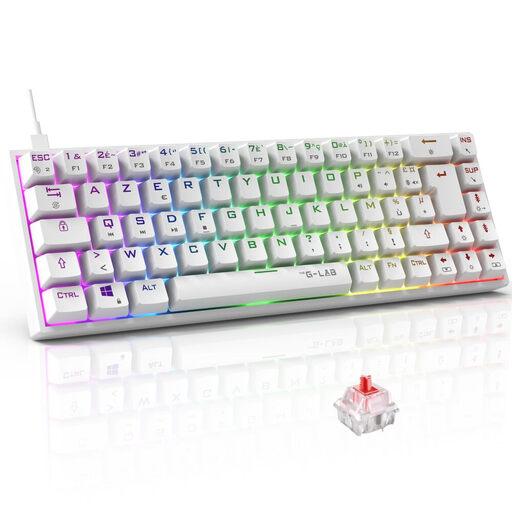
Why this choice suits this user: This 65 % AZERTY mechanical keyboard is aimed at players who want the feel of genuine mechanical switches without cluttering their desk, with a straightforward USB connection.
The AZERTY layout is clearly indicated, while the compact format means you are not paying for a number pad that is rarely useful in games.
45 gf Outemu red switches, RGB backlighting, programmable macros and advertised NKRO anti-ghosting.

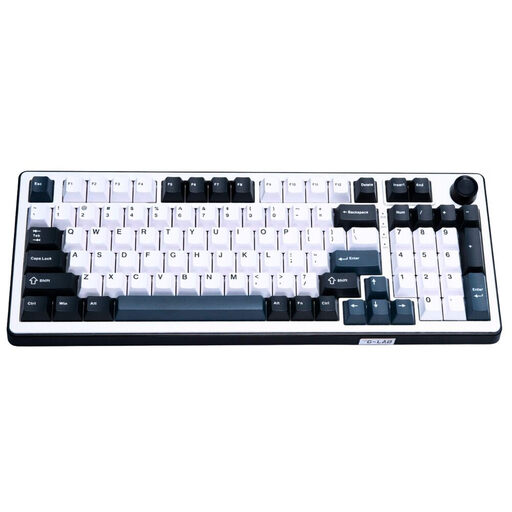
Why this choice suits this user: This US QWERTY model is aimed at customisation enthusiasts who want to switch between devices and fine-tune their typing experience.
The listing details the three connection modes, hot-swap functionality and 4 000 mAh battery, rather than relying solely on the lighting.
Gasket mount, PBT keycaps, linear switches, programmable rotary knob, Bluetooth, 2.4 GHz and USB-C.
Why this choice suits this user: Competitive players who also use a number pad may want to consider this wired keyboard fitted with magnetic switches.
The 96 % format retains the number pad, while the advertised NKRO specifies how simultaneous key presses are handled.
Hot-swappable Hall Effect magnetic switches, adjustable polling rate of up to 8 000 Hz and multimedia dial.
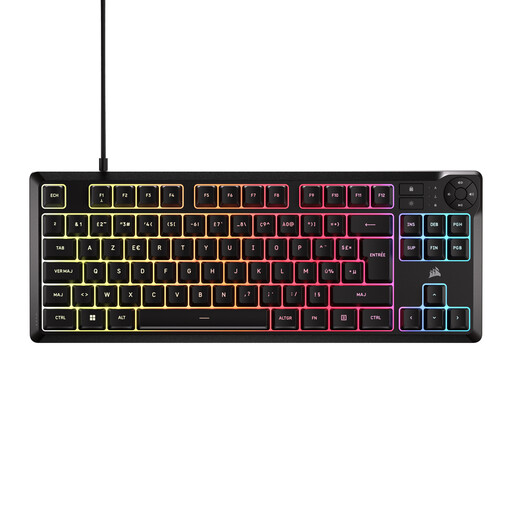
Why this choice suits this user: This wired TKL keyboard is designed for users who prioritise quiet typing, a French layout and easily accessible multimedia controls.
The listing clearly states that this is a membrane model, so it cannot be confused with a switch-based mechanical keyboard.
TKL format, quiet keys, RGB spread across five zones, 12-key anti-ghosting and a design advertised as splash-resistant.
We have brought together a complete, real-time selection of products that meet these demanding criteria, as well as European safety standards.
No. A membrane model can be perfectly suitable for versatile use, particularly if quiet operation is your priority. However, a mechanical keyboard offers a different typing feel and generally lets you choose the type of switches. For console gaming, always check the stated compatibility and supported connection mode.
It depends on the switches, build quality, usage and maintenance. Manufacturers sometimes claim 30 or 50 million keystrokes, but this figure refers to a component specification rather than a guaranteed period of use. Keep liquids away, clean the keyboard with a dry cloth and do not force the keys when removing them.
RGB lighting generally reduces battery life compared with using the keyboard without backlighting. If you play for several hours a day, compare the stated figures for both configurations and switch to wired mode when the battery starts to run low.