
Livraison le jour même ou le lendemain

Qualité garantie

Débloquez vos offres de bienvenue: Livraison GRATUITE | Jusqu'à -80 % | 30 jours d'essai gratuits à JoyPlus
Téléchargez l'application
A mechanical gaming keyboard can improve typing comfort, command precision and desk organisation. But with terms such as “mechanical” and “semi-mechanical”, RGB backlighting and performance claims, product descriptions are not always clear. To avoid disappointment, focus on the essentials: key layout, format, connectivity and switch technology.
The term “gaming” does not necessarily mean that a keyboard is mechanical. The THE G-LAB Hydrogen Combo, for example, features a semi-mechanical membrane keyboard. Its keys are described as quiet and the pack also includes a mouse, but its operation is completely different from that of a genuine mechanical keyboard with independent switches.
This difference matters if you want to change the switches, alter the typing feel or customise your keyboard. Before ordering, check the mechanical keyboard type and the technology used by the switches.
In France, a French AZERTY gaming keyboard makes it easier to type accents, symbols and common shortcuts. However, some models sold online use a US QWERTY or German QWERTZ layout. A QWERTY keyboard can be perfectly suitable for a player who is used to that layout, but you may need to change the system language or memorise where the characters are located.
The AJAZZ AK820 MAX, for example, is available with a German QWERTZ layout. It may therefore meet the needs of some users, but do not choose it by mistake simply because it has a 75% format.
With a wireless mechanical keyboard, battery life varies depending on the backlighting, connection mode and intensity of use. Figures quoted with the lighting switched off do not necessarily reflect everyday use with RGB enabled.
A tri-mode model generally offers greater flexibility: wired USB-C, Bluetooth for a tablet or phone, and 2.4 GHz with a receiver for a gaming PC. Also remember to check whether the dongle is included, the charging time and whether you can continue playing while the keyboard is charging.
The format directly determines how much space the keyboard takes up on your desk and how many keys are accessible without using a combination:
A compact mechanical keyboard is ideal for small desks, students and gamers who need plenty of room for broad mouse movements. For accounting, content creation or working from home, a 98% or full-size model will often be more functional.
Linear switches provide a consistent press without a pronounced tactile bump. Tactile switches provide noticeable feedback when activated. Blue switches, often associated with a clearly audible click, can be pleasant to use, but are less suitable for an open-plan office, shared bedroom or library.
Actuation force, travel and noise level are more informative than vague phrases such as “ultra-fast”. To customise the typing feel, look for a hot-swappable keyboard: compatible switches can be replaced without soldering. However, check whether they are compatible with a 3- or 5-pin circuit and follow the manufacturer’s recommendations.
A USB connection is simple to set up and means you do not have to monitor the battery. Wireless connectivity keeps your desk clear, but means keeping an eye on battery life and signal stability. A tri-mode keyboard is useful for switching between a PC, console, tablet or phone, provided compatibility is clearly stated.
Anti-ghosting and NKRO allow multiple keys pressed at the same time to be registered. These features are useful in games that require fast combinations, but they do not replace a suitable layout or switches that match your preferences.
Finally, a keyboard with a volume dial lets you adjust the sound or quickly mute the audio. It is a practical control both during meetings and for video editing or content creation.
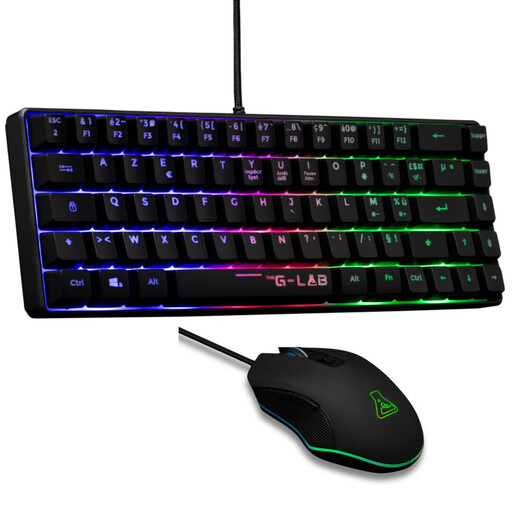
Why this choice suits this profile : This wired AZERTY pack combines a compact 60 % keyboard with a six-button mouse. It is suitable for a first PC or PS4/PS5 console setup, with no complicated configuration required.
The product description clearly states that this is a semi-mechanical membrane model, rather than a fully mechanical keyboard. This makes the choice more transparent.
French AZERTY layout, multicolour backlighting, quiet keys and a mouse adjustable up to 7200 DPI.

Why this choice suits this profile : This 98 % model is designed for those who want to keep a number pad while enjoying a customisable wireless mechanical keyboard.
The product description details the three connection modes, gasket structure and hot-swappable PCB. This makes it possible to verify the level of customisation advertised.
97 keys, metal dial, TFT screen depending on the version, RGB lighting and an advertised 8 000 mAh battery with screen.
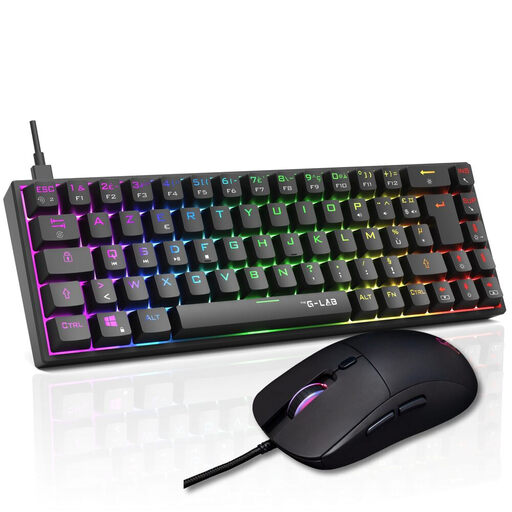
Why this choice suits this profile : This wired combo is aimed at PC gamers looking for a well-matched setup with a 65 % mechanical keyboard, mouse and gaming-focused settings.
The product description distinguishes between linear red switches, NKRO anti-ghosting and programmable functions, rather than reducing performance claims to RGB lighting alone.
65 % format, advertised 100 % NKRO, 18 RGB modes and a mouse adjustable up to 12 800 DPI.
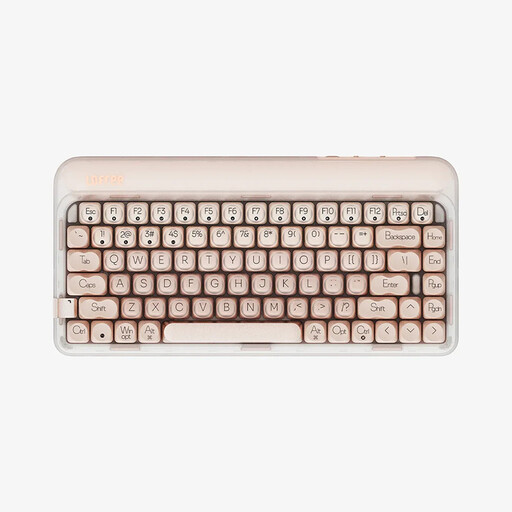
Why this choice suits this profile : Its 75 % format retains a practical function row for work, while tri-mode connectivity makes it easy to switch between a computer, tablet or phone.
The specifications clearly distinguish between hot-swapping, Bluetooth 5.3, 2.4 GHz and USB-C. This lets you check that the keyboard really offers the features you need.
84 keys, pre-lubricated linear switches, an advertised 4 000 mAh battery and a polling rate specified at 1 000 Hz.
We have put together a complete, real-time updated list of products that fully meet these strict selection criteria and European safety regulations.
No. A membrane keyboard can be perfectly suitable for occasional use or when you are working with a limited budget. Mechanical keyboards become interesting if you want more precise typing, a choice of switches, greater customisation options or easier maintenance thanks to hot-swapping. On console, check that the keyboard is compatible with the device and the games concerned.
A 60% keyboard frees up plenty of space, but some functions are only accessible via the Fn key. The 65% format generally adds the arrow keys, while the 75% retains more controls. Measure the available width and consider whether you frequently use the F keys, Delete, Home or the number pad.
Choose linear or silent switches rather than blue switches with a pronounced audible click. Keycaps, the internal structure, sound-dampening foams and the desk surface also affect the noise level. In a shared space, check the information provided about noise and do not rely solely on the term “gaming”.