Finding the perfect mechanical gaming keyboard is the holy grail for any gamer worth their salt. A great keyboard can literally transform your gaming experience. But with a jungle of models, technical jargon, and endless customisation options, it's easy to get lost. Tactile or linear switches? TKL or 60% layout? And is that RGB lighting a gimmick or a real asset?
Don't worry, this guide gets straight to the point, breaking down the essential features of a great gaming keyboard for you. We'll give you the keys to identify your needs and present a selection of models that stand out from the crowd in both design and performance.
The Key Criteria for Choosing Your Mechanical Gaming Keyboard
Before diving headfirst into product pages, you need to master the three pillars of a mechanical keyboard: the switches, the form factor, and the extra features.
1. Mechanical Switches: The Heart of the Machine
The choice of switch defines the typing feel, sound, and responsiveness of your keyboard. There's no one-size-fits-all answer; it's a matter of personal preference and use case.
- Red Switches: These switches are linear and quiet. They have no tactile "bump" or audible click upon actuation. Their smooth, linear travel makes them formidable in competitive games where every millisecond counts. They are also the discreet choice if you share your gaming (or work) space.
- Blue Switches: On the complete opposite end, the blue switch is the most expressive: it is both tactile and clicky. It offers that famous audible click and distinct tactile feedback that typewriter fans adore. Ideal for typing, but be mindful of your teammates' ears on stream or late at night!
- Brown Switches: This is the happy medium, the Swiss Army knife of switches. The brown switch is tactile (you can clearly feel the actuation point under your finger), but without the audible click of the blue switch. It's the perfect balance for versatile use, just as comfortable for racking up frags as it is for writing emails.
2. The Form Factor: Size Matters!
The size of your keyboard is more than just a detail. It directly impacts the ergonomics of your setup and the keys available to you.
- Full-Size (100%): The traditional keyboard with its number pad. Indispensable if you juggle between Excel and your games, or if you assign numerous macros.
- TKL (Tenkeyless, 80%) Keyboard: A favorite among FPS players. By sacrificing the number pad, it frees up valuable desk space for wide mouse movements. A decisive advantage in shooters.
- Compact (60% - 75%): This takes minimalism to the extreme. These models sacrifice the function keys, and sometimes even the arrow keys, which are accessible via a key combination (the famous FN key). The ideal format for clean setups and for gamers who like to travel light for LAN parties.
3. The Features That Make a Difference: Anti-Ghosting and RGB
Two terms you'll see everywhere:
- Anti-ghosting: This is the technology that ensures your keyboard registers every key you press simultaneously, without missing a single one. The gold standard is N-Key Rollover (NKRO), which ensures total detection. For competitive gaming, this is simply non-negotiable.
- RGB Keyboard: Much more than just an aesthetic gimmick! A good RGB keyboard allows you to customise the lighting key-by-key, improve visibility in the dark, and, most importantly, create profiles for each game by highlighting only the necessary keys (like W, A, S, and D). Practical and immersive.
Top Mechanical Gaming Keyboard Picks
Now that the basics are covered, here are a few models that caught our eye and cater to very different needs.
Machenike K500A-B84: The Compact All-Rounder
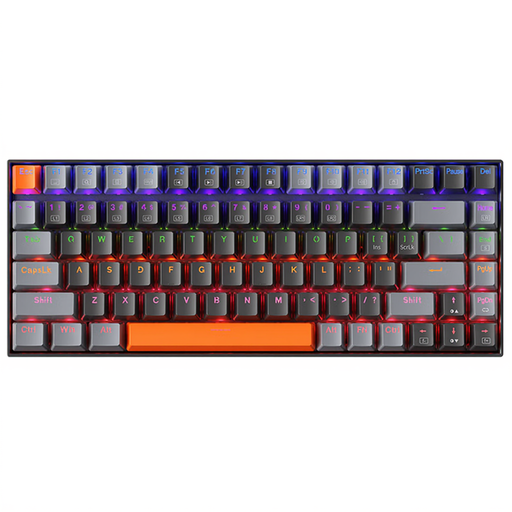
- Why it stands out: The K500A-B84 strikes the perfect balance with its 75% (84-key) layout: it keeps the precious function keys and arrow keys but remains much more compact than a TKL. Equipped with brown switches, it offers a tactile yet quiet typing experience, making it an excellent companion for both gaming and remote work.
- Key features:
- Switches: Brown (tactile and quiet).
- Form Factor: Compact 75% for a space-saving design without sacrificing essential keys.
- Connection: Wired gaming keyboard for maximum responsiveness.
- Design: Understated with a white LED backlight, fitting easily into a professional or gaming environment.
- Who is it for?: For gamers who are also professionals (or students) looking for a high-performance, sober keyboard capable of transitioning from the virtual battlefield to a work session without missing a beat.
MageGee STAR 61: The Nomad's Minimalist
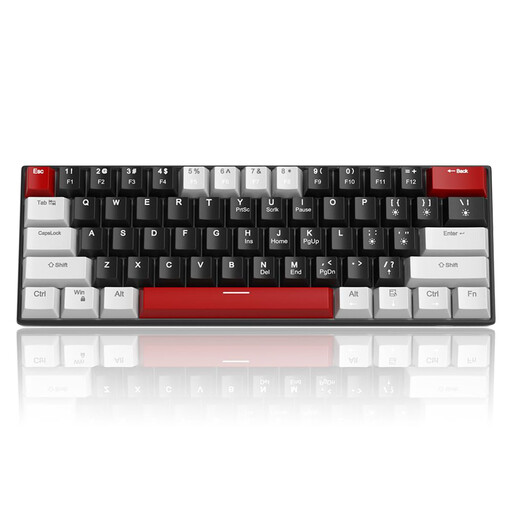
- Why it stands out: With its ultra-compact 60% layout and detachable USB-C cable, the MageGee STAR 61 is the king of minimalism and portability. It leaves maximum room for the mouse and slips into any backpack. The choice between red switches (quiet) and blue switches (loud but satisfying) allows you to tailor it to your preferences.
- Key features:
- Switches: Your choice of red switch (linear) or blue switch (clicky).
- Form Factor: Ultra-compact 60% (61 keys), ideal for maximising mouse space.
- Features: Full anti-ghosting (N-Key Rollover) on all keys.
- Lighting: Ice blue backlighting with 19 lighting modes.
- Who is it for?: For competitors who need maximum room for their mouse, nomads who frequent LAN parties, or simply lovers of clean setups.
ET 100%: The Full, No-Compromise Experience
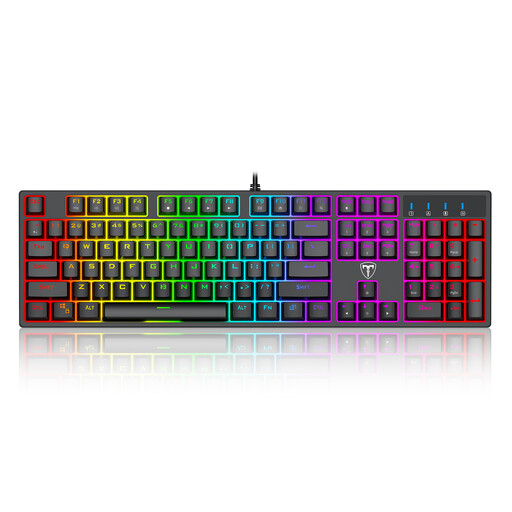
- Why it stands out: No compromises are made here. This full-size mechanical gaming keyboard is a true battle station. It packs blue switches for crisp, audible feedback, a full RGB keyboard with 20 lighting effects, and dedicated multimedia keys to control everything with a single touch.
- Key features:
- Switches: Blue switch for pronounced tactile and audible feedback.
- Form Factor: Full-size (104 keys) with number pad.
- Lighting: RGB keyboard with 20 customisable modes.
- Features: Anti-ghosting, 12 multimedia shortcuts, and a splash-resistant design.
- Who is it for?: For gamers who want the complete package: a number pad, all keys within reach, satisfyingly clicky feedback, and a festival of lights to customise their desk.
Not convinced? Explore other options!
If these models don't check all your boxes or if you're simply curious to discover other form factors and switch types, our full catalogue is here for you.
? Discover all our wired LED gaming keyboards
Frequently Asked Questions (FAQ)
What's the difference between a red switch and a blue switch?
To put it simply: the red switch is linear (no bump) and quiet, perfect for spamming keys quickly in-game. The blue switch is tactile (with a bump) and loud (clicky), offering very distinct feedback with every press. Excellent for typing, but your teammates might hear you!
Is a TKL keyboard a good choice for gaming?
Absolutely! For many gamers, the TKL keyboard (Tenkeyless) is even the best choice. By getting rid of the number pad, it frees up crucial space for the mouse, a major asset in FPS games. It's the ideal compromise between a compact format and having all the essential keys.
Why is anti-ghosting important?
Imagine: you're running diagonally (W+A), jumping (Space), and reloading (R) at the same time. Anti-ghosting is the technology that ensures your keyboard correctly registers these 4 simultaneous actions without "forgetting" one along the way. In the heat of battle, a missed command often means certain defeat. It is therefore a vital feature.


