
Livraison le jour même ou le lendemain

Qualité garantie

Débloquez vos offres de bienvenue: Livraison GRATUITE | Jusqu'à -80 % | 30 jours d'essai gratuits à JoyPlus
Téléchargez l'application
Choosing a mechanical gaming keyboard can quickly become overwhelming. Between the technical jargon, marketing promises, and multitude of layouts, the risk of making the wrong choice and regretting it is very real. Our mission: to help you decode the jargon and identify the criteria that truly matter for your specific needs, whether it's for competitive gaming, programming, or simply the pleasure of a high-quality typing experience.
Before diving into the technical details, let's review the classic mistakes that lead straight to buyer's remorse.
To sort through the options, focus on these three pillars. They alone determine 90% of your experience.
The switch is the core component of a mechanical keyboard. There are three main families:
The ultimate way to avoid making a mistake? Opt for a hot-swappable mechanical keyboard. This technology allows you to change switches without any soldering, using a simple puller tool. It's the gateway to the world of custom keyboards, allowing you to try different switch types or easily replace a faulty key.
The size of the keyboard, or layout, should match your workspace and habits.
Here, it's a question of priority: raw performance or absolute versatility?
A "tri-mode" model (Wired, 2.4 GHz, Bluetooth) ticks all the boxes and offers maximum flexibility.
Here are a few models that perfectly illustrate these criteria and cater to distinct user profiles. Please note, these models are often sold in the QWERTY (US) layout. Don't worry: a simple adjustment in your operating system is all it takes for your keystrokes to be registered in your local layout.
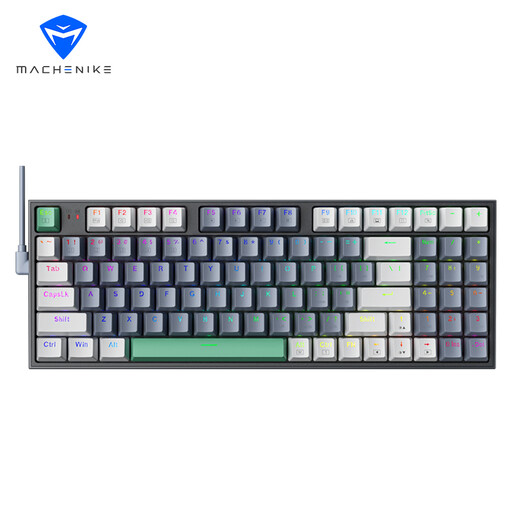
Why this one? The 90% layout is a fantastic compromise: it retains the number pad, which is essential for productivity, while being more compact than a standard keyboard. A real space-saver for your mouse. Its Brown *switches* are perfect for beginners, as they are highly versatile.
It avoids the pitfall of an unsuitable layout by offering a perfect middle ground. Its *hot-swappable* capability is an insurance policy: if you decide you don't like the Brown *switches*, you can change them.
Versatile 90% layout; hot-swappable support to evolve with your preferences.

Why this one? For those looking for an ultra-solid foundation to get started with **customisable mechanical keyboards**. It combines tri-mode connectivity, a **hot-swappable** PCB, a *gasket mount* structure for a softer typing feel and a more muted sound, a volume knob, and even a small TFT screen.
This is the antithesis of a "disposable" keyboard. Its *hot-swappable* design ensures long-term durability and adaptability: you are never locked into one type of *switch*.
Tri-mode connectivity (Wired, 2.4G, Bluetooth); Fully hot-swappable with a Gasket structure for a premium experience.

Why this one? With its unique space-exploration-inspired design, light bar, and magnetic accessories, this is a true collector's item for any desk. The TKL keyboard layout and wireless mechanical keyboard (tri-mode) connectivity help create a clean, modern setup.
It proves that an original design doesn't have to mean compromising on quality. It avoids the "gimmick" trap by integrating solid technical features like a *gasket* structure and *hot-swappable switches*.
Distinctive design with an RGB light bar; Compact TKL format with tri-mode connectivity.
Discover our full selection of products that meet our quality criteria and safety standards.
Yes, absolutely. You just need to set the input language in your operating system (Windows, macOS) to your local layout. Even though the letters on the physical keycaps are QWERTY, your computer will interpret each keystroke as if you were using your native layout. This is a very common practice among developers, gamers, and fans of imported keyboards.
Most major manufacturers (like Cherry, Gateron, Kailh) rate their switches for 50 to 100 million keystrokes. In practical terms, your keyboard can last for many years, even with heavy use. A switch failure is rare, and with a hot-swappable keyboard, it can be fixed in seconds.
Absolutely. The technology is specifically designed to be user-friendly. The process is simple: you remove the keycap, then pull out the switch using the provided tool. The only precaution is to insert the new switch straight to avoid bending its metal pins. It's an operation within anyone's reach, opening up a world of endless customisation.