
Livraison le jour même ou le lendemain

Qualité garantie

Débloquez vos offres de bienvenue: Livraison GRATUITE | Jusqu'à -80 % | 30 jours d'essai gratuits à JoyPlus
Téléchargez l'application
Choosing a mechanical gaming keyboard can sometimes be a real puzzle. Between the different layouts, switch types, and countless features, it's easy to feel lost in the face of marketing promises and technical jargon. Don't panic: this guide is here to cut through the noise and help you find THE keyboard that will elevate your gaming sessions and typing comfort. Whether you're an esports pro, a hardware enthusiast, or a demanding professional, we've got you covered.
As a product expert at Joybuy, my mission is to do the legwork for you and present a relevant, no-nonsense selection.
Before diving into our top picks, let's review the three fundamental criteria that will define your future experience.
Your keyboard's size directly impacts the ergonomics of your gaming and workspace.
Mechanical switches are the core of the experience: they define the feel, sound, and responsiveness of every key. There are three main families:
Finally, don't overlook the features that can make all the difference.
Here are a few models that stand out for their performance and features, all in the US QWERTY layout.
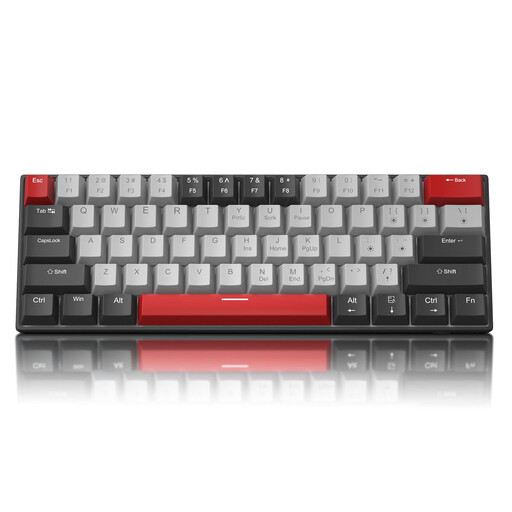
What sets it apart: The MageGee STAR 61 is a 60% keyboard that gets straight to the point. Its ultra-compact form factor frees up maximum desk space, ideal for minimalist setups or FPS gamers who need ample room for their mouse. Its detachable USB-C wired connection also makes it easy to transport.
Key Features:
Who is it for? Gamers and users looking for a simple, effective, and very compact first mechanical gaming keyboard. It's perfect for small desks and for those who enjoy the characteristic sound of Blue switches.
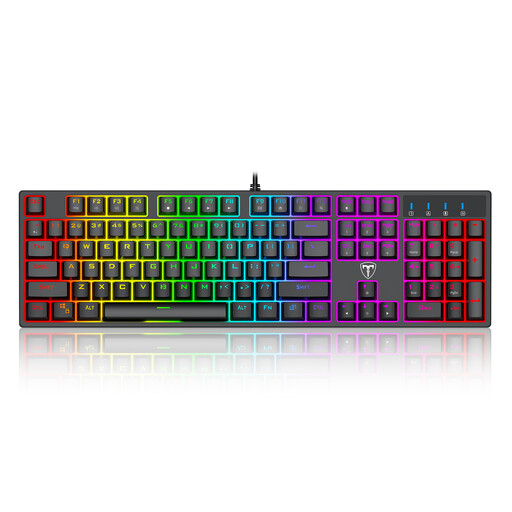
What sets it apart: This ET keyboard offers a full experience with its 104 keys, including the numeric keypad. It combines the expected features of a gaming keyboard (mechanical switches, anti-ghosting) with practical multimedia functions and customisable RGB backlighting.
Key Features:
Who is it for? Gamers looking for a versatile keyboard that is just as comfortable for gaming as it is for work. It's the ideal option for those who can't do without the numeric keypad.
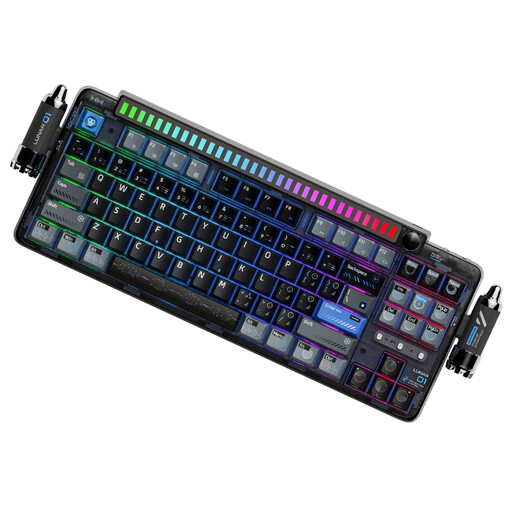
What sets it apart: The KEYSME Lunar 01 plays in the big leagues. It's aimed at fans of customisation and acoustic comfort. Its "Gasket-Mount" structure and multiple layers of dampening are designed to produce a deep, muted typing sound. Its triple connectivity and hot-swap function make it a future-proof and ultra-versatile model.
Key Features:
Who is it for? Keyboard enthusiasts, developers, and creatives looking for a premium typing experience, great flexibility, and endless customisation possibilities. Its TKL format is an excellent compromise between compactness and functionality.
Our selection highlights models with varied profiles. If you haven't found what you're looking for or prefer a more understated design, feel free to explore our full collection. You'll find many alternatives for all budgets and styles.
For example, discover our range of Black USB Keyboards, which includes reliable and discreet models for both gaming and work.
Unlike a standard membrane keyboard, a mechanical gaming keyboard equips each key with its own individual switch. The result? Far superior precision, responsiveness, and durability. The tactile and/or audible feedback allows you to better feel command actuations, a decisive advantage in the heat of the moment.
Yes, provided your work doesn't require intensive use of the numeric keypad. A TKL keyboard retains all the essential keys for navigation and daily work. A 60% keyboard requires a slight learning curve to master the shortcuts (e.g., FN + another key), but it can be just as effective once you get used to it, all while offering much better ergonomics for your mouse.