
Livraison le jour même ou le lendemain

Qualité garantie

Débloquez vos offres de bienvenue: Livraison GRATUITE | Jusqu'à -80 % | 30 jours d'essai gratuits à JoyPlus
Téléchargez l'application
The mechanical gaming keyboard market has never been more dynamic. Between the different layouts, switch types, connectivity options, and new technologies like gasket mounting, it's easy to feel lost. Are you looking for a superior typing feel for gaming, a setup optimised for remote work, or a solid foundation to dive into the world of custom keyboards?
This guide is here to help you make sense of it all. Our mission: to decipher the spec sheets for you and present concrete, relevant options. We'll explore the essential criteria to consider before buying and offer a selection of models that meet specific needs, from the competitive gamer to the demanding professional.
Before we dive in, let's review the essential points to check to find the keyboard that's right for you.
The key layout, or form factor, has a direct impact on ergonomics and the space available on your desk.
One of the greatest appeals of modern mechanical keyboards is the ability to shape them to your liking.
Your keyboard should adapt to your environment, not the other way around.
We've selected three models that stand out from the crowd, each tailored to a specific user profile.

Why We Love It
The AJAZZ AK980 V2 is a true Swiss Army knife. It features a 98% layout that retains the number pad while being more compact than a standard keyboard. Its tri-mode connectivity (wired, Bluetooth, 2.4Ghz) makes it equally at home in a gaming setup or a mobile workspace. The addition of a customisable TFT screen and a metal volume knob gives it a premium touch rarely seen at this price point.
Key Features
Who is it for?
For the user who refuses to compromise. Whether you're a gamer who needs a number pad, a remote professional, or a creative, the AK980 V2 checks all the boxes with a complete and high-performance package.
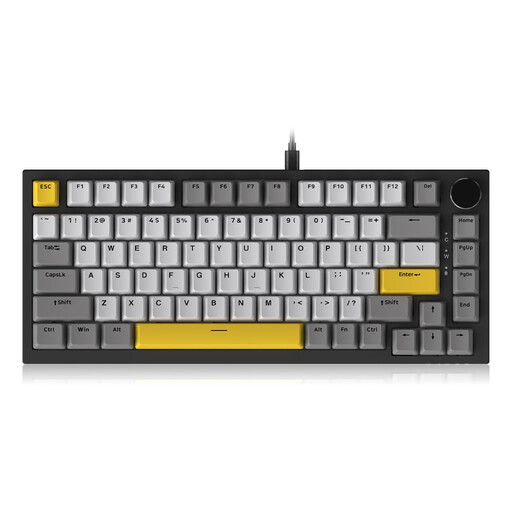
Why We Love It
The AJAZZ AK820 focuses on the essentials and does them remarkably well. In the enthusiast-favourite 75% layout, it packs high-end features like a Gasket Mount and a CNC-machined metal volume knob. By relying on an ultra-reliable wired connection, it makes the premium typing experience more accessible.
Key Features
Who is it for?
For gamers and professionals seeking the perfect balance between compactness and typing quality. It's the smart choice for enjoying a Gasket Mount and a volume knob in a flawless, wired configuration.
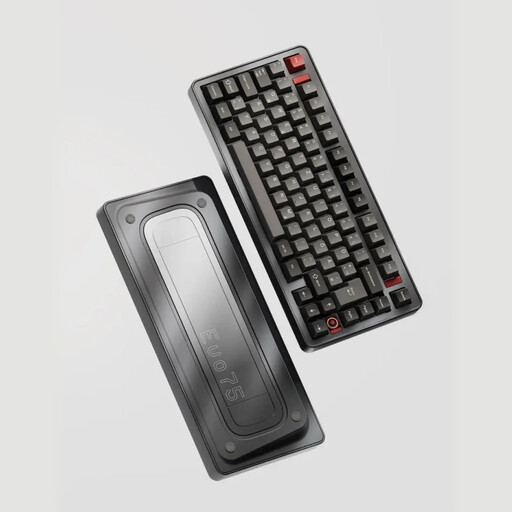
Why We Love It
The Ticktype EVO75 is aimed squarely at custom keyboard enthusiasts. Its fully CNC-machined aluminium chassis gives it a weight and finish worthy of a high-end board. It takes the concept further than a Gasket Mount with a Leaf Spring structure: flexible plates that offer an absolutely unique bounce and typing feel. Its VIA compatibility opens the door to full key remapping, for an unparalleled level of customisation.
Key Features
Who is it for?
For the enthusiast who wants the best of the custom keyboard experience without having to build it piece by piece. The keyboard of choice for aesthetes who demand premium materials, a distinctive typing feel, and absolute control over their tool.
Our selection covers specific needs, but the world of mechanical keyboards is a deep rabbit hole. If you haven't found your perfect match here, or if you're simply curious to discover other accessories to complete your setup, feel free to explore our collections.
Discover our Grey Filament collection to explore other possibilities.
These are the three main families of mechanical switches, each offering a distinct typing feel:
Absolutely. For a newcomer, it's a guarantee that you can test different types of switches without having to buy multiple keyboards. For an expert, it greatly simplifies maintenance (a faulty switch can be replaced in an instant) and allows you to fine-tune your typing feel by mixing and matching switches. It's a feature that offers immense flexibility and significantly increases your keyboard's lifespan.
Yes, and significantly so. By isolating the plate from the chassis, it absorbs vibrations to create a "softer," more cushioned typing feel. The acoustics are transformed, resulting in a generally deeper and more muted sound (the famous "thock" that enthusiasts contrast with the sharper "clack"). While it's all a matter of taste, this architecture is now considered a real step up in quality and the hallmark of a well-crafted keyboard.