
Livraison le jour même ou le lendemain

Qualité garantie

Débloquez vos offres de bienvenue: Livraison GRATUITE | Jusqu'à -80 % | 30 jours d'essai gratuits à JoyPlus
Téléchargez l'application
By our product experts, July 18, 2026
Choosing the right mechanical gaming keyboard can be a daunting task. Between the different switch types, the bewildering array of form factors, and the multiple connectivity options, it's easy to get lost. You want responsive keystrokes, rock-solid reliability for your long gaming sessions, and a design that enhances your desk—all without breaking the bank.
This guide is here to shed some light. We've scrutinised the spec sheets of dozens of models to bring you a curated selection focused on the best value for money. Our mission: to help you find the keyboard that perfectly meets your needs, whether you're an avid gamer, a developer, or a passionate writer.
Before diving into our selection, let's review the essential criteria for making the right choice.
The switch is the mechanism under each key. It defines the feel, responsiveness, and sound of your typing. Blue switches, for example, are very popular for two reasons:
A mechanical keyboard with blue switches is therefore an excellent choice for those who appreciate crisp, audible feedback with every keystroke.
The size of your keyboard directly impacts your desk ergonomics and gaming comfort.
Here are three models that caught our attention with their technical specs and excellent value.
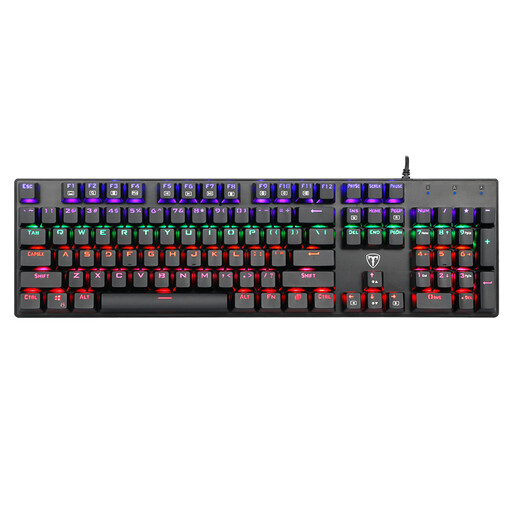
Why it stands out: This model is the ideal entry point into the world of mechanical keyboards. Comprehensive and affordable, it makes no compromises on essential features. Its 104-key format includes the numpad, making it just as comfortable for gaming as it is for office work. Please note, this is a US QWERTY layout, an important point if you are used to a different regional layout.
Key Features:
Who is it for? For gamers and professionals who want a full-size keyboard with a numpad and swear by the reliability of a wired connection. It's the perfect model for taking your first steps into the mechanical world without breaking the bank.
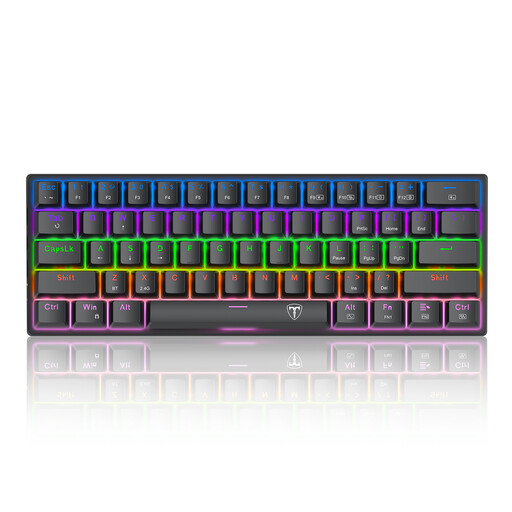
Why it stands out: This 60% keyboard is all about efficiency and minimalism. Its ultra-compact form factor frees up maximum desk space—a strategic advantage for FPS players who need ample room for their mouse.
Key Features:
Who is it for? FPS gamers, digital nomads, and anyone with a modest-sized desk. This is the choice for those who prioritise mouse space and portability above all else.

Why it stands out: Versatility is the name of the game for this model. By juggling three connection modes (wired, Bluetooth, and 2.4?GHz), it adapts to any device and use case, offering absolute flexibility.
Key Features:
Who is it for? For the demanding user looking for a versatile wireless gaming keyboard capable of controlling multiple devices. Ideal for those who dream of a cable-free desk and juggle between a desktop PC, a laptop, and a tablet.
If these models don't check all your boxes, or if you're simply curious to discover other gems, feel free to explore our other peripheral selections to complete your setup.
? Discover our collection of Vintage Accessories
Blue switches are known for their very distinct tactile feedback and audible "click." This crisp feedback confirms every keystroke, which can improve speed and accuracy for writers or developers. For gamers, it helps prevent accidental presses. Be warned, however: their loud sound can quickly become a nuisance in a shared office or open-plan workspace.
Absolutely, but it requires a short adjustment period. For gaming, its compact size is an undeniable advantage, freeing up space for the mouse. For work, the absence of dedicated function keys, arrow keys (often accessible via a combination with the Fn key), or the numpad can be disorienting at first. It's perfect for tasks focused on text entry but will require some mental gymnastics for everything else.
Anti-ghosting is a technology that ensures the keyboard correctly registers multiple simultaneous keystrokes. On a standard keyboard, pressing too many keys at once can lead to "ghost" inputs (the infamous ghosting), meaning they aren't detected. A keyboard with good anti-ghosting, or even N-Key Rollover (NKRO), ensures that every command is sent to the computer. It's an essential feature in fast-paced games that require quick and complex key combinations.