
Livraison le jour même ou le lendemain

Qualité garantie

Débloquez vos offres de bienvenue: Livraison GRATUITE | Jusqu'à -80 % | 30 jours d'essai gratuits à JoyPlus
Téléchargez l'application
Buying a mechanical gaming keyboard AZERTY isn’t just about picking RGB lighting and a well-known brand. Compact format, switch type, wireless connection, console compatibility and programmable keys – every detail can make a noticeable difference to your gaming and typing comfort.
Three mistakes keep cropping up among French buyers:
The format determines both the footprint on your desk and your access to the keys you use every day.
For games that require large mouse movements, a TKL or compact gaming keyboard frees up a welcome area. Conversely, for accounting or intensive number entry, a 96% or full-size model remains far more practical.
Linear red switches offer a smooth press with no tactile click. They often appeal to gamers looking for fluid typing and the ability to chain presses quickly. However, the noise level depends a lot on the keyboard’s construction, the keycaps used and the internal dampening.
Optical, magnetic or proprietary switches can offer more advanced adjustments, but you need to check what the supplied software actually allows. An advertised lifespan of tens or even hundreds of millions of keystrokes refers to the mechanism – it doesn’t guarantee the keycaps, cable or battery will stay like new for that long.
If you plan to change the switches later, look for a programmable hotswap mechanical keyboard. Before ordering, check the compatibility of the switch format, stabilisers and keycaps. You can also browse our selection of hotswap AZERTY keyboards.
A gaming keyboard compatible with PC and console can work via USB, Bluetooth or a 2.4 GHz wireless connection. These three options don’t suit exactly the same uses:
Anti-ghosting and N-Key Rollover mean a certain number of keys can be pressed simultaneously without any command being lost. However, check whether this function covers the whole keyboard or only certain keys.
Finally, a mechanical RGB gaming keyboard can offer per-key lighting, profiles, macros and synchronisation with other peripherals. These settings usually require software – make sure it’s compatible with your system and that the advertised functions are actually available on console.
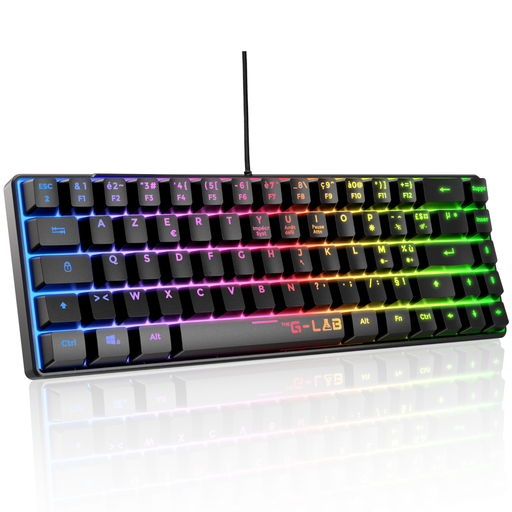
Why this choice suits this profile: Its TKL format keeps 87 keys and frees up space for your mouse, with no battery to recharge or wireless receiver to manage.
The AZERTY layout, USB connection and advertised compatibility with PC, PS4, PS5 and Xbox reduce nasty surprises during setup.
Linear red switches, 32 macros, anti-ghosting advertised for up to 88 keys and 20 lighting modes.
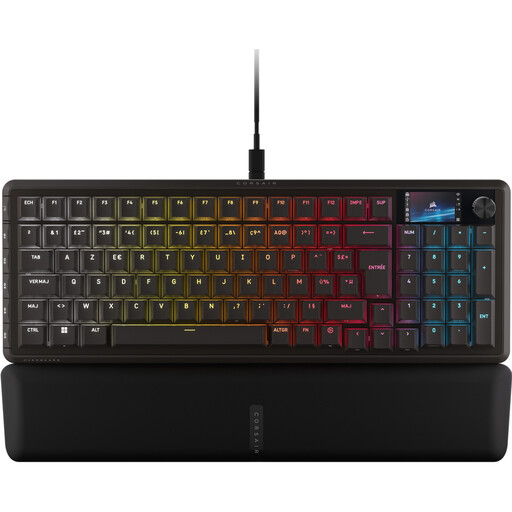
Why this choice suits this profile: This 96% keyboard keeps the numeric keypad while adding an integrated screen, a control wheel and six programmable G keys.
The format is clearly stated and the numeric keypad is present – office work isn’t sacrificed in favour of a more compact keyboard.
CORSAIR MGX Hyperdrive magnetic switches, six G keys, LCD screen, double-shot PBT keycaps and per-key RGB lighting.
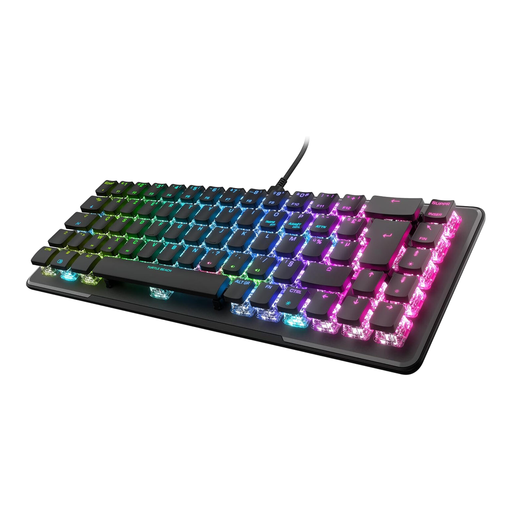
Why this choice suits this profile: Its 65% format and detachable USB-C cable suit gamers who transport their gear or are short on desk space.
The directional arrows are retained despite the reduced format, and programmable profiles can be saved to the onboard memory.
Linear TITAN II optical switches, multi-function keys, AIMO RGB lighting and a manufacturer’s warranty advertised as two years.
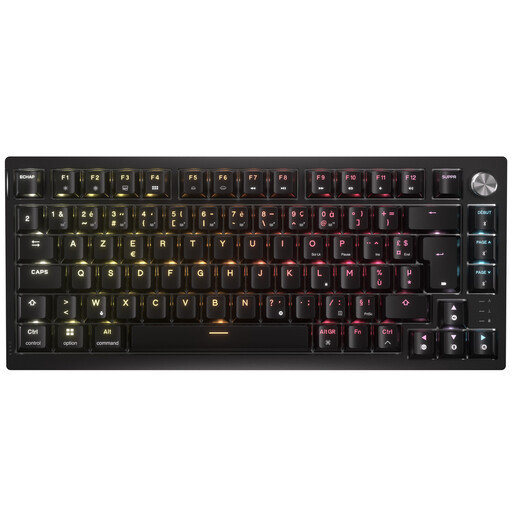
Why this choice suits this profile: The 75% format keeps everyday functions while offering Bluetooth, USB-C and SLIPSTREAM wireless connection.
The three connection modes let you switch between gaming, laptop or console, with the option to play wired while charging.
87 AZERTY keys, CORSAIR MLX Red linear switches, per-key RGB, volume wheel and iCUE software for macros.
We’ve put together a comprehensive, real-time updated list of products that meet these demanding selection criteria while complying with European safety regulations.
Many USB models are advertised as compatible with PS4, PS5 or Xbox. However, actual compatibility can vary depending on the game and the functions supported. For wireless, check that the console accepts Bluetooth or recognises the 2.4 GHz receiver. Macros and lighting may require software only available on Windows.
It depends on the switches, keycaps, cable, battery and maintenance. Manufacturers often quote a keystroke count for the switches, but this figure doesn’t necessarily cover the other components. Avoid liquids, unplug the keyboard before cleaning and use a soft, dry cloth. For a wireless model, recharge the battery with a cable and adapter that comply with the manufacturer’s recommendations.
Consumption is generally moderate for a USB peripheral, but full brightness lighting and wireless connection can increase it. Reducing the RGB intensity or turning off effects when the keyboard isn’t in use helps limit consumption. With a wireless gaming keyboard, remember to switch it off or activate the standby functions provided by the manufacturer.