Joybuy Insights

Mechanical Gaming Keyboard Guide: How to Make the Right Choice

Navigating the jungle of mechanical gaming keyboards can often feel like an uphill battle. Between the technical jargon, marketing promises, and the myriad of available models, it's easy to feel lost... and end up with buyer's remorse. Our mission, as experts, is to cut through the noise for you and highlight the criteria that truly make a difference.

But before taking the plunge, here are the classic pitfalls to avoid so you don't throw your money down the drain.

  • The Foreign Layout Trap?: Many keyboards with alluring designs, often imported, are only available in layouts other than the standard QWERTY used in English-speaking countries. For daily use, typing on an AZERTY (French) or QWERTZ (German) layout can quickly become a nightmare. Verifying the keyboard has a standard QWERTY layout (either US or UK) is a non-negotiable prerequisite for most users.
  • The Myth of the Loud "Click"?: The iconic "clicky" sound of some mechanical keyboards is often heavily marketed. However, what sounds satisfying in a review video can quickly become a torment for those around you, or even for your own microphone if you stream. A silent mechanical keyboard often proves to be a much wiser choice for use in an open-plan office or at home.
  • The "Do-It-All" Keyboard Illusion?: Be wary of models that claim to be perfect for every situation. A keyboard built for extreme responsiveness in competitive gaming won't necessarily offer the ideal typing comfort for writing long emails, and vice versa.

The 3 Technical Criteria You Should Never Overlook

To make an informed choice, focus on what directly impacts your performance and comfort, not on gimmicks.

1. The Switch Type: The Heart of Your Keyboard

This is the mechanism hidden under each key that defines the typing feel, noise, and responsiveness.

  • Traditional Mechanical Switches?: These are divided into three main families. Linears (Reds) offer a smooth and quiet keystroke, highly prized for fast-paced gaming. Tactiles (Browns) have a slight, perceptible bump at the actuation point, providing an excellent compromise between typing and gaming. Finally, Clickys (Blues) add an audible click to the tactile feedback, which is satisfying for some but very loud.
  • Optical Switches?: An optical keyboard uses a beam of light to detect a keystroke. This lack of physical contact results in faster actuation and increased durability. This is a major advantage for FPS players where every millisecond counts.
  • Magnetic (Hall Effect) Switches?: This is the cutting-edge technology. A magnetic keyboard allows you to customise the actuation point of each key with incredible precision (sometimes down to a tenth of a millimetre). Features like "Rapid Trigger" (which instantly resets the key as soon as it travels upward) offer a decisive advantage in competitive games.

2. The Form Factor: TKL, 75%, or Full-Size?

The size of the keyboard, or form factor, has a direct impact on your ergonomics and the space available for your mouse.

  • Full-Size (100% / 104-108 keys)?: The classic format with the number pad. Essential if you work with spreadsheets or use it extensively for productivity tasks.
  • TKL (Tenkeyless / 80%)?: This format ditches the number pad, freeing up valuable desk space for wide mouse movements. The TKL mechanical keyboard is one of the most popular form factors among gamers.
  • Compact (75%, 65%)?: These formats push compactness even further by tightening the layout of the keys (arrows, Del, etc.). The 75% layout retains the function key row (F1-F12), making it an excellent compromise between space-saving and functionality.

3. Connectivity and Customisation

These options define the versatility and, in some cases, the lifespan of your keyboard.

  • Connectivity?: A wired keyboard guarantees near-zero latency. Today, a good wireless gaming keyboard using a 2.4?GHz connection offers indistinguishable performance, with the added benefit of a cleaner desk setup. Bluetooth remains practical for office work but should be avoided for competitive gaming due to its higher latency.
  • RGB Customisation?: Far more than a simple gimmick, a per-key customisable RGB keyboard allows you to create visual profiles for each game, illuminating only the necessary commands.
  • Hot-swappable?: A hot-swappable keyboard allows you to change out the switches without any soldering. This is a major plus for experimenting with different switch types or for easily replacing a faulty switch, thereby significantly extending the life of your investment.

Recommended Keyboards for Every Need

Here are a few models that tick all the boxes for distinct user profiles, keeping performance and relevance for the market in mind.
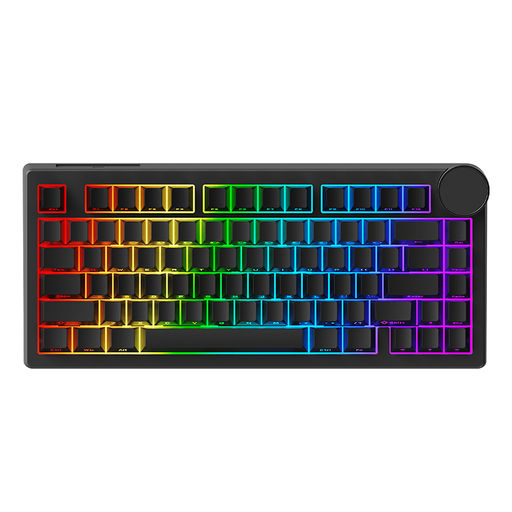
IDEAL FOR: THE COMPETITIVE GAMER (FPS/MOBA)
AJAZZ AK820 V2 wired HE magnetic switch gaming mechanical keyboard

AJAZZ AK820 V2 Wired Magnetic Switch Gaming Mechanical Keyboard

Why it stands out: This keyboard is built for pure performance. Its magnetic switches allow for ultra-precise actuation point adjustment and instant reset (Rapid Trigger): a decisive advantage for micro-adjustments in FPS games. Its wired connection with an 8000 Hz polling rate guarantees virtually non-existent latency.

How It Avoids the Traps

It doesn't market itself as a universal keyboard, but as a specialist's tool. Its 75% form factor frees up crucial mouse space without sacrificing essential function keys.

Key Feature & Strengths

Hall effect magnetic switches for custom-tuned responsiveness. 8000 Hz polling rate for imperceptible latency.
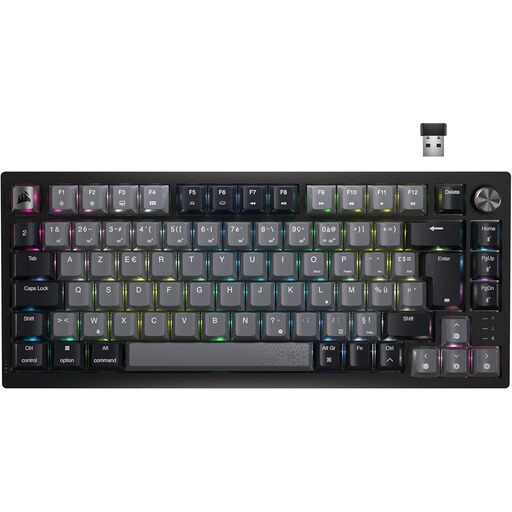
IDEAL FOR: THE VERSATILE USER (GAMING & PRODUCTIVITY)
Corsair K65 Plus Gaming Keyboard Mechanical (MLX Red) Wireless Backlit RGB 75% - AZERTY - Black

Corsair K65 Plus Wireless 75% Mechanical Keyboard - AZERTY

Why it stands out: This keyboard is the king of balance. Its triple connectivity (2.4 GHz, Bluetooth, wired) makes it perfect for switching between a gaming PC and a laptop. The linear MLX Red switches are responsive for gaming and comfortable for typing, without being deafening. The volume wheel is a real quality-of-life feature for daily use.

How It Avoids the Traps

It ticks all the right boxes: it comes in a proper AZERTY layout for French-speaking users, its linear switches are quiet, and its 2.4 GHz wireless connection ensures reliable gaming performance without compromise.

Key Feature & Strengths

Versatile wireless connectivity (2.4 GHz/Bluetooth). Dedicated volume wheel. 75% AZERTY form factor.
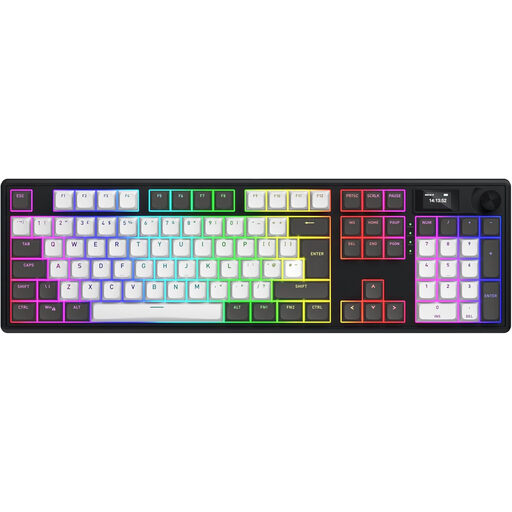
IDEAL FOR: THE CUSTOM KEYBOARD ENTHUSIAST
Hator Magnetic Wireless Gaming Keyboard Skyfall 100 Pro RGB - EU/ISO Layout - Black/Grey

Hator Skyfall 100 Pro Wireless Gaming Keyboard - EU/ISO Layout

Why it stands out: This keyboard is a modder's dream. It combines a premium build (*gasket mount*, PBT keycaps) with advanced features like a TFT screen and a massive 8000 mAh battery. Most importantly, it comes with the extra keycaps to easily switch it to an AZERTY layout.

How It Avoids the Traps

It solves the eternal QWERTY/AZERTY dilemma by providing the conversion keycaps. Its "Vanilla Silent" switches are mechanical but particularly discreet, avoiding the noise trap.

Key Feature & Strengths

Gasket Mount design for a premium sound and feel. AZERTY conversion kit included. TFT screen and 8000 mAh battery.

Haven't found what you're looking for?

Discover our full collection of keyboards that meet our strict selection criteria and are perfectly suited for your needs.

Frequently Asked Questions

What is the lifespan of a mechanical gaming keyboard?

The lifespan of a mechanical keyboard primarily depends on its switches. Most standard mechanical switches are rated for 50 million keystrokes. Higher-end models, especially optical or magnetic ones, can reach or even exceed 100 million keystrokes. With regular maintenance, a good mechanical keyboard can last you for many, many years.

Are mechanical keyboards always loud?

No, that's a very persistent misconception. The noise depends entirely on the switch type. "Clicky" switches (Blues) are designed to be loud. Conversely, linear switches (Reds) and tactile switches (Browns) are much quieter. There are even ranges of silent mechanical keyboards, equipped with internal dampeners for a nearly inaudible keystroke, perfect for a shared office or a late-night gaming session.

Wired or wireless: which is better for gaming?

For competitive gaming, latency is the name of the game. A wired keyboard will always offer the most stable and fastest connection. That said, a modern wireless gaming keyboard using 2.4?GHz technology (via a USB dongle) now offers latency so low that it's imperceptible to the vast majority of players. A Bluetooth connection, on the other hand, should be reserved for office work or casual gaming due to its much higher latency.