Joybuy Insights

Mechanical Gaming Keyboard Guide: How to Choose the Right One

The world of mechanical gaming keyboards is alluring?: lightning-fast responsiveness, limitless customisation, sleek designs... But behind the marketing claims lie pitfalls that can quickly turn a promising purchase into a costly disappointment. As a product specialist at Joybuy, my mission is to guide you through this jungle. Let's break down the classic mistakes together to help you make the right choice.

The 3 Pitfalls to Avoid When Buying a Gamer Keyboard

  1. The "100% Anti-Ghosting" Myth on Entry-Level Models: Many keyboards boast this feature. However, the real technology to look for is N-Key Rollover (NKRO), which ensures every single keystroke is registered individually, no matter how many keys are pressed at once. Simple "anti-ghosting" is often limited to a few key zones on the keyboard, which is insufficient for demanding games.
  2. Choosing Your Switches Blindly: Tempted by the satisfying "clicky" sound of a Blue switch? While it's excellent for typing, its noise can quickly become a nuisance for you or those around you during long gaming sessions or while streaming. Conversely, a linear and silent Red switch might lack the tactile feedback needed for heavy office use. The ideal switch depends entirely on your use case.
  3. The Phantom Battery Life of Wireless RGB Keyboards: A wireless gaming keyboard with vibrant RGB lighting is a feast for the eyes, but it's also a major power drain. Some models see their batteries depleted in just a few hours, forcing you to play in wired mode most of the time... which defeats the whole purpose of going wireless.

Key Criteria to Check Before You Buy

To avoid falling into these traps, focus on a few fundamental technical specifications. These are what will determine your comfort, performance, and the longevity of your keyboard.

Size Matters?: Full-Size, TKL, or Compact?

The keyboard's format, or layout, has a direct impact on your ergonomics and the amount of space on your desk.

  • Full-size (100%): The classic format with a number pad. Versatile, but also the bulkiest.
  • TKL (Tenkeyless, ~80%): Identical to a full-size but without the number pad. An excellent compromise that frees up precious space for your mouse. The TKL keyboard is a very popular choice for gaming.
  • Compact (60% or 65%): These models sacrifice the function keys (F1-F12) and the navigation cluster. The 60% keyboard is ultra-portable and minimalist, but it requires a learning curve to master secondary functions via key combinations.
  • Hybrid Formats (75%, 96%): They rearrange the keys to offer maximum functionality in a condensed frame. The 96% is a compact keyboard that impressively manages to keep the number pad.

At the Core?: Choosing the Right Switches

Mechanical switches are what define the entire typing feel. They fall into two main families:

  • Linear (e.g., Red Switch): The keystroke is smooth and consistent, with no tactile bump or audible click. Fast, responsive, and quieter, they are the preferred choice for competitive gaming.
  • Tactile (e.g., Blue Switch, Brown Switch): They provide a noticeable bump at the actuation point. The Blue switch adds a very distinct audible "click," which is particularly popular for typing. The Brown switch, on the other hand, is tactile but silent: an excellent middle ground.

Connectivity and Customisation?: The Features That Make a Difference

  • Connectivity: A wired keyboard offers a rock-solid, latency-free connection. A wireless gaming keyboard offers flexibility, but you need to pay close attention to the technology used (2.4 GHz is best for low-latency gaming) and the real-world battery life.
  • Hot-Swap: A hot-swappable keyboard lets you change switches without any soldering. This is a fantastic feature for those who love to experiment with different typing feels or easily replace a faulty switch.
  • Internal Structure (Gasket Mount): Rarer and often reserved for higher-end models, the gasket mount structure uses flexible materials to isolate the plate from the chassis. The result? A softer typing feel, a more muted sound, and vastly improved comfort.

Mechanical Keyboards for Every Typist

To help you see how these criteria apply in practice, here are a few models suited for specific needs.
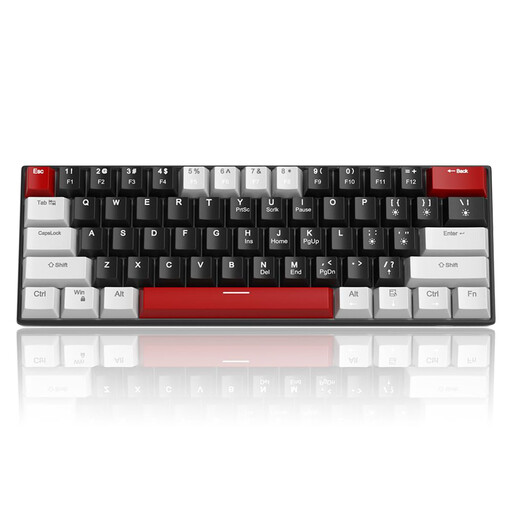
PERFECT FOR : The Budget-Conscious Gamer
MageGee STAR 61 60% Wired Gaming Keyboard

MageGee STAR 61 60% Wired Gaming Keyboard

Who is it for? Ideal for taking your first steps into the world of mechanical keyboards without breaking the bank. Compact, responsive, and affordable, it gets straight to the point: pure performance.

How It Avoids the Pitfall

It features true mechanical switches (your choice of Red switch or Blue switch) and full N-Key Rollover, ensuring all your commands are registered, unlike disguised membrane keyboards.

Key Advantage

Its 60% keyboard format frees up valuable desk space for wide mouse movements, a decisive advantage in FPS games.
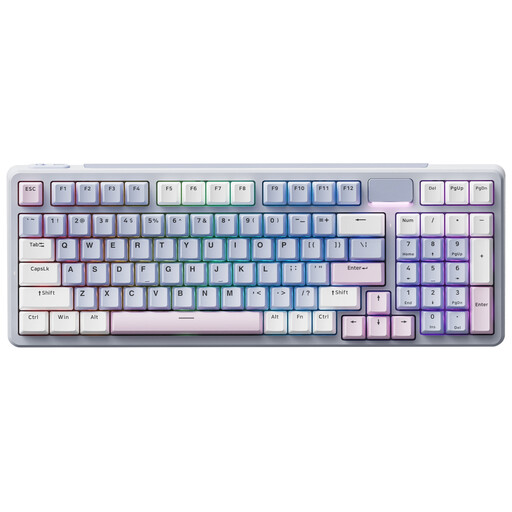
PERFECT FOR : The Customisation Enthusiast
RAPOO V700DIY 96% Mechanical Tri-Mode Keyboards

RAPOO V700DIY 96% Mechanical Tri-Mode Keyboards

Who is it for? For those who want total control over the feel and sound of their keyboard, and who see their peripheral as a centrepiece of their setup.

How It Avoids the Pitfall

It's truly hot-swappable (compatible with 3 and 5-pin switches) and its gasket mount structure provides a flexible typing experience and a muted sound that standard models can't match.

Key Advantage

Its triple-mode connectivity (wireless gaming keyboard 2.4Ghz/Bluetooth + wired) and its 96% format that retains the number pad in a frame just slightly wider than a TKL.

PERFECT FOR : The On-the-Go or Minimalist Gamer
ET 60% Tri-Mode Mechanical Keyboard

ET 60% Tri-Mode Mechanical Keyboard

Who is it for? Ideal for clean setups, small desks, or for those who transport their gear for LAN parties or travel.

How It Avoids the Pitfall

Its triple-mode connectivity includes a low-latency 2.4Ghz mode for gaming and a battery designed for extended use (especially with the RGB dimmed or off), preventing a dead battery mid-game.

Key Advantage

Ultra-compact (60% keyboard) and versatile, it connects to a PC, laptop, or even a tablet, offering maximum flexibility.

Looking for the Perfect Keyboard?

Explore our full selection of keyboards that tick all the right boxes, tested and approved by our experts.

Mechanical Gaming Keyboards?: Your Questions, Our Answers

What is the lifespan of a mechanical gaming keyboard?

The longevity of a mechanical keyboard is directly tied to its switches. Most major manufacturers (like Outemu, Kailh, or Cherry MX) guarantee a lifespan of around 50 million keystrokes per key. For even a heavy user, this translates to many, many years of use. PBT keycaps, which are more durable than ABS, also contribute to better longevity.

Is a QWERTY keyboard really a problem in a non-QWERTY country?

The vast majority of specialised gaming keyboards use the QWERTY keyboard (US) layout. It's the de facto standard in the gaming and coding ecosystem. For typing in other languages, a short adjustment period is needed, or you can simply switch the keyboard language in your operating system. In-game, where ZQSD keys are remapped to WASD anyway, it's a non-issue.

Is "hot-swap" useful for beginners?

More than ever! A hot-swappable keyboard is an excellent investment, even for a first-time buyer. It gives you the freedom to experiment with different switch types (linear, tactile, clicky) to find what you love, without having to buy a whole new keyboard. It's also a guarantee of longevity: if a switch fails, you can replace it in seconds and get right back in the game.