
Livraison le jour même ou le lendemain

Qualité garantie

Débloquez vos offres de bienvenue: Livraison GRATUITE | Jusqu'à -80 % | 30 jours d'essai gratuits à JoyPlus
Téléchargez l'application
The mechanical gaming keyboard market is a real jungle, saturated with technical acronyms and marketing promises. Between "revolutionary" switches, ultra-compact form factors, and endless customisation options, it's easy to get lost and make a purchase you'll immediately regret. As a product expert at Joybuy, my mission is to cut through the noise and help you identify the features that truly matter.
Before you spend hundreds of dollars, beware of these three common pitfalls:
magnetic switches with Rapid Trigger as the ultimate weapon. While this tech offers a measurable advantage in competitive FPS games, it's often overkill and expensive for versatile use or less twitchy games.hot-swappable keyboard is a great feature. However, the idea of building a custom keyboard from scratch often hides additional costs (for switches, keycaps) and unexpected complexity, especially when hunting for a quality keycap set in a specific regional layout.To avoid making a mistake, focus on these three key points that will determine if a mechanical keyboard is right for you.
Your keyboard's size has a direct impact on your ergonomics and desk space.
The switch is the heart of your keyboard. It defines the typing feel, sound, and responsiveness.
wireless mechanical keyboard and Your Local LayoutHere are a few options that cater to distinct user profiles, taking into account the criteria we've just discussed.
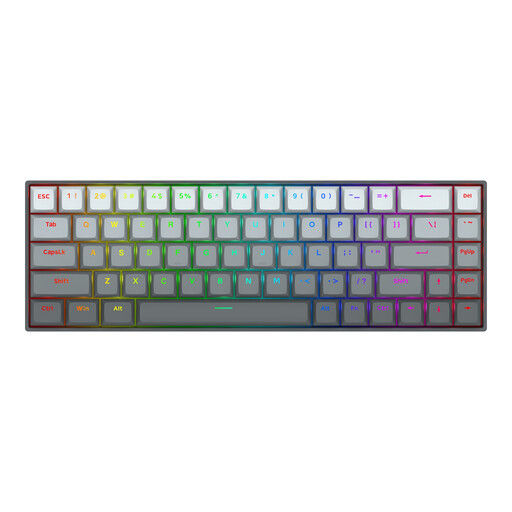
Why we chose it: Designed for pure performance, this keyboard combines a compact 65% layout that frees up maximum mouse space with the cutting-edge technology of magnetic switches, essential for players of Valorant, CS2, or Apex Legends.
It doesn't just promise speed; it delivers it with concrete technical features (8000 Hz polling rate, adjustable actuation point, Rapid Trigger) that have a direct impact in-game, far from empty marketing claims.
Rapid Trigger technology for maximum responsiveness and an aluminium chassis for rock-solid stability. Note: US QWERTY layout.
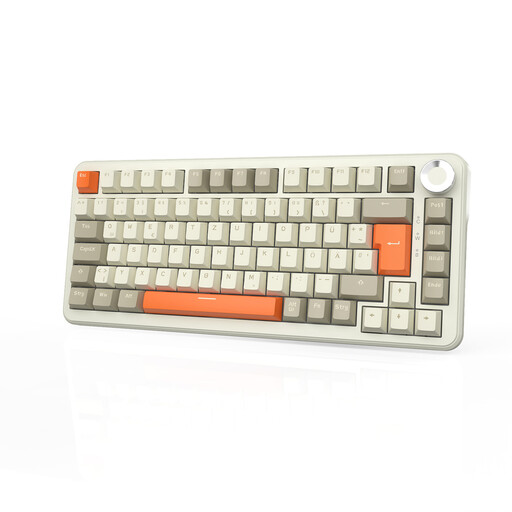
Why we chose it: This is the ultimate Swiss Army knife. Its 75% layout is an ideal compromise, its tri-mode connectivity (2.4G, Bluetooth, Wired) makes it ultra-versatile, and its 8000 mAh battery provides weeks of autonomy. The volume knob is a real plus for daily use.
It offers accessible customisation (hot-swappable) without forcing you to become an expert. It's an "out-of-the-box custom" keyboard that spares you the complexity and hidden costs of a full build.
Exceptional battery life and tri-mode flexibility to switch from your gaming PC to your work laptop effortlessly. *Gasket Mount* structure for a more muted sound and typing feel. Note: QWERTZ (German) layout.
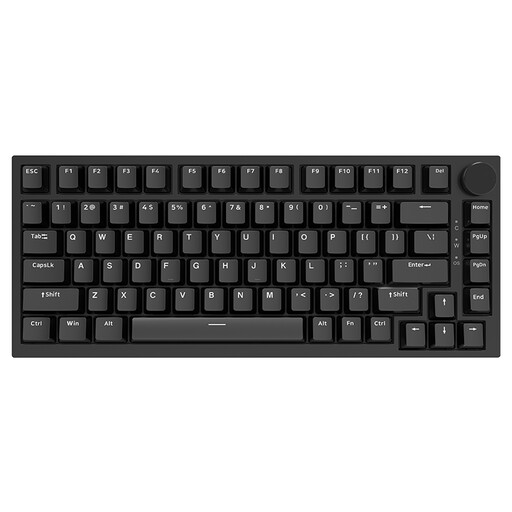
Why we chose it: This is a remarkable starting point for anyone looking to get into customisation. It incorporates high-end features (Gasket mount, sound-dampening foams, hot-swappable PCB) in a popular 75% format, all at a very accessible price point.
It avoids the form factor trap by offering a 75% compromise that retains the arrow and function keys, which are so often missed on 60% keyboards. It's an upgradable base that doesn't sacrifice essential ergonomics.
Gasket structure and hot-swappable PCB (3/5-pin compatible) provide an excellent foundation for future switch and keycap upgrades. Note: US QWERTY layout.
We have curated a complete list of products that meet our strict selection criteria.
Not necessarily. The sound depends entirely on the switch type. Clicky switches (Blues) are designed to be loud. Conversely, linear switches (Reds) are very quiet. Furthermore, modern keyboards with a Gasket Mount structure and layers of dampening foam (Poron, IXPE) significantly reduce noise and vibrations, offering a more muted and satisfying typing experience.
The lifespan is generally very long. Mechanical switches are rated to endure tens of millions of keystrokes (often between 50 and 100 million). One of the biggest advantages of hot-swappable keyboards is that if a switch ever fails, you can replace it in seconds for a minimal cost, thereby extending the life of your keyboard almost indefinitely.
Rapid Trigger for gaming?It all depends on your skill level and your games of choice. For a casual player or a fan of RPGs and MOBAs, the difference will be minimal. However, for a highly competitive player in FPS titles like Valorant or CS2, where every millisecond counts for counter-strafing and movement control, Rapid Trigger can offer a tangible advantage in responsiveness. It's a cutting-edge technology, but it's not essential for everyone.