
Livraison le jour même ou le lendemain

Qualité garantie

Débloquez vos offres de bienvenue: Livraison GRATUITE | Jusqu'à -80 % | 30 jours d'essai gratuits à JoyPlus
Téléchargez l'application
Finding your way through the jungle of keyboards can be tough. For a gamer, responsiveness and reliability are non-negotiable. For heavy office use, typing comfort and durability are paramount. A good mechanical gaming keyboard must reconcile the best of both worlds.
To help you make an informed decision, we've broken down the essential technical points and selected models for every type of user and budget. Follow our guide to make the right choice.
Before you jump on a specific model, it's crucial to understand the three key points that define an excellent keyboard.
The fundamental difference between a mechanical keyboard and its membrane cousin? The switches. On a mechanical keyboard, each key has its own individual switch. The result: a unique typing feel, superior responsiveness, and unbeatable durability. There are three main families of switches:
Connectivity is a choice that depends on your desk setup and habits.
Beyond switches and connectivity, certain technical details can transform your experience:
Let's get down to business with a few models that have particularly caught our eye.
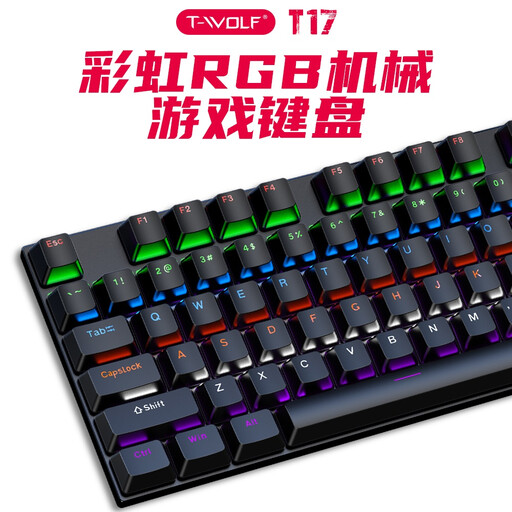
Why it stands out: The Rexsun T17 is a mechanical gaming keyboard that gets straight to the point. It packs the essentials for gaming—full anti-ghosting and RGB backlighting—into a chassis that exudes durability. Its design even includes drainage holes to resist accidental spills, a detail that can be a lifesaver.
Pros:
Who is it for? It's aimed at PC keyboard gamers looking for raw performance, responsiveness, and durability without unnecessary frills. An excellent choice for those who swear by the reliability of a wired connection. Note that it comes in a US QWERTY layout.
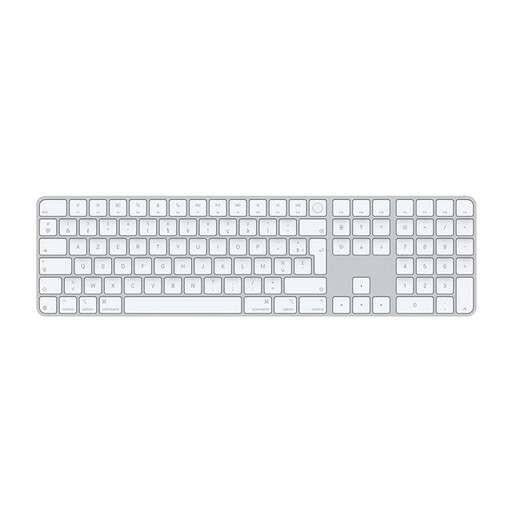
Why it stands out: While it's not a mechanical keyboard, the Apple Magic Keyboard is a must-have for Mac users. Its seamless integration into the ecosystem, featuring a highly convenient Touch ID for unlocking your session or making online payments, makes it a productivity champion. Its sleek design and quiet keystrokes make it as pleasant to look at as it is to use.
Pros:
Who is it for? This keyboard is for Mac users with an Apple silicon chip who are looking for a comfortable and quiet typing experience for mixed use (work, office tasks, and casual gaming). It's the logical choice for those who prioritise design, software integration, and the elegance of a wireless desk setup.
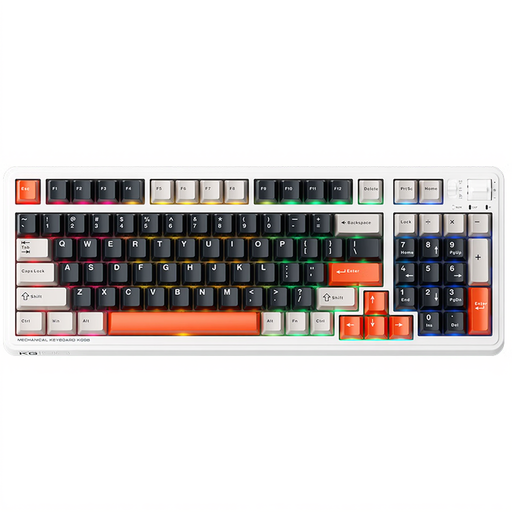
Why it stands out: The Machenike KG98 is built for enthusiasts who refuse to compromise. Its triple connectivity (wired, Bluetooth, and 2.4?GHz) gives it absolute versatility. Its trump card? The switches are hot-swappable, allowing you to change them on the fly without soldering to custom-tailor your typing feel.
Pros:
Who is it for? This wireless gaming keyboard is for tech enthusiasts and gamers who love to tinker with their gear. If you enjoy experimenting with different switch types or juggling between a gaming PC and a laptop, the KG98 is a prime candidate. It is available in a US QWERTY layout.
The choice between AZERTY, QWERTY, and other layouts is primarily a matter of habit. If our suggestions don't match your preferences, especially if you're a fan of QWERTZ (used in Germany and Switzerland), other options are available to you.
? Discover our range of QWERTZ keyboards
On a membrane keyboard, the keys press down on a rubber dome, which often results in a mushy and less precise feel. A mechanical keyboard, however, dedicates an independent switch to each key. The benefit is threefold: responsiveness, durability, and a much crisper, more satisfying typing feel.
Absolutely. The responsiveness of mechanical switches means your actions are registered faster, which is a crucial advantage in competitive play. Anti-ghosting ensures that all your commands, even when pressed simultaneously, are registered without error. Finally, their robust construction guarantees longevity against the repeated punishment of intense gaming sessions.
It's all a matter of habit. AZERTY is the standard in France, optimised for the French language. QWERTY, the international standard, is often preferred by developers and some gamers for more direct access to certain keys in software or games. If you don't have a strong preference, the most natural choice is to stick with the layout you use every day.