Choosing a mechanical gaming keyboard can quickly become overwhelming. Layouts, switch types, connectivity... faced with a jungle of options, it's easy to feel lost. This guide is here to cut through the noise and give you the keys to choosing the keyboard that perfectly fits your playstyle, productivity needs, and customisation desires. As the head of product recommendations at Joybuy, I've dissected the spec sheets of current models to curate a balanced selection for 2026.
How to Choose Your Mechanical Gaming Keyboard
Before diving into our selection, let's go over the essential criteria that will guide your choice.
Layout: TKL, 75%, or Full-Size?
The size of the keyboard is the first decision to make. It determines your comfort and how much space you'll have on your desk.
- Full-size (100%): This includes the numpad, which is essential for some office tasks, but it can be bulky for gaming, limiting the range of mouse movements.
- TKL (Tenkeyless) Layout: By removing the numpad, this layout strikes an excellent compromise. It frees up valuable space for your mouse while retaining essential navigation keys (arrows, Insert, Delete, etc.).
- 75% Layout: Even more compact, this layout condenses the navigation keys and the function row (F1-F12) against the main key cluster. A 75% keyboard maximises space efficiency without sacrificing essential keys.
Connectivity: Wired or Wireless?
The wired versus wireless debate is no longer as one-sided as it once was.
- Wired: The reliable choice. A wired connection guarantees a stable, zero-latency experience. It's a dependable and often more affordable option.
- Wireless: A modern wireless gaming keyboard promises a clean, clutter-free desk and total freedom of movement. Proprietary 2.4 GHz technologies (like Razer HyperSpeed or ROG SpeedNova) now offer near-zero latency, effortlessly rivalling wired connections. Bluetooth remains a versatile option for switching between multiple devices, but it's less suitable for competitive gaming.
Customisation at the Heart of the Experience
One of the greatest joys of a mechanical keyboard is its immense potential for customisation.
- Hot-swappable keyboards: This magical feature allows you to change the switches under each key without any soldering. It's a game-changer for those who love to experiment with different typing feels (linear, tactile, clicky) or simply want to replace a faulty switch.
- Keycaps and Aesthetics: Customisation also extends to the look and feel, especially by changing the keycaps. PBT models, for example, are far more durable and resistant to shine than standard ABS. A RGB keyboard allows you to sync your keyboard's style with the rest of your setup. Finally, for many users, ensuring the availability of a specific regional layout, such as AZERTY, is a non-negotiable criterion.
Our Mechanical Keyboard Recommendations
Here are three models that have caught our eye. Each caters to different needs and budgets.
1. AJAZZ AK820
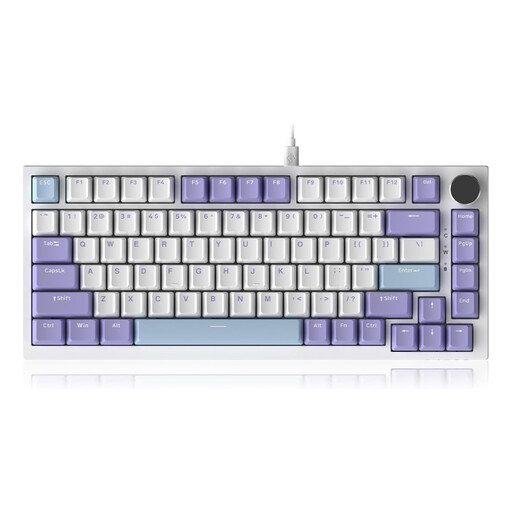
AJAZZ AK820 75% TKL Wired Mechanical Keyboard
- Why it stands out: The AK820 stands out from the crowd with its gasket mount design. This internal architecture, which uses silicone gaskets to cushion every keystroke, delivers a deeper sound and an incredibly smooth typing feel. These are features typically found on much more expensive models. The icing on the cake is its CNC-machined metal volume knob, which is as practical as it is elegant.
- Advantages:
- Comfortable typing feel thanks to the gasket mount.
- Hot-swappable (3/5-pin compatible).
- Dedicated volume knob.
- Durable PBT keycaps.
- Five-layer sound-dampening structure.
- Who is it for?: Gamers and typing enthusiasts who want a taste of the "custom" experience without breaking the bank. It's perfect for those who prioritise typing quality and acoustics and don't mind a wired connection. Note, however, that this model is only available in a QWERTY (US) layout.
2. Razer BlackWidow V4 Tenkeyless HyperSpeed
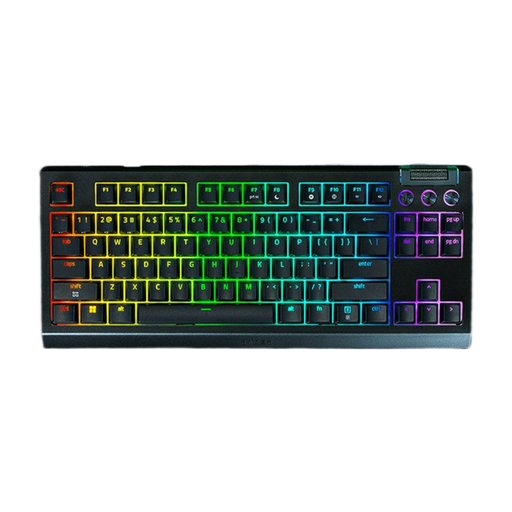
Razer BlackWidow V4 Tenkeyless HyperSpeed Wireless Gaming Keyboard
- Why it stands out: This keyboard successfully combines the freedom of wireless with the responsiveness essential for competitive gaming. Its Razer HyperSpeed Wireless (2.4 GHz) technology ensures an ultra-low-latency connection, while Bluetooth allows you to switch between multiple devices in an instant. Its TKL keyboard format and availability in an AZERTY layout make it a prime candidate for many European users.
- Advantages:
- Low-latency HyperSpeed wireless and Bluetooth connectivity.
- Hot-swappable and compatible with 3 or 5-pin switches.
- AZERTY (French) layout available.
- Record-breaking battery life (up to 980 hours advertised on Bluetooth).
- Multi-function roller and media keys.
- Who is it for?: Demanding gamers who want flawless wireless performance in a compact form factor. It's the logical choice for those dreaming of a minimalist desk setup without sacrificing responsiveness, all while enjoying the flexibility of hot-swap.
3. Asus ROG Azoth
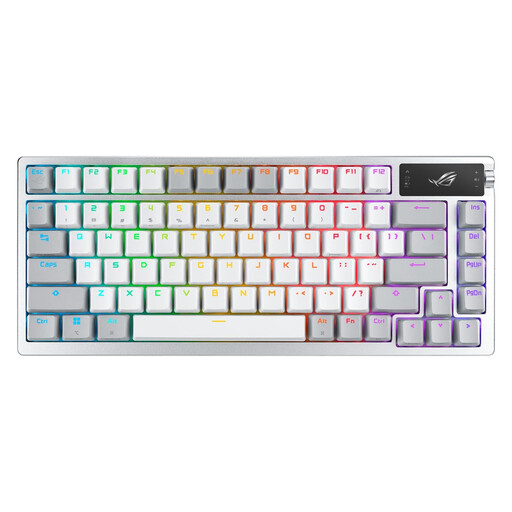
Asus ROG Azoth Wireless Gaming Mechanical Keyboard - AZERTY - White
- Why it stands out: The ROG Azoth is the ultimate keyboard for enthusiasts. It features a 2-inch OLED screen to display system info or animations, tri-mode connectivity (2.4 GHz, Bluetooth, wired), and a top-notch internal design with its silicone gasket mount. A rare and noteworthy feature is the included complete lubrication kit, allowing purists to fine-tune the smoothness of their switches.
- Advantages:
- Customisable OLED screen.
- Tri-mode connectivity (ROG SpeedNova 2.4 GHz, Bluetooth, USB).
- Hot-swappable keyboard and AZERTY layout available.
- Silicone gasket mount for a cushioned typing experience.
- Switch lubrication kit included.
- Who is it for?: Enthusiasts and gamers seeking the ultimate premium experience with a customisable keyboard right out of the box. It's a true investment for those who appreciate cutting-edge features, impeccable build quality, and the ability to optimise every last detail.
Looking for Other Options?
Our selection highlights models with diverse profiles, but the market is full of other gems. If you want to explore more wireless options to free up your gaming space, feel free to browse our complete catalogue.
? Discover our full range of wireless gaming keyboards to find the right model for you.
Frequently Asked Questions About Mechanical Gaming Keyboards
What's the difference between a mechanical and a membrane keyboard?
A mechanical keyboard uses an individual switch under each key. The result is precise tactile feedback, better responsiveness, and far superior durability. In contrast, a membrane keyboard relies on a rubber dome sheet shared across all keys, which results in a mushier, less precise typing feel and a shorter lifespan.
How do I choose the right switches for my mechanical gaming keyboard?
Choosing switches is a very personal decision. They can be classified into three main families:
- Linear (e.g., Red): Smooth, fast, and quiet keystrokes. Ideal for gaming where speed is paramount.
- Tactile (e.g., Brown): A slight tactile bump at the actuation point, but without the audible "click." It's the perfect compromise between gaming and typing.
- Clicky (e.g., Blue): A pronounced tactile feedback and an audible "click" with each press. Very satisfying for typing, but be mindful of those around you!
Is a hot-swappable keyboard really useful?
Yes, and for good reason. First, it allows you to test different types of switches to find your perfect typing feel without having to buy a whole new keyboard. Second, maintenance becomes a breeze: a faulty switch? You can replace it in seconds, instead of throwing the keyboard away or attempting a risky soldering job.


