
Livraison le jour même ou le lendemain

Qualité garantie

Débloquez vos offres de bienvenue: Livraison GRATUITE | Jusqu'à -80 % | 30 jours d'essai gratuits à JoyPlus
Téléchargez l'application
A MagSafe case for iPhone 17 Pro and iPhone 18 Pro needs to do several jobs: protect your phone, feel comfortable in the hand, and allow wireless charging without having to remove the case. The problem is that some product descriptions blur the lines between simple wireless charging compatibility, a genuine MagSafe ring, and protection that’s actually built to absorb drops.
Before you choose a MagSafe iPhone 17 Pro case or a MagSafe iPhone 18 Pro case, check three things: exact compatibility with your model, the materials used, and the level of protection stated. These few checks are often enough to avoid a purchase that doesn’t suit you.
Wireless charging and the MagSafe ecosystem don’t cover exactly the same ground. A case can let induction energy pass through while still holding a charger, mount or magnetic wallet poorly.
Look for mentions of MagSafe compatible or integrated magnetic ring. With MagSafe accessories for iPhone, the alignment of the magnets matters just as much as their mere presence.
A slim iPhone case is lightweight and pleasant to carry, but its protection can be limited in the event of a drop. At the other end of the scale, a very thick model can interfere with the buttons, the magnetic mount or access to the ports.
Raised edges around the screen and camera module are good indicators to check. They prevent direct contact with a table, desk or any other flat surface, but they obviously don’t guarantee protection against all impacts.
A clear iPhone case lets you keep the phone’s design visible, but some plastics scratch or yellow with heat and prolonged exposure to sunlight. A matte iPhone case hides fingerprints better, provided you clean it gently so as not to damage its finish.
Only choose a reference explicitly stated for iPhone 17 Pro and iPhone 18 Pro. The cut-outs must align with the lenses, buttons, speakers and connector. A case intended for a different variant can press on the controls or partially obscure the camera.
Before fitting it, remove the old case and clean the phone. Engage one edge first, then press gently on the corners. Finally, check that every opening is correctly positioned.
TPU is a soft thermoplastic, often used for edges and absorbing minor impacts. Polycarbonate, or PC, forms a more rigid part, better equipped against scratches and useful for maintaining the case’s shape.
A TPU and polycarbonate case therefore combines soft sides with a rigid back. Fully TPU models are generally lighter and more flexible, but their resistance to major impacts depends heavily on their design.
A case compatible with a MagSafe charger must allow the charger to position itself and stay stable. Also remember to check its compatibility with the car mounts, power banks and magnetic card holders you already use.
Magnets can pose a risk to certain sensitive medical devices as well as to cards with a magnetic stripe. Consult the precautions given by the manufacturer. Also avoid immersion: the models shown here are not stated as waterproof.
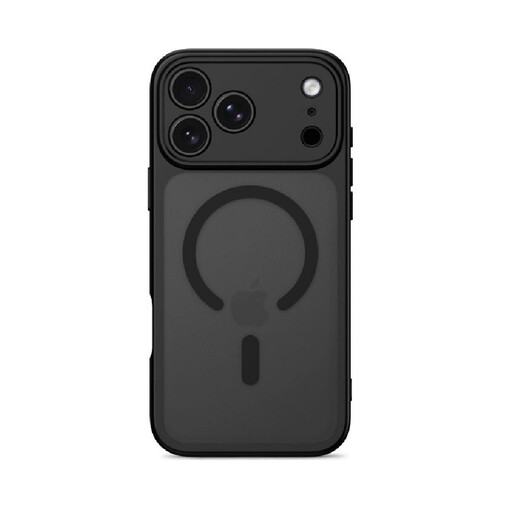
Why this choice suits this profile: This model combines a soft TPU edge with a polycarbonate back. Its matte finish also helps reduce the appearance of fingerprints.
The integrated magnetic ring avoids confusing simple wireless charging compatibility with genuine MagSafe accessory compatibility.
A two-layer construction, raised edges for the screen and camera, plus precise cut-outs.
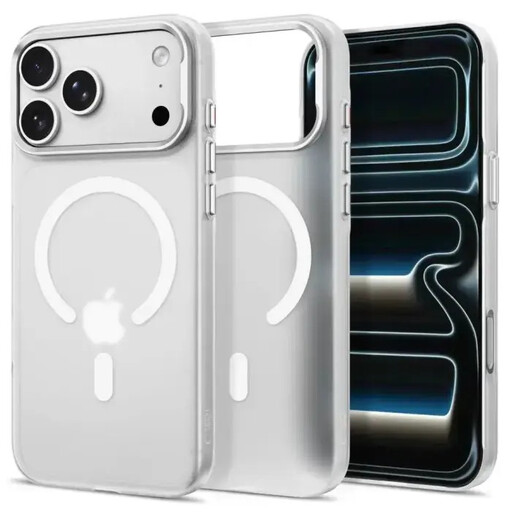
Why this choice suits this profile: Its matte white finish gives it a sleek, bright look, while its slim profile keeps the grip compact and unobtrusive.
The listing mentions a PC + TPU construction, not just a decorative cover, as well as protection against scratches and everyday knocks.
Integrated MagSafe magnets, a slim profile and clear access to buttons, ports and lenses.
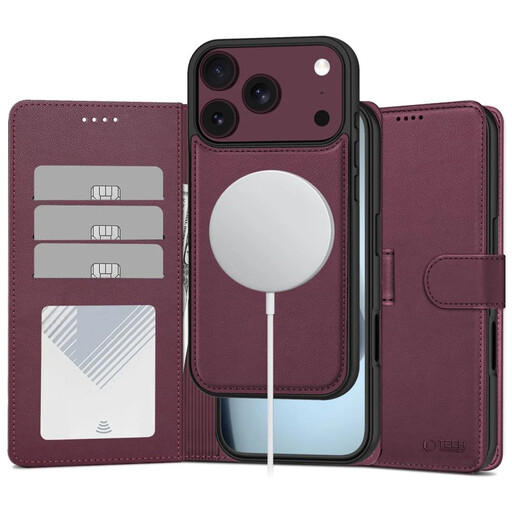
Why this choice suits this profile: Its wallet format lends itself well to daily commutes, with slots for cards and a stand function for watching content in landscape mode.
The listing clearly distinguishes the card slots, magnetic flap and TPU base: so you can check the features offered before buying.
MagSafe magnets, an integrated stand, inner pockets and a magnetic closure.

Why this choice suits this profile: Its clear back lets the iPhone’s design show through, while combining soft sides with a rigid rear structure.
Its hybrid design avoids having to choose between seeing the phone and having protective edges around the screen and camera module.
TPU and polycarbonate, an integrated magnetic ring, raised edges and precise cut-outs.
We’ve put together a comprehensive, real-time updated list of products that fully meet these strict selection criteria and European safety regulations.
Yes. A case doesn’t protect the touchscreen. An iPhone 17 Pro screen protector or an iPhone 18 Pro screen protector can effectively complement protection against scratches and smudges. Just check that it remains compatible with the case’s edges, to avoid it peeling off at the sides.
It can support wireless charging, but the magnetic attachment mainly concerns chargers and accessories designed for the MagSafe ecosystem. Check the product listing and make sure an integrated magnetic ring is present.
Its appearance depends on the material, exposure to heat, friction and how you care for it. Avoid solvents, abrasive products and prolonged exposure to sunlight. Clean it with a soft, slightly damp cloth.
Wallet models that are MagSafe compatible can be charged with a suitable charger. However, the thickness of the case, the flap and any cards stored in the pockets can disrupt alignment. For regular charging, check the stability of the connection and remove cards if the manufacturer recommends it.