
Livraison le jour même ou le lendemain

Qualité garantie

Débloquez vos offres de bienvenue: Livraison GRATUITE | Jusqu'à -80 % | 30 jours d'essai gratuits à JoyPlus
Téléchargez l'application
As the head of product selections at Joybuy, my mission is to guide you through the gaming hardware jungle. Today, we're breaking down the magnetic switch gaming keyboard, a technology generating a lot of buzz, especially among competitive FPS players on titles like Valorant or CS2. Our goal is to give you the keys to making a smart choice, cutting through the often-misleading marketing jargon.
The market is flooded with technical terms promising a decisive advantage. However, behind these claims lies a much more nuanced reality. Here are the three classic pitfalls that could lead to buyer's remorse.
To find the perfect magnetic mechanical keyboard for you, focus on these three technical aspects that are true game-changers.
The core technology is the Hall Effect switches. Unlike traditional mechanical switches that rely on physical contact, these use a magnetic sensor to measure the exact position of the key throughout its entire travel distance.
This precise measurement makes the Rapid Trigger function possible. In practice, you can configure a key to actuate at 0.5 mm of pressure and deactivate the instant you release it, even by just 0.1 mm. For a Valorant or CS2 player, this translates to deadly accurate stopping power and seamless strafing with zero latency.
The other major advantage of magnetic switches is the adjustable actuation point. Most models allow you to customise the actuation distance for each key, typically within a range of 0.2 mm to 4.0 mm.
Regarding the 8000 Hz polling rate, ensure your processor is powerful enough to handle it and that you connect the keyboard to a USB 3.0 port or higher. For the average gamer, a stable 1000 Hz rate is already excellent, but 8000 Hz can offer a subtly smoother feel on very high-end systems.
The keyboard's form factor has a direct impact on your desk space.
Build quality is just as crucial. An aluminium chassis provides rigidity and weight that anchors the keyboard to your desk in the heat of the action. PBT (polybutylene terephthalate) keycaps are also a real plus: they resist wear and the "shiny" effect much better than their ABS counterparts, ensuring a pleasant and precise feel month after month.
Here is our selection, designed for different player profiles and strictly adhering to the performance and quality criteria we've just discussed.
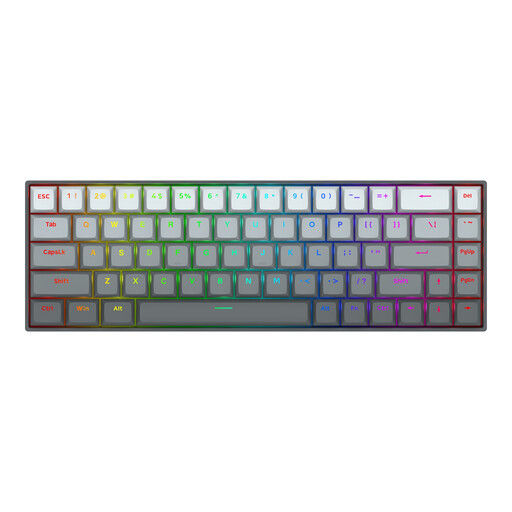
Why we chose it: Designed for raw performance. Its ultra-compact 65% form factor frees up maximum space for the mouse, a decisive advantage in FPS games. It checks all the technological boxes to give you the upper hand.
It doesn't just flaunt the 8000 Hz feature. It integrates it into a coherent ecosystem with an effective Rapid Trigger and fully customisable Hall Effect switches. It's the complete package for responsiveness.
The winning trio: compact form factor, Rapid Trigger, and 8000 Hz. Note that this is an American (ANSI) layout, an important detail.
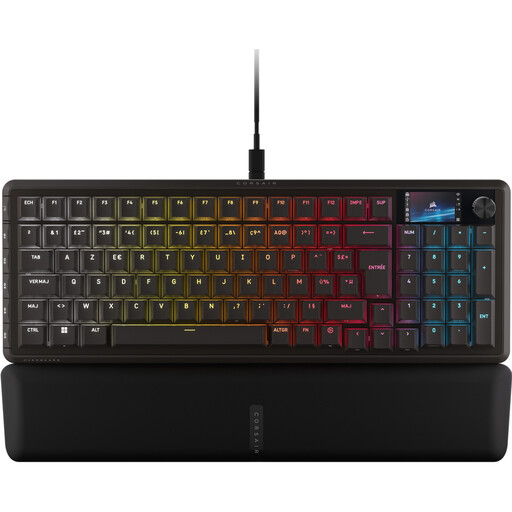
Why we chose it: The perfect compromise for those who want gaming performance without sacrificing everyday comfort. Its 96% format manages to keep the number pad in a chassis that's barely wider than a TKL. The LCD screen is the icing on the cake, both practical and customisable.
Its secret: a perfect balance between cutting-edge gaming technologies (CORSAIR MGX magnetic switches) and practical features (screen, G-keys). It never sacrifices versatility for the sake of pure performance.
It comes in a native AZERTY layout, a major plus for users in French-speaking regions. Paired with durable PBT keycaps, it's a prime ally for both gaming and work.
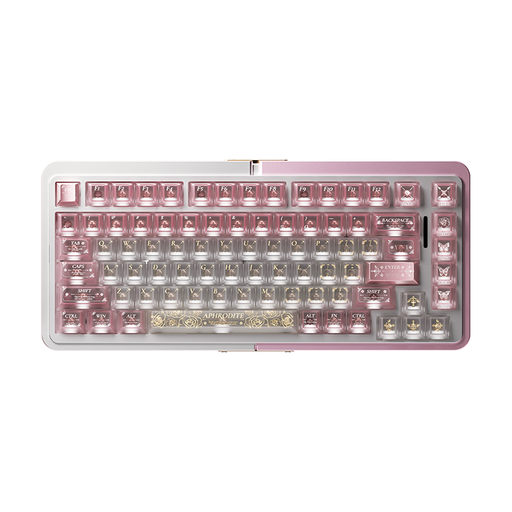
Why we chose it: For those for whom build quality is non-negotiable. Its full CNC-machined aluminium chassis gives it a weight, stability, and typing feel that are simply out of reach for plastic models.
It pushes back against easy marketing by betting everything on build quality, an all-too-often underestimated criterion. The result is an ultra-solid foundation that ensures consistent performance and rock-solid durability.
Its 100% CNC aluminium chassis. It's a heavyweight, stable as a rock, and built to last. A point of caution: it is offered in an American (ANSI) layout.
We have curated a complete selection of products that meet our demanding selection criteria and current safety standards.
The usefulness of an 8000 Hz polling rate is debatable. In theory, it reduces input latency from 1 ms (at 1000 Hz) to 0.125 ms. This difference is completely imperceptible to the average person. However, professional or ultra-competitive gamers on very high-end systems (high-refresh-rate monitor, powerful processor) might perceive a very slight improvement in smoothness. For most users, a stable 1000 Hz keyboard with an excellent Rapid Trigger implementation will be far more beneficial.
A traditional mechanical switch (like a Cherry MX Red) uses a physical metal contact to register a keystroke, which leads to wear and tear and imposes a fixed actuation point. The Hall Effect magnetic switch, on the other hand, operates without any physical contact. It uses a magnet and a sensor to measure the key's depression distance in real time. The result: theoretically far superior durability and access to advanced features like an adjustable actuation point and Rapid Trigger.
Using your native regional layout (like AZERTY) is obviously more comfortable for typing and daily use. The catch is that many niche or "custom"-oriented gaming keyboards are only available in the standard QWERTY (ANSI) layout. In-game, the difference is less pronounced, as the standard movement keys (WASD) are in the same physical location regardless of the printed characters. It all depends on your primary use: typing comfort in your native language or access to a wider selection of specialised models (QWERTY).