While the iPad is a powerful and versatile tool, typing long texts on its touchscreen can quickly become an uphill battle. For professionals, students, or content creators looking to transform their tablet into a true portable workstation, an external keyboard isn't a luxury—it's a necessity. The Magic Keyboard for iPad stands out as the ultimate all-in-one solution, combining typing comfort, protection, and advanced features.
This guide is here to help you navigate the different options by breaking down the compatibility and specifications of each model. The goal is to empower you to make the right choice—one that perfectly matches your device and your needs.
How to Choose the Right Magic Keyboard for Your iPad??
Before making a purchase, several criteria must be considered to ensure flawless compatibility and an optimal user experience.
1. Check Your iPad Model's Compatibility
This is the first and most crucial step. Apple designs specific Magic Keyboards for each iPad range and size. A keyboard for a 13-inch iPad Pro will not be compatible with an iPad Air or a 10th-generation iPad. To avoid any mistakes, precisely identify your iPad model (e.g., iPad Pro 13-inch (M4), iPad Air (M2), iPad (10th generation)). This information is usually found on the back of the device or in Settings?: General > About.
2. Assess Your Needs?: 'Laptop-Like' Experience or Versatility??
The lineup is primarily split into two philosophies?:
- The classic Magic Keyboard?: Designed for iPad Pro and iPad Air, it features a unique cantilever design where the iPad appears to float magnetically above the keyboard. It transforms the iPad into a near-laptop, with a continuously adjustable viewing angle. This is the go-to option for those who prioritise productivity and intensive typing.
- The Magic Keyboard Folio?: Dedicated to the iPad (10th generation), this iPad keyboard case consists of two detachable parts?: the keyboard on one side and a back cover with an integrated kickstand on the other. This modular design offers incredible versatility, allowing you to detach the keyboard to simply watch a video or draw.
3. Ensure a QWERTY Layout
For English-speaking users, it's essential to choose a QWERTY Apple iPad keyboard. Rest assured, all models in our selection feature this standard layout to guarantee a familiar and seamless typing experience.
Top Magic Keyboard Recommendations
Here are a few recommended options, each tailored to specific needs and iPad models.
Apple Magic Keyboard for iPad Pro 13-inch (M4) - Black
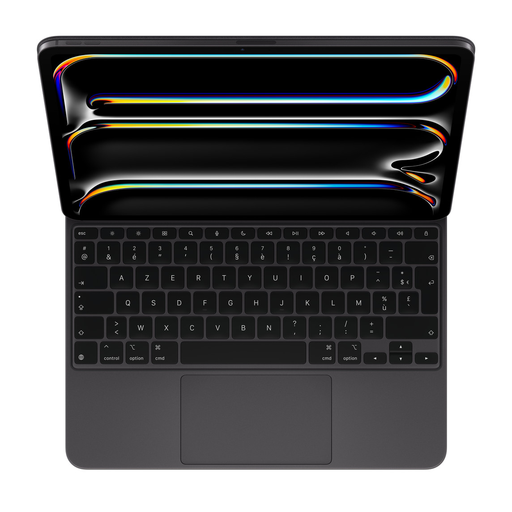
- Its standout feature?: It delivers a typing and navigation experience worthy of a MacBook, thanks to its glass trackpad and backlit keys.
- Highlights?:
- Exceptional typing comfort with a scissor mechanism and 1?mm key travel.
- Large glass keyboard with trackpad for iPad, featuring haptic feedback for ultra-precise navigation and support for Multi-Touch gestures.
- A row of 14 function keys for direct access to essential settings (brightness, volume, etc.).
- Integrated USB-C port for pass-through charging of the iPad, freeing up the tablet's port for other accessories.
- Instant connection via the Smart Connector?: no Bluetooth pairing, no battery to charge.
- Who it's for?: Professionals and creators who have made their iPad Pro 13-inch (M4) their primary work tool and demand a premium, no-compromise productivity solution.
Apple Magic Keyboard for iPad Pro 11-inch (M4) - White
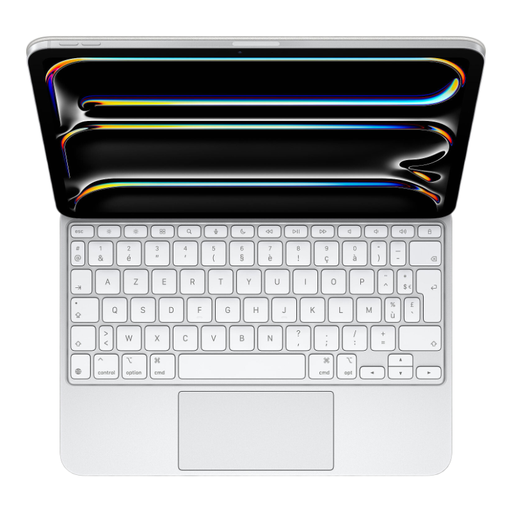
- Its standout feature?: It offers all the power of the 13-inch version in a more compact, portable format, perfect for working on the go.
- Highlights?:
- Cantilever design with a continuously adjustable viewing angle.
- Backlit keys with a scissor mechanism for responsive and quiet typing.
- Spacious glass trackpad with haptic feedback, supporting all iPadOS gestures.
- Pass-through charging for the iPad via the keyboard's USB-C port.
- Folds to protect the front and back of the iPad Pro.
- Who it's for?: Mobile users of the 11-inch iPad Pro (M4) who want a first-class typing and navigation experience without weighing down their bag.
Apple Magic Keyboard Folio for iPad (10th generation)
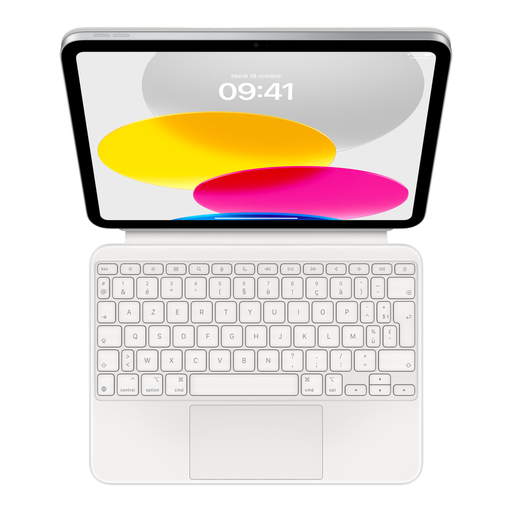
- Its standout feature?: Its two-piece modular design provides unbeatable versatility, adapting to both work and leisure.
- Highlights?:
- Detachable keyboard that attaches magnetically, allowing you to use the iPad with or without it.
- Adjustable kickstand integrated into the back cover to find the perfect viewing angle.
- Full 14-key function row for control at your fingertips.
- Large click-anywhere trackpad.
- Provides front and back protection when the case is closed.
- Who it's for?: Students and users of the iPad (10th generation) looking for an accessory with an iPad Pro feel, but with the flexibility of a detachable keyboard for taking notes, writing assignments, or watching content.
Explore Other Accessories for Your iPad
A great keyboard is the first step to unlocking your iPad's productivity. But for pinpoint accuracy when taking notes, annotating documents, or drawing, nothing beats a good stylus.
Discover our selection of styluses to complete your productivity toolkit.
Frequently Asked Questions About the Magic Keyboard for iPad
What's the difference between the Magic Keyboard and the Magic Keyboard Folio??
The fundamental difference lies in their design and philosophy. The Magic Keyboard (for iPad Pro and Air) is a single-piece accessory with a cantilever design, engineered to replicate a laptop experience. The Magic Keyboard Folio (for iPad 10th generation) is a modular two-part system with a detachable keyboard and a kickstand, prioritising versatility to adapt to all uses.
Does the Magic Keyboard for iPad need to be charged or paired via Bluetooth??
Absolutely not. All Magic Keyboard and Magic Keyboard Folio models connect to the iPad via the Smart Connector, a magnetic port on the back of the tablet. This connection handles both power for the keyboard and data transfer. The result?: no battery, no charging, and no Bluetooth pairing.
How do I know which Magic Keyboard is compatible with my iPad??
The surest method is to check the exact name of your iPad model in Settings > General > About. Then, consult the "Compatibility" section on the product page of the Magic Keyboard you're interested in. Each keyboard is custom-fit for specific dimensions and camera placement, so it's crucial to choose the model that corresponds exactly to your device.


