
Livraison le jour même ou le lendemain

Qualité garantie

Débloquez vos offres de bienvenue: Livraison GRATUITE | Jusqu'à -80 % | 30 jours d'essai gratuits à JoyPlus
Téléchargez l'application
The launch of a new Apple computer is always an event. The 13-inch MacBook Neo, with its colourful design and A18 Pro chip, is already generating a lot of buzz, especially among students and young professionals. But before you take the plunge, beware of the common pitfalls that can turn a promising purchase into a regret. The goal isn't to buy the trendiest new Mac, but to choose the one that truly fits your needs.
This guide is here to help you decode the MacBook Neo's spec sheet and find the configuration that will serve you well for years to come—without needlessly overspending.
Apple's marketing has mastered the art of highlighting strengths, but certain details can turn the dream into a disappointment. Here are the three most common mistakes to avoid.
To make the right choice, focus on the features that are real game-changers in daily use.
At the heart of the beast is the new MacBook Neo A18 Pro chip. Without diving into impenetrable technical jargon, let's see what this means for you. It integrates dedicated performance and efficiency cores. The result? Your Mac is ultra-responsive when you need it, yet knows how to be power-efficient to preserve the MacBook battery life during light tasks.
But the real bonus of this chip is its optimisation for Apple Intelligence. This name refers to a suite of AI features integrated into macOS Tahoe to assist you with writing, sorting your photos, or summarising documents. The 16-core Neural Engine processes these operations locally, directly on the machine, which guarantees both responsiveness and, crucially, privacy.
Apple advertises up to 16 hours of video playback. For a lightweight MacBook for students or mobile professionals, this means you can get through a full day of classes or meetings without worrying about finding a power outlet. For anyone who's constantly on the move, this is simply a non-negotiable feature.
This is THE point you can't afford to overlook. To put it simply:
To help you decide, here are our recommendations based on your profile.

Why this choice: With its feather-light weight of 1.23 kg and battery life built for a full day of classes, it's the perfect study companion. Its power is more than sufficient for research, writing, and presentations. The added bonus? Its vibrant colour helps you stand out.
It keeps the budget in check: no superfluous power. The 256 GB of storage, combined with the cloud, is a smart and cost-effective solution for student use.
The perfect balance of portability, battery life, and everyday performance, all in a chassis that's as lightweight as it is colourful.
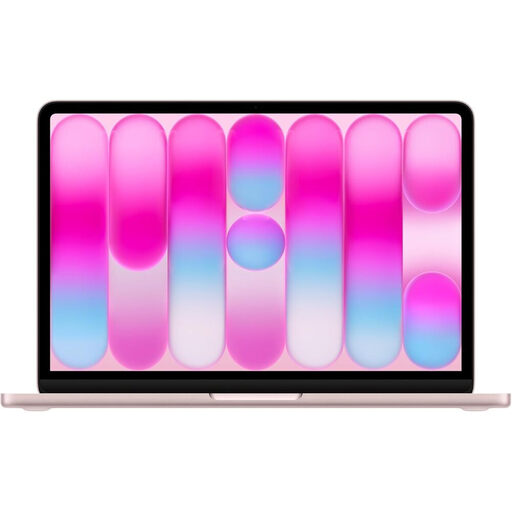
Why this choice: Doubling the storage is a game-changer, offering the flexibility needed to manage creative projects, large photo libraries, or demanding software. Touch ID adds a welcome layer of security and convenience for unlocking your session or authorising payments. A real plus in a professional setting.
It sidesteps the pitfall of insufficient storage. With 512 GB, you get peace of mind and won't have to invest in an external drive after six months.
Ample storage for large files and enhanced security thanks to Touch ID. Perfect for juggling your professional and personal life.
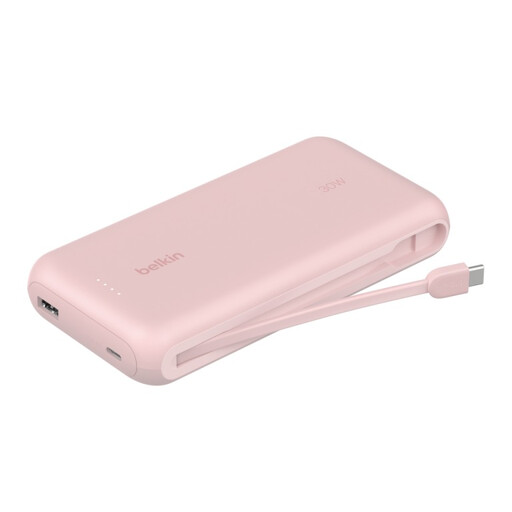
Why this choice: For those who work anywhere but the office, this accessory isn't an option—it's essential. It extends the already excellent battery life of the MacBook Neo, whether during a long trip or an intense day far from any outlet. Its 20,000 mAh capacity can recharge a smartphone multiple times or provide those few life-saving extra hours for your computer.
It addresses the "hidden cost" of absolute mobility: low-battery anxiety. It's a small investment for complete peace of mind on the go.
High capacity, fast 30W Power Delivery charging via its integrated USB-C cable, and it's airline-approved. A reliable and high-performing ally.
We have curated a complete selection of products that meet our selection criteria and the most stringent safety standards.
The MacBook Neo positions itself as a new option in the 13-inch Apple laptops lineup. It focuses on a slim, colourful design while incorporating the new generation of chips (A18 Pro) built for Apple Intelligence. It can be seen as an evolution that blends the portability of the Air with cutting-edge AI features, targeting an audience seeking the latest innovations in an ultra-compact form factor.
Yes. In line with its environmental policy, Apple no longer includes a power adapter in the box. It is sold separately. The box only contains a USB-C charging cable. To charge the MacBook Neo, an adapter of at least 20W is required. However, to take advantage of fast charging, we recommend opting for a 35W model or higher.
For the vast majority of the MacBook Neo's target users (students, office professionals, occasional creatives), 8 GB of unified memory is more than sufficient. The architecture of Apple's chips, combined with the optimisations in macOS Tahoe, ensures incredibly efficient memory management. Everyday tasks, moderate multitasking, and even some light photo editing will remain perfectly smooth and responsive.