
Livraison le jour même ou le lendemain

Qualité garantie

Débloquez vos offres de bienvenue: Livraison GRATUITE | Jusqu'à -80 % | 30 jours d'essai gratuits à JoyPlus
Téléchargez l'application
A compact Apple laptop can be just as suitable for studying as it is for a day of remote working or business travel. But you need to look beyond the claims made in the adverts. Weight, RAM, storage and connectivity all have a direct impact on everyday comfort. Colour or a long list of advertised features alone are not enough to judge whether a model is right for you.
The Apple MacBook Neo 13-inch 8GB 256GB AZERTY is aimed at users looking for a lightweight macOS laptop for office work, browsing, video calls, streaming and everyday multitasking. Here are the points to check before placing your order.
The terms 8GB RAM and 256GB SSD do not refer to the same thing. RAM keeps your active applications running and lets you switch quickly between tasks. The SSD, on the other hand, stores your files, software and the operating system.
A configuration with 8GB of RAM and a 256GB SSD can work perfectly well for office work and browsing online content. However, it does require a bit of discipline if you accumulate lots of videos, photos or large files. An external drive or a cloud storage service can then take over.
A computer that has been imported or designed for another market may have a different layout to the AZERTY keyboard used in France. The position of letters, accents and certain shortcuts can vary noticeably.
The model shown features a backlit Magic Keyboard in AZERTY. A welcome detail if you need to write emails, reports or university work without having to get used to a foreign keyboard.
Battery life depends on many factors: screen brightness, Wi-Fi quality, software in use, volume level or connected peripherals. For this MacBook Neo, the manufacturer claims up to 16 hours of video playback or 11 hours of web browsing. These are benchmarks, not a guaranteed duration in every situation.
On the train, in class or during a working day in a place without easy access to a power socket, the weight and the ability to charge via USB-C matter almost as much as the figure on the spec sheet.
The MacBook Neo A18 Pro is powered by an Apple A18 Pro chip with a 6-core processor: 2 performance cores and 4 high-efficiency cores. The integrated graphics section has 5 cores. This architecture targets everyday uses: documents, browsing with multiple tabs, video calls and content playback.
Its 16-core Neural Engine and built-in artificial intelligence features are designed for certain functions compatible with Apple Intelligence. The availability of these features may vary depending on the version of macOS, the configured language and the region.
This 13-inch Apple laptop has a Liquid Retina display with 2,408 × 1,506 pixels, a claimed brightness of 500 nits and support for one billion colours. It supports several HDR formats, including HDR10, HDR10+, Dolby Vision and HLG.
This resolution is well suited to reading text, light editing, presentations and streaming. For extended outdoor use, however, it is better to check the glare management and adjust the brightness correctly rather than relying solely on the number of nits.
Weighing in at 1.23 kg and measuring 1.27 cm thick, this model ranks among the lightest laptops. Its dimensions are 29.75 × 20.64 × 1.27 cm.
Connectivity includes two USB-C ports that support charging and DisplayPort, a 3.5 mm headphone jack, Wi-Fi 6E and Bluetooth 6.0. Only one external display can be used. If you plan to connect a docking station, monitor or several accessories, check their compatibility before buying.
According to available information, the mains charger is not included. You will need to budget for a USB-C power supply compatible with USB Power Delivery of at least 20W. A power output of 35W or more enables fast charging, according to the manufacturer's guidance.
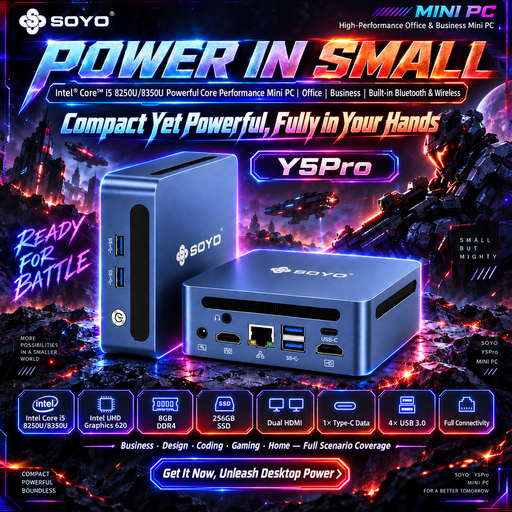
Why this choice suits this profile: this compact unit is suitable for a fixed desk looking for a Windows solution for simple tasks, with multiple video outputs and an Ethernet port.
The spec sheet clearly details the 8GB of memory, the 256GB SSD and the available ports, making it easy to compare with an Apple laptop.
105 × 113 × 45 mm format, two HDMI outputs, four USB ports and Ethernet connection.
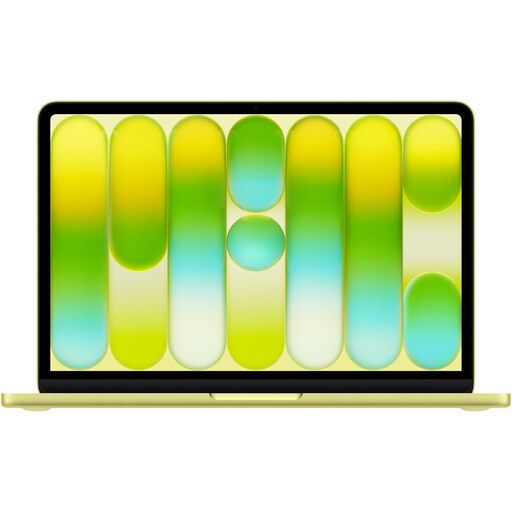
Why this choice suits this profile: it combines a Liquid Retina display, macOS Tahoe, a lightweight chassis and good integration with other Apple devices thanks to Continuity features.
The spec sheet specifies the AZERTY layout, weight, dimensions, SSD capacity and ports, rather than just relying on design-related arguments.
6-core A18 Pro chip, 13-inch 500-nit display, 1.23 kg weight and claimed battery life of up to 11 hours of web browsing.
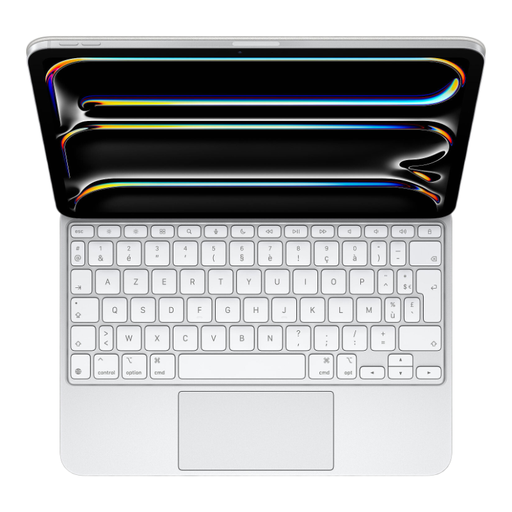
Why this choice suits this profile: this keyboard is aimed at users of an iPad Pro 11-inch M5 who want to write regularly with a trackpad and backlit keys.
Its compatibility with the iPad Pro 11-inch M5 is clearly stated and connection is via the Smart Connector. It should therefore not be confused with a MacBook.
Glass trackpad with haptic feedback, 14 function keys, backlighting and USB-C pass-through charging.
We have put together a comprehensive, real-time updated selection of products that meet these strict criteria as well as European safety regulations.
Yes. Its specifications match everyday uses: word processing, spreadsheets, video calls, web browsing and streaming. The 8GB of unified memory may, however, show its limits with many demanding applications open simultaneously, advanced video editing or particularly heavy tasks.
Available information indicates that the mains adapter is sold separately. You will therefore need to budget for a USB-C power supply compatible with USB PD of at least 20W. Remember to check the exact contents of the offer displayed before ordering.
It all depends on compatible updates, battery condition, free space and the software you use. To avoid slowing down the SSD, do not fill it completely and back up your documents regularly. The spec sheet also mentions a repairability score of 6.8/10 and an EPEAT Gold certification, two useful indicators for comparing the design and lifecycle of the product.