
Livraison le jour même ou le lendemain

Qualité garantie

Débloquez vos offres de bienvenue: Livraison GRATUITE | Jusqu'à -80 % | 30 jours d'essai gratuits à JoyPlus
Téléchargez l'application
A Logitech wireless mouse can make working on a laptop, working from home or studying much easier. However, technical specifications sometimes highlight figures that do not tell the whole story. Battery life stated in months, a ‘universal’ connection or a shape described as ergonomic should always be considered alongside your equipment and habits.
Before placing your order, three potential pitfalls deserve particular attention:
Bluetooth is particularly well suited to laptops, Macs, tablets and, more generally, devices that already support this connectivity. The Logitech M240 Silent connects without a dongle, so it does not take up a USB port. It is advertised as compatible with Windows, macOS and ChromeOS.
The 2.4 GHz connection with nano USB receiver is very simple to use: plug in the receiver, then use the mouse. The Logitech M185, M170 and M171 are designed for this type of use, with a stated range of up to 10 metres in good conditions.
However, remember to check the type of port available on your computer. A device equipped only with USB-C ports may require an adaptor to connect the receiver of a standard Logitech USB mouse.
A 1000 DPI optical mouse is generally sufficient for everyday tasks such as web browsing, word processing, spreadsheets and file management. According to the information provided, the M185 and M170 offer this resolution. A higher DPI count is mainly useful for adjusting cursor sensitivity; it does not automatically turn the mouse into a model suitable for every use.
For office work, focus primarily on how smoothly the mouse moves across your desk. A clean, sufficiently even mouse mat can also improve tracking stability.
A compact mouse is convenient to carry, but a format that is too small can become uncomfortable over several hours. An ambidextrous mouse works equally well for right- and left-handed users. Conversely, a vertical model or one specifically designed for the left hand will generally require a short adjustment period.
If you work in a shared room or a quiet environment, a silent mouse can help reduce noise. The M240 Silent claims to reduce click noise by 90%, while retaining a similar feel according to its product listing. However, this is information supplied by the manufacturer, not a guarantee of complete soundproofing.
Finally, check the number of buttons. Three buttons are enough for standard office work, while programmable side buttons can be useful for shortcuts.
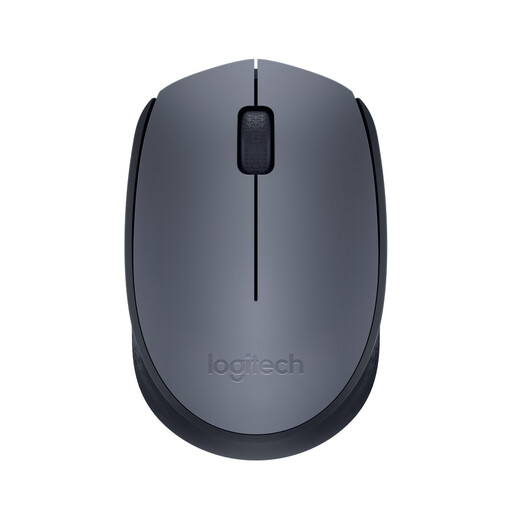
Why this choice suits this profile : It is suitable for everyday tasks on PC, Mac, Chromebook or Linux. Installation is via a USB receiver and does not require any additional software.
Its features are clearly designed for office work: 1000 DPI optical tracking, an ambidextrous shape and a stated range of up to 10 metres.
An AA battery rated to last for up to 12 months, a USB receiver and a manufacturer-stated weight of 70 g.
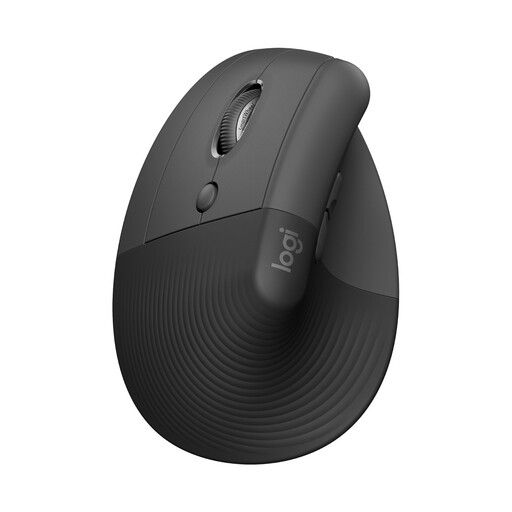
Why this choice suits this profile : This model is designed for left-handed users with small or medium-sized hands who are looking for a vertical grip to work for longer in greater comfort.
Its left-handed orientation is clearly stated. This means you avoid choosing a standard shape that would not suit your dominant hand.
A 57° vertical angle, Bluetooth or Logi Bolt connectivity, four programmable buttons and a stated battery life of up to 24 months with an AA battery.
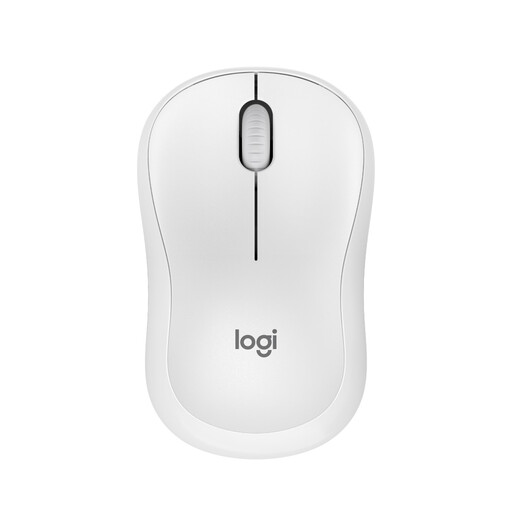
Why this choice suits this profile : It is aimed at people working from home, students and mobile users who want to reduce click noise while keeping their USB port free.
Bluetooth connectivity means there is no nano receiver to misplace while travelling, provided the device being used is compatible.
Clicks advertised as silent, a 1000 DPI optical sensor, three buttons and a stated battery life of up to 18 months with one battery.
We have put together a complete, real-time-updated selection of products that meet these demanding criteria and European safety standards.
The models featured here use one or more AA batteries. The M170 and M185 offer up to 12 months of battery life, compared with 18 months for the M240 Silent and 24 months for the Lift Left. These figures vary depending on how often the mouse is used, battery quality and how standby mode operates.
None of these models is presented as rechargeable. If you want to reduce your battery purchases, compare the price of a set of rechargeable batteries compatible with your charger. You could also consider a rechargeable mouse in a dedicated category. Never mix new and used batteries, or batteries using different technologies. If the mouse will not be used for an extended period, remove the battery to reduce the risk of leakage.
Yes. Several models are advertised as compatible with macOS and ChromeOS, including the M240, M185, M170 and M171. With a Bluetooth model, switch on Bluetooth and select the mouse name. With a USB model, plug the receiver into a compatible port.
Bluetooth is convenient if you want to keep your ports free and carry fewer accessories. A USB receiver allows for immediate installation, but requires an available port or an adaptor. Check this before placing your order.
It depends on the actual battery life, the price of the batteries and how often you use the mouse. A wireless mouse with long battery life can reduce how often batteries need replacing, but the stated duration is still an indicative maximum. Check the model’s product details and keep a spare battery in your bag if you regularly take the mouse with you.