
Livraison le jour même ou le lendemain

Qualité garantie

Débloquez vos offres de bienvenue: Livraison GRATUITE | Jusqu'à -80 % | 30 jours d'essai gratuits à JoyPlus
Téléchargez l'application
Replacing your Logitech peripherals might seem straightforward… until a mouse proves uncomfortable, a keyboard doesn’t match the French layout, or a headset needs an adaptor. Whether you’re a home user, student, remote worker or professional, a few checks are all it takes to avoid a purchase that doesn’t quite fit.
A Logitech wireless mouse can work with a 2.4 GHz USB receiver, while a Logitech Bluetooth mouse connects directly to a compatible computer. The first system takes up a USB-A port. The second doesn’t need a receiver, but requires Bluetooth to be switched on and pairing to be completed.
You also need to tell the difference between the Logitech Unifying receiver and the brand’s other receivers. A Unifying-compatible model can be paired with several compatible devices, but not all Logitech wireless peripherals use this protocol.
A Logitech keyboard in US International QWERTY doesn’t match the French AZERTY layout. The position of letters, accents and certain symbols differs in particular. For everyday use in France, check the layout shown on the product page, then the one selected in your operating system.
A Logitech ergonomic mouse may have a vertical or curved shape without suiting every hand. The width, weight, orientation for right or left-handed use, and the position of the buttons genuinely change the experience. The same goes for a lightweight Logitech headset: it may be comfortable for calls, but the cable length and connector type remain decisive.
Product pages usually list the supported systems: Windows, macOS, ChromeOS or Linux. This software compatibility doesn’t guarantee that all customisation features will be accessible on every system.
Wireless mice and keyboards often run on AA or AAA batteries. The stated battery life — up to 12, 18 or 24 months depending on the model — depends on how often you use it and your settings. A wired mouse avoids changing batteries, while a Bluetooth model or one with a receiver gives you more freedom on your desk.
For a Logitech wireless keyboard and mouse set, also check how many batteries are supplied, the type of receiver included, and whether there’s an on/off switch.
A compact mouse slips easily into a bag, but it may be less comfortable for a larger hand during long sessions. A standard-sized mouse offers a more generous palm rest. On the keyboard side, the numeric keypad is still valuable for accounting and data entry, while a compact format frees up desk space.
For a headset, compare the connection carefully: USB on the H340, dual 3.5 mm jacks on the H111. For a webcam, look at the resolution, frame rate, built-in microphone and privacy shutter rather than stopping at the mention of “4K”.
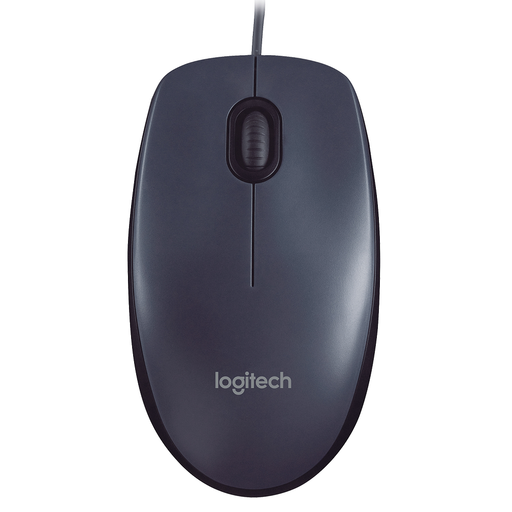
Why this choice suits them: This wired mouse plugs in via USB-A and works without drivers. Its 1,000 DPI optical sensor, three buttons and ambidextrous shape are perfect for everyday tasks on PC, Mac or Linux.
No battery to replace or pairing to do. The 1.5 m cable does need to be long enough for your desk setup.
USB-A connection, 1,000 DPI sensor, three buttons and ambidextrous design.
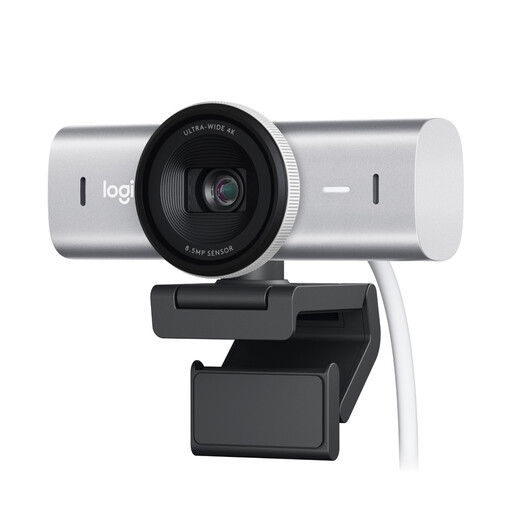
Why this choice suits them: This webcam is aimed at video calls, presentations and streams that need detailed images and advanced video adjustments.
4K won’t work miracles in a poorly lit room: position the camera at eye level and use the privacy shutter when it’s not in use.
Video up to 4K, 1080p mode at 60 fps, two microphones and USB-C connection.
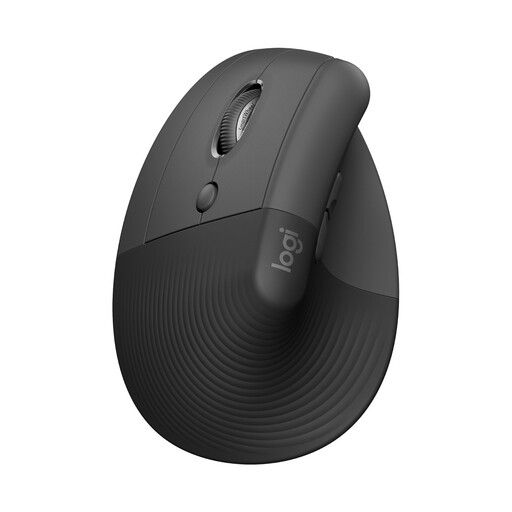
Why this choice suits them: Designed for left-handed users with small to medium hands, this vertical mouse has a 57° angle, offers Bluetooth or Logi Bolt connection and has four customisable buttons.
Its left-handed orientation is clearly stated. This stops you from choosing a standard shape that doesn’t suit your dominant hand.
57° vertical angle, four buttons, stated battery life up to 24 months and connection to three devices.
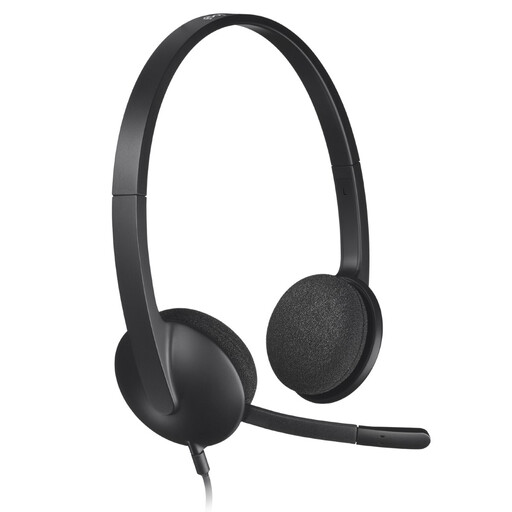
Why this choice suits them: The Logitech H340 headset connects via USB and works straight away on both PC and Mac. It has an adjustable headband and a rotating microphone.
The product page states the USB connection and that no driver installation is needed. Just make sure a USB port is available on your computer.
1.8 m cable, stereo sound, microphone with stated noise reduction and weight of 282 g.
We’ve put together a complete, real-time updated selection of products that meet these strict criteria, while complying with European safety regulations.
Yes, as long as the Mac has the required Bluetooth and the model is compatible with the system. Turn on Bluetooth, switch on the mouse, then select its name from the list of devices. With a USB receiver mouse, you’ll need a compatible port or an adaptor.
It depends on usage, maintenance, any knocks and the condition of the battery. Manufacturers often state a battery life of several months to several years with batteries, but this refers to power, not the overall lifespan of the product. Clean the mouse with a soft cloth and remove the battery if you’re storing it for a long period.
A wired model is perfect for a fixed desk and avoids dealing with batteries. A Logitech wireless keyboard and mouse set reduces clutter and is more practical with a laptop or a screen set at a distance. In this case, check the layout — QWERTY or AZERTY —, the receiver supplied and compatibility with your system.