
Livraison le jour même ou le lendemain

Qualité garantie

Débloquez vos offres de bienvenue: Livraison GRATUITE | Jusqu'à -80 % | 30 jours d'essai gratuits à JoyPlus
Téléchargez l'application
A lightweight laptop backpack should make your daily journeys easier without leaving your computer unprotected. Whether you’re a student taking the Underground, an employee who travels frequently or a remote worker moving between home and the office, saving a few grams every day can make a real difference. However, low weight alone does not guarantee a good purchase.
Before choosing a 15.6-inch laptop backpack, laptop bag or sleeve, check that it is compatible with your machine, that the compartments are well organised and that the materials are durable. Here are the main pitfalls to avoid, along with the models to consider for different uses.
A 194 g ultra-light backpack can be very comfortable to carry, without having a padded compartment suitable for a laptop. Some compact models are primarily designed for carrying a tablet, a few books or accessories.
If the product listing gives neither the internal dimensions nor details of a padded divider, avoid placing your computer directly inside. A 15-inch laptop sleeve can provide the missing protection.
On many product listings, “waterproof” actually means that the fabric is water-repellent or splash-resistant. That may be enough for a quick shower or a few drops, but not for prolonged exposure to rain. A watertight zip or rain cover is often still essential.
For urban use, look for specific details such as water-repellent fabric, easy-clean base or splash protection. In heavy rain, make sure you have additional protection.
A student backpack or work backpack may offer generous capacity but become uncomfortable as soon as it is full. Straps that are too thin, poor weight distribution or a lack of back support can quickly make daily journeys more difficult.
The capacity should match what you actually carry: laptop, charger, notebooks, bottle, lunch and accessories. A compact high-capacity backpack is only worthwhile if its pockets allow you to distribute the load properly.
The stated screen size is not always enough. Two 15.6-inch laptops may have chassis with different widths. Compare your device’s dimensions with those of the internal compartment specified by the manufacturer.
For a larger machine, check in particular:
A laptop bag is better suited to direct journeys between two locations. A backpack distributes the load more evenly across both shoulders, making it more practical on public transport or when walking distances become longer.
The empty weight should always be considered alongside the capacity. The NINETYGO Tiny Backpack has a net weight of 194 g and a capacity of 12 L. This size is suitable for everyday essentials, a tablet, a few lightweight books and small accessories. The product listing also mentions a concealed front pocket and side pockets for a bottle or umbrella.
However, no internal dimensions for a standard laptop are provided. If you want to carry a laptop, pair this backpack with a suitable sleeve and avoid filling it to the brim.
Tear-resistant fabric, neat stitching and zips that run smoothly all help extend a backpack’s lifespan. Polyester with a soft lining can help prevent scratches, while foam or EVA provide useful extra protection in a sleeve.
Care also plays an important role: when recommended by the manufacturer, opt for hand cleaning or a damp cloth. Abrasive brushes, harsh detergents and tumble drying may damage the fabric or affect its water-repellent treatment.
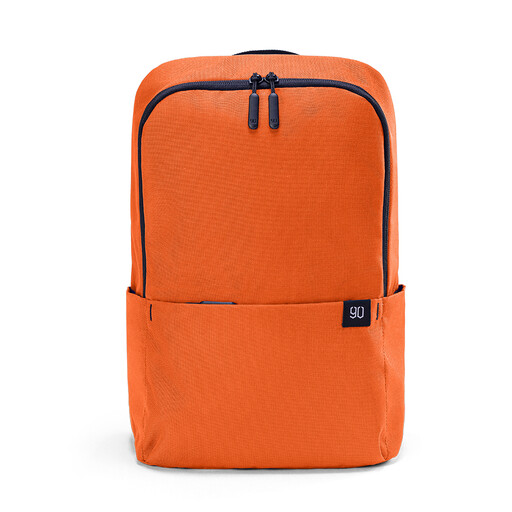
Why this choice suits this profile : Weighing 194 g and offering 12 L of capacity, this model is ideal for light journeys, classes and walks. If you carry a laptop, however, it is best used with a sleeve.
The listing gives details of the weight, capacity, pockets and care instructions. It does not promise complete laptop protection, encouraging you to use a separate sleeve.
194 g, 12 L capacity, concealed front pocket, side pockets and adjustable shoulder straps.
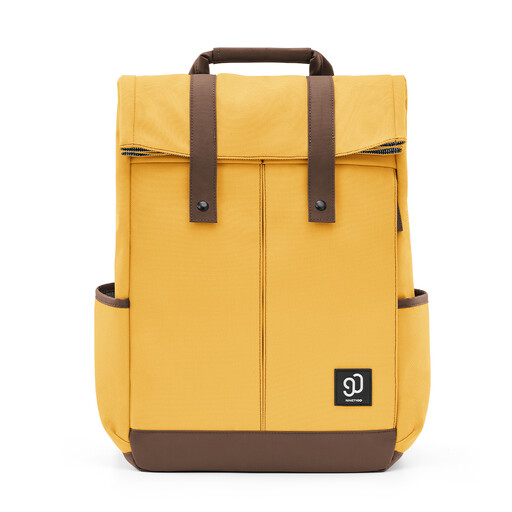
Why this choice suits this profile : This model combines 900D fabric, well-structured organisation and side access to the laptop. It is designed for anyone looking for a work or study backpack made for intensive use.
The listing distinguishes water resistance from genuine waterproofing and advises against prolonged exposure to heavy rain. This useful clarification helps you avoid overestimating the stated protection.
Reinforced 900D fabric, three front pockets, side access and reinforced side pockets.
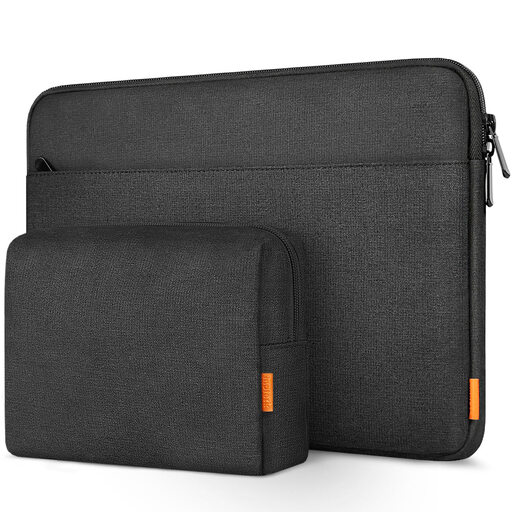
Why this choice suits this profile : This sleeve is ideal for users who carry a 15 to 15.6 inch laptop in a separate bag or want to add extra protection for their device.
The stated internal dimensions are 37.5 × 25.8 × 3 cm. You must compare them with your laptop’s dimensions before ordering.
Five-layer construction, soft lining, splash-resistant exterior, double zip and pouch for cables or a mouse.
We have put together a complete, real-time updated list of products that fully meet these strict selection criteria and European safety regulations.
Not necessarily. The weight of a backpack says nothing about its padding or impact resistance. Check for a dedicated compartment and add a sleeve when integrated protection is not clearly specified.
Measure your device’s width, height and thickness, then compare these measurements with the backpack’s internal dimensions. The term “15.6 inches” can cover different sizes depending on the bezels and the shape of the chassis.
Follow the recommendations given on the product listing. In most cases, gentle hand cleaning or wiping with a damp cloth is preferable. Avoid abrasive products and machine washing when the manufacturer advises against it.