
Livraison le jour même ou le lendemain

Qualité garantie

Débloquez vos offres de bienvenue: Livraison GRATUITE | Jusqu'à -80 % | 30 jours d'essai gratuits à JoyPlus
Téléchargez l'application
In the age of remote work, staying productive far from a power outlet has become essential. Yet, the battery life of our laptops remains their Achilles' heel. A meeting that runs long, a lengthy train ride, and you're running on empty. The solution seems obvious: a portable laptop power bank. The problem is, the market is a jungle of marketing promises that too often end in buyer's remorse.
Before pulling out your credit card, let's break down the two classic pitfalls that cost uninformed buyers dearly:
20000mAh power bank is automatically a powerhouse. Big mistake. High capacity without sufficient power output (in Watts) will never properly charge a laptop. At best, you'll end up with a brick that can barely slow down your battery's demise.To avoid falling into the trap, focus on the technical specifications that truly matter. A good portable laptop charger is much more than a sleek design or a flashy number on the box.
It's simple: this is the most important factor. The output power, expressed in Watts (W), determines if the power bank has enough "juice" to power your computer.
A fast-charging power bank worthy of the name must clearly display its maximum wattage on its USB-C PD port.
While milliamp-hours (mAh) are an indicator, Watt-hours (Wh) are a much more reliable metric for comparing power banks because they factor voltage into the calculation. Most serious models for laptops range between 70 Wh and 100 Wh (the legal limit for carry-on luggage on most airlines).
A high-capacity power bank of around 20,000 to 27,000 mAh (or 74 to 99 Wh) represents an excellent trade-off between battery life and portability. It can typically provide one to two full charges for a smartphone and at least one charge (partial or full) for a laptop, depending on the model. For a backup battery for MacBook, the golden rule is to always verify that the PD output matches your original charger's specifications.
Instead of just a list of features, here are concrete solutions for real-world needs.
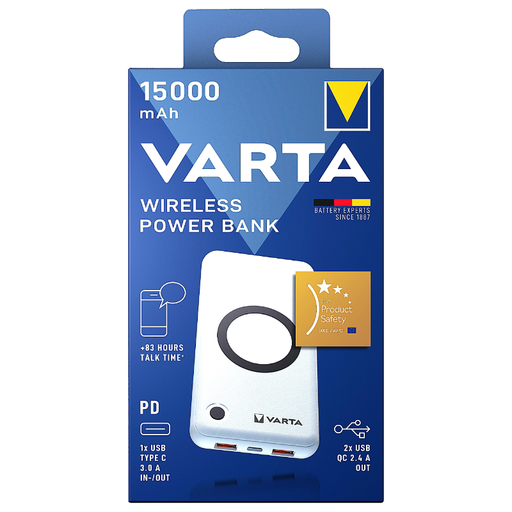
Why this choice? Perfect for those who juggle multiple devices. It wirelessly charges a smartphone, earbuds, and can even give a boost to a low-power ultraportable thanks to its USB-C PD port. It's the true Swiss Army knife of portable charging.
It doesn't pretend to charge a workstation. Its 20W PD output is clearly stated, so you know it will provide a slow or trickle charge, thus avoiding the disappointment of an inadequate power level.
Maximum flexibility with its 10W wireless charging and the ability to charge up to 4 devices at the same time.
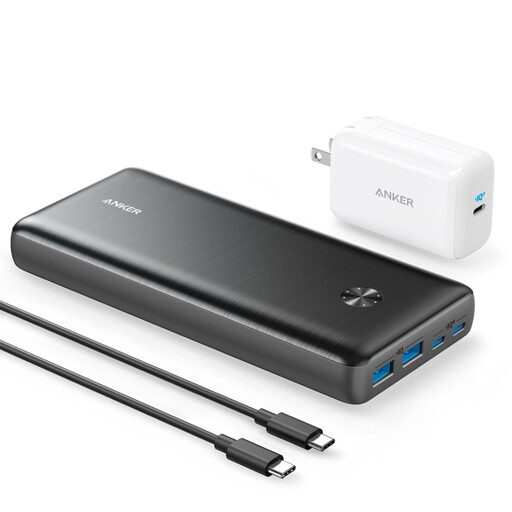
Why this choice? For those who can't afford any downtime. With its colossal capacity and 87W output, this power bank rapidly charges the most demanding laptops (including a MacBook Pro) while powering other devices. A true pocket-sized power station.
It pairs a very high capacity (25,600 mAh) with a high power output (87W) that meets the real-world needs of powerful laptops. It doesn't fall into the "high mAh, low wattage" trap.
Its 87W USB-C Power Delivery output can power and charge nearly any USB-C laptop at optimal speed.
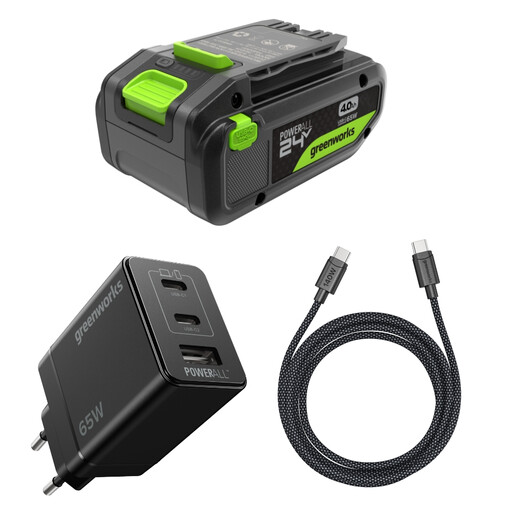
Why this choice? A clever solution for those who already own cordless DIY or gardening tools. Designed for the Greenworks 24V line, this battery includes a USB-C PD port. It can power a drill just as easily as it can charge your laptop, whether you're on a job site or out camping.
It doesn't masquerade as a standard power bank. Its dual purpose is its main selling point. It avoids the "gimmick" USB-C trap by integrating true bidirectional PD charging into an ultra-rugged tool battery.
A 2-in-1 investment: it powers over 200 Greenworks tools and serves as a heavy-duty USB-C power bank for all your electronic devices.
We have compiled a complete and up-to-date selection of products that meet our strict selection criteria and European safety standards.
The minimum recommended power is 45W for ultraportables. For more power-hungry models (workstations, gaming PCs, MacBook Pros), an output of 60W to 100W is preferable to ensure fast and efficient charging, even while using the device. The golden rule: always check the wattage of your original charger.
Not necessarily. The 20,000 mAh capacity only indicates the energy reserve. The decisive factor for charging a MacBook is the power output: the power bank must have a USB-C Power Delivery (PD) port capable of supplying at least 45W (for a MacBook Air) or 60W and above (for a MacBook Pro). A 20,000 mAh power bank with an 18W output will never charge a MacBook effectively.
To preserve your battery's health, avoid extremes: never let it fully discharge and don't store it at 100% charge for long periods. The ideal is to keep it between 20% and 80% charge. Also, avoid exposing it to extreme temperatures (extreme heat or cold) and always use high-quality cables and chargers.