
Livraison le jour même ou le lendemain

Qualité garantie

Débloquez vos offres de bienvenue: Livraison GRATUITE | Jusqu'à -80 % | 30 jours d'essai gratuits à JoyPlus
Téléchargez l'application
Finding the right laptop backpack can be more complex than it seems. Between marketing promises and the reality of daily use, many models quickly disappoint. As a product expert at Joybuy, my mission is to help you see things more clearly. Before we dive into our top picks, let's identify the most common pitfalls that lead to buyer's remorse.
backpack with a USB port is often seen as a high-tech feature. In reality, it's usually just an extension cable: a wire connecting an internal pocket (where you place your own power bank) to an external port. If the design is poor, the port is exposed to rain and can be damaged in no time.To make an informed decision, focus on objective features rather than advertising claims. Here are the three priority points to examine.
The "for 15-inch laptop" label isn't enough. The dimensions of laptops vary considerably, even with the same screen size.
The longevity of your bag depends directly on the quality of its materials.
Certain features transform a simple bag into a true daily companion, whether it's for a work backpack or a travel backpack.
anti-theft backpack: Hidden pockets in the back are very practical for storing a wallet or passport out of sight. Some models also offer slash-proof materials or RFID protection.cabin backpack: If you travel often, choose a model whose dimensions are explicitly compliant with airline restrictions (e.g., 45?x?36?x?20?cm for EasyJet). A full 180-degree opening makes security checks much easier.insulated backpack: For those who pack their lunch, an integrated or removable insulated compartment is a much more practical solution than carrying an extra bag.Here are a few models that cater to specific user profiles, taking into account the objective selection criteria we've just discussed.
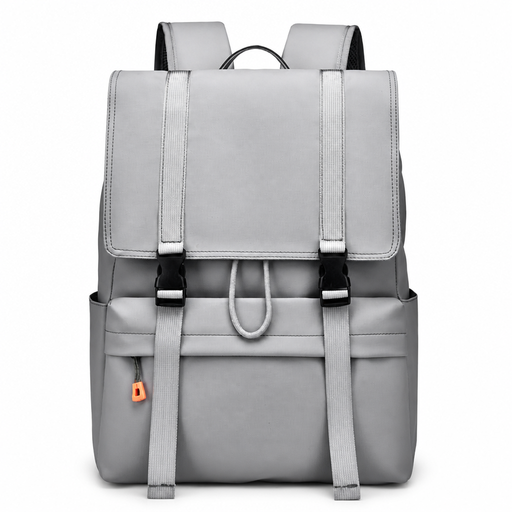
Why it's a great fit : Perfect for students or young professionals who need a large volume for books, notebooks, and a laptop. Its casual style and drawstring closure are both practical and trendy for daily city use.
Its simple design gets straight to the point and avoids unnecessary gimmicks. The top flap, combined with the drawstring closure, offers better protection against rain than an exposed classic zipper, reducing the risk of water getting in.
Large storage capacity for school supplies and personal items. Water-resistant fabric suitable for daily commutes.
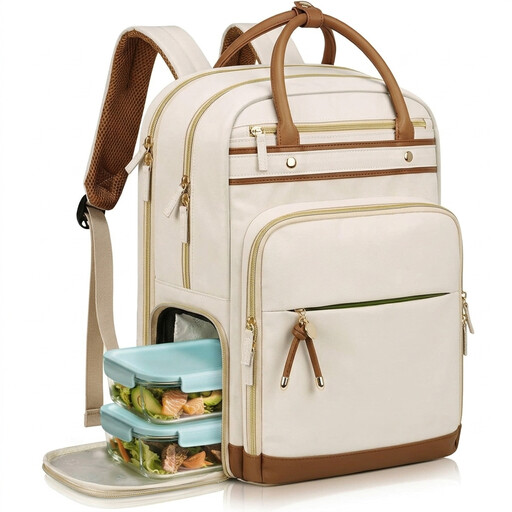
Why it's a great fit : This `women's backpack` is designed for those who juggle the office, commutes, and personal life. It allows you to carry a laptop, documents, and your lunch in a single, elegant, and well-organized bag.
Here, the `insulated backpack` compartment is a genuinely useful and well-integrated feature, not just a gimmick. Being removable makes the bag versatile. The multiple dedicated pockets avoid the trap of a disorganized "catch-all" bag.
2-in-1 design with a removable insulated lunch compartment. Thoughtfully designed compartments for professional organization (laptop, A4 documents).
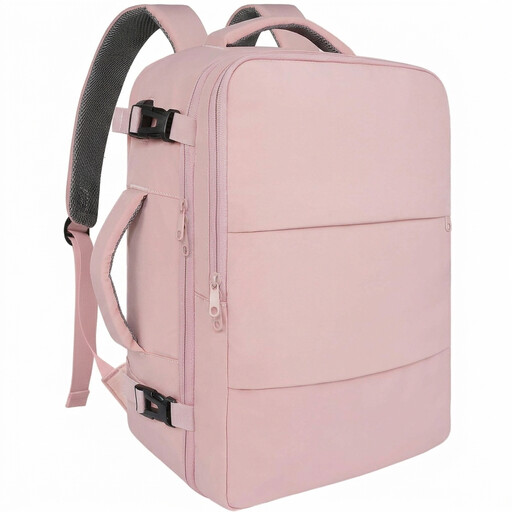
Why it's a great fit : Designed specifically as a `cabin backpack` for business or leisure travelers. Its dimensions are optimized for budget airlines like EasyJet, and its features are designed to streamline the airport experience.
It directly addresses the pitfall of non-compliant dimensions by clearly stating its compatibility (45 x 36 x 20 cm). The 180° opening is a real added value for security checks, far more useful than a marketing gimmick.
Compliant with EasyJet cabin bag dimensions. 180° opening ("TSA-friendly" style) and a separate shoe compartment.
We have compiled a complete and updated list of products that meet these strict selection criteria and safety standards.
A water-resistant (or water-repellent) material has been treated to make water bead up on its surface. It will protect your belongings during light rain or brief exposure. However, water will eventually seep in, especially through seams and zippers. A waterproof bag, on the other hand, is made with materials and techniques (like welded seams) that prevent any water from getting in, even in heavy rain. These models are rarer and often more expensive. For daily use, a good water-resistant bag with protected zippers is often sufficient.
No, in almost all cases. The external USB port is simply a pass-through connection. It's linked by an internal cable to a pocket where you must place your own power bank. The advantage is being able to charge your phone while holding it without having to take the power bank out of the bag. Remember to check that your power bank complies with airline regulations if you travel.
Don't just rely on the "for 15.6-inch" label. Measure your laptop (length, width, thickness) and compare these numbers to the internal dimensions of the bag's compartment, which are usually specified in the product description. A good fit is crucial: there should be enough space to easily insert and remove the device, but not so much that it "floats" around inside. The presence of a securing strap is an excellent indicator of quality.