
Livraison le jour même ou le lendemain

Qualité garantie

Débloquez vos offres de bienvenue: Livraison GRATUITE | Jusqu'à -80 % | 30 jours d'essai gratuits à JoyPlus
Téléchargez l'application
A good laptop backpack is much more than a simple accessory: it's your digital life's travel companion. Whether you're a student, a commuting professional, or a digital nomad, finding the ideal model can quickly become a headache when faced with often-vague marketing jargon. As a product expert at Joybuy, my role is to help you see things more clearly. Together, let's decode the misleading claims and focus on the real criteria that matter for making an informed choice.
Before you even start comparing models, it's crucial to know how to outsmart the marketing promises that lead straight to disappointment.
To be confident in your purchase, rely on concrete features rather than slogans.
Don't just trust the "for 15.6-inch laptop" or "for 17-inch backpack" label. The only thing that matters are the internal dimensions (length x width x depth) of the dedicated compartment. Ideally, you should allow for 1 to 2 cm of extra space on each side to easily insert and remove your device, and perhaps even add a protective sleeve. Make sure the padding is dense and protects all sides, including the bottom of the bag (which is often overlooked!).
The distinction is crucial for the survival of your devices.
Certain options, if well-designed, can truly make your life easier.
Here are a few models that meet specific needs, based on the criteria we've just discussed.
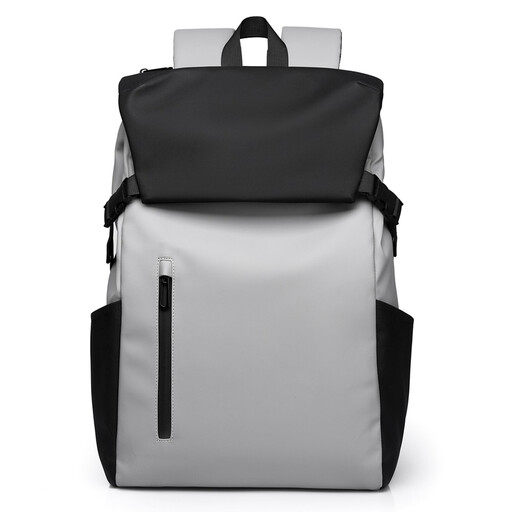
Why it's a match: Perfect as a student backpack, it combines an urban look with a generous volume to carry a laptop, books, and notebooks. Its simple, functional design is tailored for daily life on campus.
No false promises here: the fabric is clearly advertised as water-repellent, which is honest and protects against light rain. The main compartment, with its drawstring closure under the flap, offers double protection against weather and snatch-and-grab theft.
Its flap and drawstring closure system is practical, secure, and allows for quick access to the bag's contents.
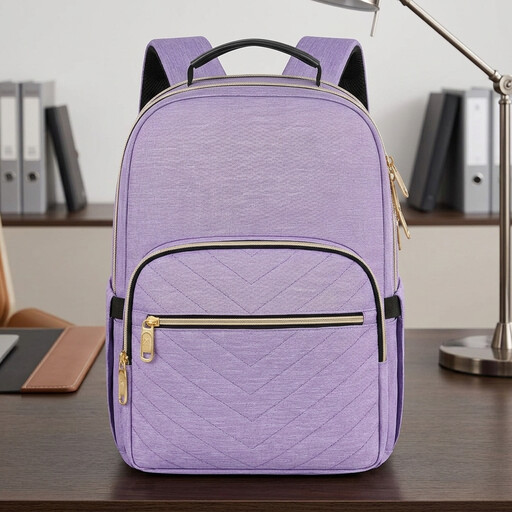
Why it's a match: This women's work backpack is designed for daily commutes and business trips alike. It integrates security and comfort features, like a luggage strap, without sacrificing elegance.
This model goes beyond a simple laptop compartment. It offers a hidden anti-theft pocket on the back and an RFID-blocking pouch: real solutions to protect your belongings and your financial data.
The trio of an anti-theft pocket, RFID protection, and a luggage strap makes it the perfect ally for professional travel.
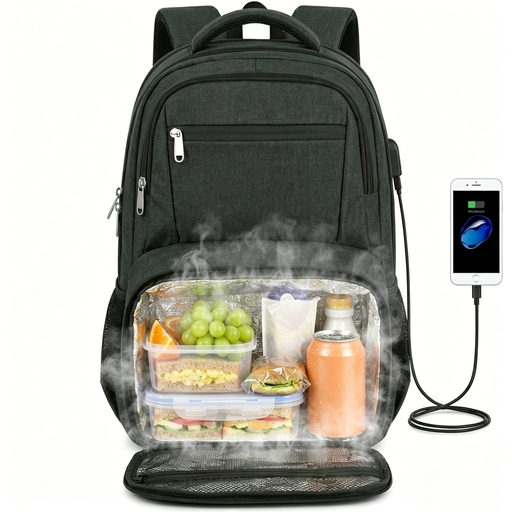
Why it's a match: This is the ultimate all-in-one model for those who juggle work, meals, and travel. It combines a large compartment for a 17-inch backpack with a genuine insulated backpack section for lunch.
Far from being a gimmick, the insulated compartment is spacious, collapsible, and lined with a leakproof aluminum foil. Additionally, compatibility with laptops up to 17.3 inches is clearly specified, which avoids unpleasant surprises upon delivery.
Its immense versatility is its key strength: it serves as a work bag, lunch bag, and an occasional travel bag thanks to its TSA-friendly design and luggage strap.
Explore our full selection of products that meet our quality and security standards.
Most bags made of synthetic materials (polyester, nylon) should not be machine-washed, as this can damage their structure and water-repellent coating. Opt for spot cleaning with a damp cloth and a little mild soap. For an insulated compartment, a sponge and gentle detergent are sufficient. Always let it air dry completely, away from any heat source.
Yes, absolutely. The USB port on the bag is just a pass-through. You must connect your own power bank to the cable inside the bag for the external port to be powered and able to charge your phone or other devices.
A water-repellent fabric causes water to bead on the surface, effectively protecting your belongings from light rain or brief exposure. A waterproof bag, on the other hand, is made with materials and techniques (welded seams, sealed zippers) that prevent water from penetrating, even during a prolonged heavy downpour. For daily commutes, a water-repellent model is usually more than enough.