
Livraison le jour même ou le lendemain

Qualité garantie

Débloquez vos offres de bienvenue: Livraison GRATUITE | Jusqu'à -80 % | 30 jours d'essai gratuits à JoyPlus
Téléchargez l'application
Reading on a Kobo e-reader is already a joy, but the experience can be even more comfortable. Holding your device at arm's length for hours, especially while cozied up in bed, inevitably gets tiring. That's where the Kobo page-turner remote comes in: a small accessory designed for absolute hands-free reading.
The problem is, the accessories market is flooded with gadgets that promise the world but often disappoint in practice. To help you avoid falling into a trap and making a purchase you'll regret, here are the most common pitfalls to watch out for.
To ensure your Kobo accessory lives up to expectations, here are the non-negotiable technical specs you should focus on.
This is the number-one criterion: native compatibility. A remote designed specifically for Kobo e-readers guarantees immediate recognition and flawless operation. Check that the product explicitly mentions compatibility with your model (Clara, Libra, Sage, Elipsa, etc.). Pairing should be a breeze: you activate Bluetooth on the e-reader, press a button on the remote, and you're all set. An official or certified Kobo Bluetooth remote remains your safest bet.
A good remote should feel invisible in your hand. Keep an eye on the following points:
Connection stability is paramount. Recent Bluetooth technology ensures sufficient range (typically up to 10-20 metres) and low latency. For power, models that use a standard AAA battery are often the most practical. Easy to find and replace, the battery provides months of use without the hassle of charging yet another device.
We've selected a few models and matched them with typical user profiles to guide you.
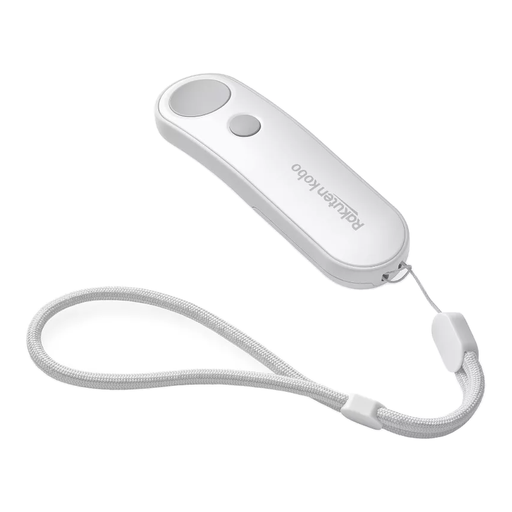
Why it's the perfect match: Perfect for those who want a 100% seamless reading experience. Its lightweight, ergonomic design lets you devour chapters for hours with your hands warm under the covers, without ever needing to touch the e-reader's screen or buttons.
As an official product, the risks of incompatibility or an unstable connection are non-existent. Pairing is instant and responsiveness is flawless.
Custom-designed for Kobo e-readers. Made from recycled plastic and comes with a practical wrist strap.
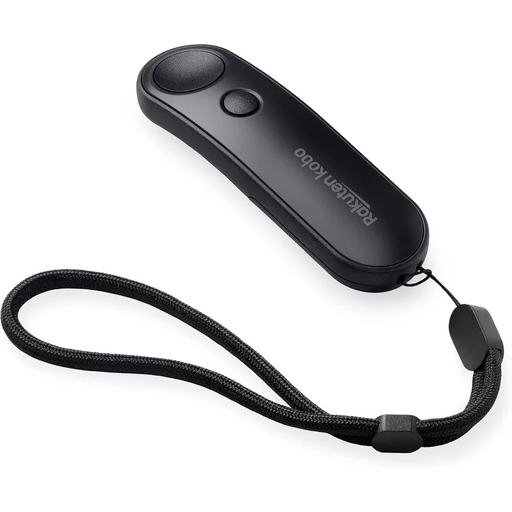
Why it's the perfect match: For readers who love it when their accessories perfectly match their device. This black version is ideal for pairing with dark Kobo models like the Sage or Elipsa 2E, creating a sleek, harmonious set.
Its official design guarantees a build quality and ergonomics truly engineered for reading, unlike generic gadgets that often sacrifice comfort for the sake of style.
It offers the same performance as the white version but with a more discreet black finish. The AAA battery power ensures months of worry-free use.
Why it's the perfect match: This accessory is a fantastic solution for people with limited mobility or for anyone who finds handling an e-reader a bit tricky. A single click is all it takes to turn the page, making digital reading more accessible and comfortable for everyone.
It eliminates the frustration of sometimes-imprecise touch controls or the e-reader's physical buttons, which aren't always easy to reach depending on your reading position.
Maximum ease of use with two large, distinct buttons. The included wrist strap provides extra security against drops.
We have selected a full range of products for you that meet our demanding selection criteria and current safety standards.
It's simple! Make sure Bluetooth is enabled on your Kobo e-reader (via the Settings > Bluetooth Connection menu). Then, press the pairing button on the remote. Your e-reader should automatically detect the "Kobo Remote" device. Select it to confirm the connection.
The official Kobo remote is designed to work with most recent Kobo e-readers that have Bluetooth functionality. This includes models like the Kobo Clara Colour/BW, Libra Colour, Libra 2, Sage, and Elipsa 2E. As a precaution, we always recommend checking the list of compatible models on the product page before finalising your purchase.
The Kobo remote runs on a single AAA battery, which is usually included. Battery life lasts for several months, depending on your usage. To replace it, simply open the compartment (sometimes with a small, thin tool), remove the old battery, and insert the new one.