
Livraison le jour même ou le lendemain

Qualité garantie

Débloquez vos offres de bienvenue: Livraison GRATUITE | Jusqu'à -80 % | 30 jours d'essai gratuits à JoyPlus
Téléchargez l'application
Finding the right kids' camera can quickly become a headache. Between gadgets that are more toy than camera and models with overwhelming spec sheets, it's hard to know where to start. As a product expert, my mission is to decode the market for you. The goal? To find the camera that will spark your child's creativity without becoming a source of frustration (or a financial drain).
Before you start, here are the three pitfalls to avoid at all costs:
To make an informed choice, you need to focus on what guarantees a good day-to-day experience. Here are the points to examine closely.
A camera for a child must be able to withstand... let's say, enthusiastic use.
This choice will define your child's experience, as well as the budget you'll need to plan for.
Nothing is more frustrating than a dead battery in the middle of a creative exploration. Most current models include a rechargeable battery via USB. This is far more convenient and eco-friendly than the chore of changing batteries.
Also, check for a microSD card port. The internal memory is often negligible. A memory card is therefore not an option: it's essential to avoid running out of space after just ten photos.
To move from theory to practice, here are three models that meet our criteria, suited for different ages and interests.
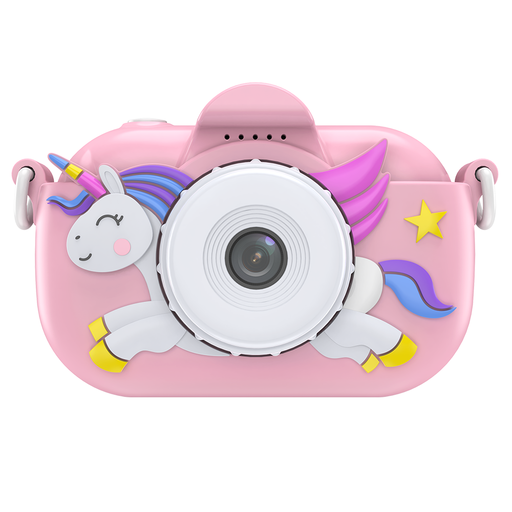
Why it's a good fit: Designed for simplicity and safety, this is the perfect camera for a first introduction to photography. Its silicone case absorbs shocks and ensures a secure grip for the youngest users.
Its silicone case bypasses the "deceptive durability" trap and offers real resilience against the sometimes rough handling of little ones.
Effective shock protection and a fun design make it an excellent and genuinely functional toy camera.
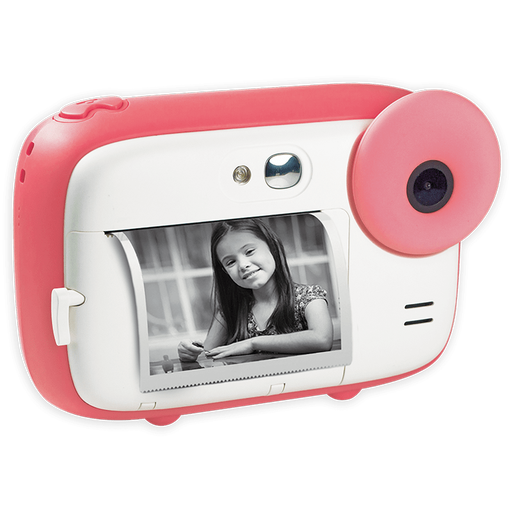
Why it's a good fit: It combines digital photography with printing for the joy of instant results. A child can print their favourite shots in black and white to colour them in, while keeping a colour version on the memory card.
It uses ink-free thermal printing technology. Say goodbye to the recurring costs of cartridges and expensive special paper. A single roll can produce up to 100 prints.
Smart 2-in-1 function (print + save) and creative filters to customise photos before printing.
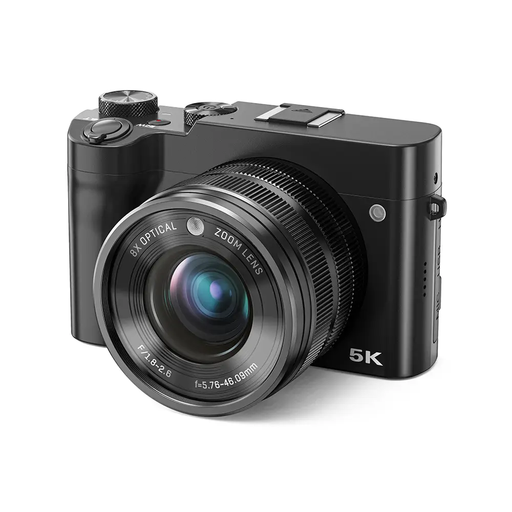
Why it's a good fit: Ideal for a teen or pre-teen, this model offers more advanced features. It's an excellent first camera for a teenager to take the next step without breaking the bank on an expert model.
Unlike toys that boast a digital zoom, this one includes a genuine 8x optical zoom. It brings the subject closer without degrading the image. Goodbye, pixelated mess!
The optical zoom and high-resolution video allow for a more serious approach to photography and videography.
Discover our full selection of cameras that meet our quality criteria and European safety standards.
Optical zoom uses the camera's lenses to magnify the image, just like a pair of binoculars would. The quality is preserved. Digital zoom, on the other hand, simply crops the image to enlarge it artificially, which causes a noticeable loss of quality (the infamous pixelation effect). For sharp photos, optical zoom is therefore a prerequisite.
Absolutely. The internal memory on kids' cameras is often negligible, enough to store only a handful of photos. To avoid limiting your child's creativity, buying a microSD card (usually up to 32GB) is an almost mandatory step. Just remember to check the maximum capacity supported by the camera.
These cameras rely on thermal printing. The secret lies in a special, heat-sensitive paper that turns black when it comes into contact with the heat from the camera's print head, forming a black and white image. The process is economical, clean (no more leaky cartridges!), and perfectly safe for children.