
Livraison le jour même ou le lendemain

Qualité garantie

Débloquez vos offres de bienvenue: Livraison GRATUITE | Jusqu'à -80 % | 30 jours d'essai gratuits à JoyPlus
Téléchargez l'application
The 13-inch iPad Pro, armed with its M4 chip, is a powerhouse. For professionals, creatives, and students, the goal is the same: to turn it into a true work machine capable of replacing a laptop. The keyboard case for the iPad Pro 13 M4 is the key accessory for this transformation. The problem? The market is flooded with options that promise the world but often disappoint in practice. Before you make a purchase, it's essential to know the pitfalls to avoid so you don't throw your money away.
Don't just trust the marketing. Many keyboard cases look appealing on paper but hide deal-breaking flaws that only become apparent once you have the product in hand. Here are the red flags to keep in mind.
To make the right choice, focus on objective criteria. Here are the three pillars of a keyboard case for the iPad Pro M4 that actually delivers.
You have two main options:
This is crucial for your productivity.
A case isn't just for typing; it must first and foremost protect your investment. Opt for robust yet lightweight materials with a soft inner lining to prevent screen scratches. A dedicated and secure slot for the Apple Pencil Pro is also a significant advantage to prevent misplacing it.
Different users have different needs. Here is our selection, designed for various profiles but always with our quality criteria in mind.
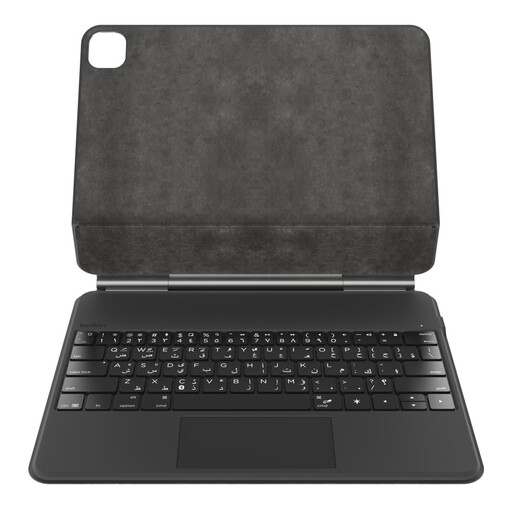
Why we chose it: This model stands out as a comprehensive and serious alternative to Apple's Magic Keyboard. It combines robust protection, a backlit keyboard (regional layouts available), a large Multi-Touch trackpad, and storage for the Apple Pencil. It's the all-in-one solution for turning your iPad into a true mobile workstation, without compromise.
Its compatibility is clearly stated for the iPad Pro M4, ensuring a perfect, precision fit. Its internal battery (rechargeable via USB-C) preserves the iPad's battery life, and its ergonomics (keyboard, trackpad) are tailored for productivity.
Seamless integration of features (protection, typing, navigation, stylus storage). Stable Bluetooth connection and dedicated multimedia function keys.
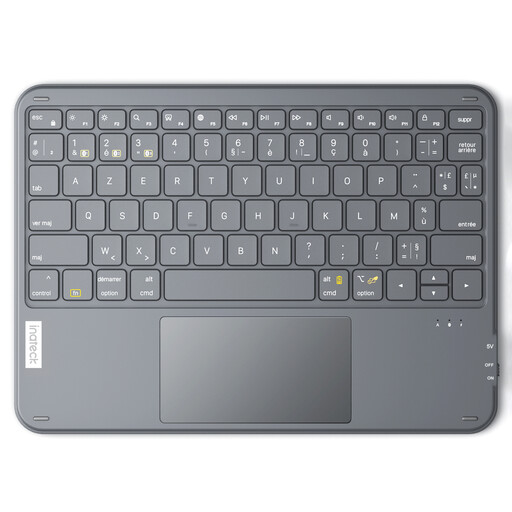
Why we chose it: For those seeking flexibility and a controlled budget, this standalone Bluetooth keyboard is an excellent option. Ultra-thin and lightweight, it offers a comfortable typing experience (regional layouts available) and an integrated trackpad. Since it's not attached to a case, you can use it with other devices (computer, TV) and choose any protective iPad case you like.
As an independent accessory, it eliminates any risk of physical incompatibility. It provides a quality typing and navigation experience (regional layout, trackpad, shortcuts) without the extra cost of an all-in-one case.
Versatility (connects to up to 3 devices). Ultra-portable and lightweight, perfect for travel. Excellent value for office and productivity tasks.
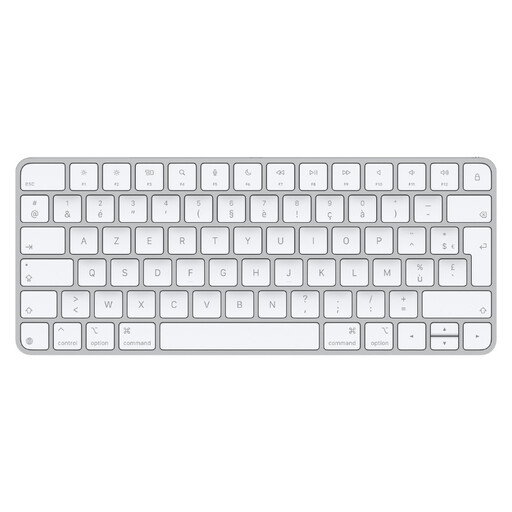
Why we chose it: If your iPad Pro primarily sits on a desk with a stand, typing comfort is paramount. Apple's Magic Keyboard remains the gold standard for its quiet and comfortable typing experience. Connected via Bluetooth, it offers a familiar and reliable experience for long work sessions.
It bypasses the ergonomics pitfall by focusing entirely on unparalleled typing quality. As an Apple product, the finish and reliability are impeccable. It lacks a trackpad but pairs perfectly with a Magic Mouse or Magic Trackpad to create a complete desktop setup.
Unmatched typing quality and comfort. Minimalist design and aluminium finish. Exceptional battery life and simple charging via USB-C.
We have compiled a complete and up-to-date list of products that meet our strict selection criteria and current safety standards.
No, as long as you choose a product from a reputable brand that adheres to certification standards (like CE, FCC). These keyboards are designed to operate autonomously. Their internal battery is recharged via a dedicated port (usually USB-C) and never interferes with the iPad's charging circuit. Therefore, your tablet's battery life is completely preserved.
Absolutely not, and this is a crucial point to watch. Many sellers, especially on marketplaces, offer keyboards in different regional layouts (e.g., QWERTZ instead of QWERTY). Verify that the product page explicitly mentions "US English Layout" or "QWERTY". The product pages in our selection always state this clearly.
It all depends on the build quality and the intensity of your use. An entry-level model will show signs of wear (keys, hinge) after just a year. Conversely, a high-quality model, like those from Belkin or other reputable brands, is built to last for several years. Its key mechanisms are tested for millions of keystrokes, and its materials are designed to withstand daily wear and tear.