
Livraison le jour même ou le lendemain

Qualité garantie

Débloquez vos offres de bienvenue: Livraison GRATUITE | Jusqu'à -80 % | 30 jours d'essai gratuits à JoyPlus
Téléchargez l'application
Choosing a new keyboard might seem simple, but the market is a jungle of options with often misleading promises. Between technical jargon and aggressive marketing, it's easy to end up with a model you'll regret a few months later. As editorial experts, our job is to cut through the noise for you. Let's break down the pitfalls to avoid and the essential criteria for finding the keyboard that truly fits your needs.
Before diving into features, it's crucial to know the most common pitfalls that can ruin your experience.
To make an informed choice, three fundamental parameters need close inspection. These alone determine 90% of your daily comfort and efficiency.
This is the great debate. The choice depends entirely on your use case and preferences.
Your keyboard's connection method has a direct impact on its responsiveness and versatility.
The size of your keyboard should match your workspace and your habits.
Instead of a simple product list, here are concrete solutions that meet specific needs while avoiding the pitfalls we've just discussed.
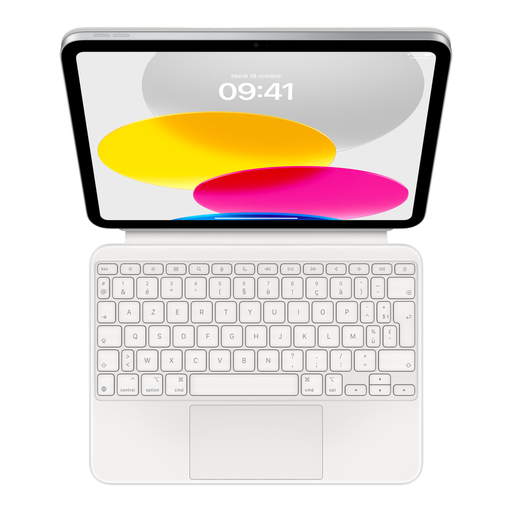
Why we chose it: For those who use their iPad as their primary work tool, this accessory transforms it into a true ultraportable. Its modular design and magnetic connection make it the ideal travel companion for staying productive in any situation.
It guarantees an authentic French AZERTY layout and perfect software integration. Its connection via the Smart Connector eliminates all latency and battery concerns, thus sidestepping the "wrong layout" and unreliable wireless traps.
Comfortable, laptop-style typing thanks to its scissor mechanism. Modular design with an adjustable stand and full front/back protection.
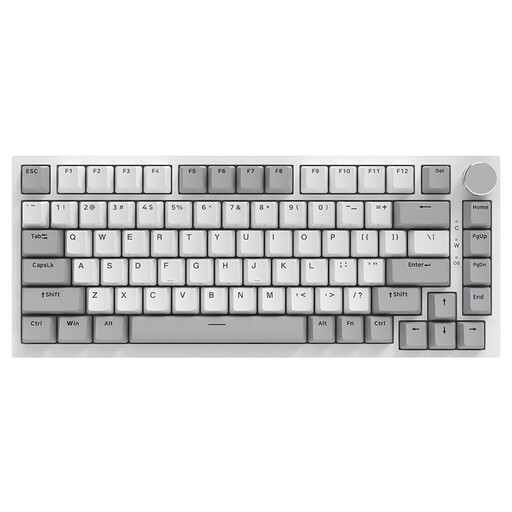
Why we chose it: This keyboard is built for performance. Its compact 75% form factor frees up space, its wired connection ensures flawless responsiveness, and its swappable mechanical *switches* allow for deep customisation. Note: This model is QWERTY, a layout often preferred by gamers and developers.
It avoids the "RGB for show" trap by offering genuine mechanical performance (Gasket structure, sound-dampening foams) that justifies its appearance. Here, typing quality takes precedence over lighting effects.
Gasket Mount structure for a soft typing feel and a muted sound. Hot-swappable *switches* for on-the-fly customisation. Convenient CNC-machined metal volume knob.
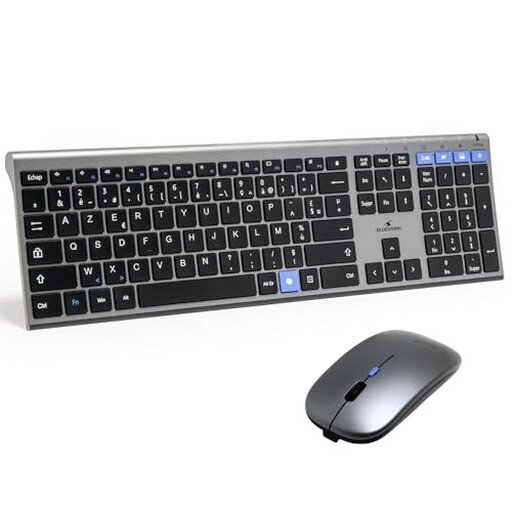
Why we chose it: This combo is a cost-effective, turnkey solution for a clean and functional workstation. Its dual wireless connectivity (2.4 GHz and Bluetooth) offers maximum flexibility, allowing you to switch between a desktop PC and a laptop, for example.
It checks all the right boxes: a true French AZERTY layout and reliable dual wireless connectivity. The fact that it's rechargeable ends the hassle of dealing with batteries.
Complete wireless keyboard + mouse bundle. Dual connectivity (2.4 GHz + Bluetooth) for total versatility. Integrated rechargeable batteries.
We have curated a complete, up-to-date selection of products that meet our strict selection criteria.
A mechanical keyboard is designed to last much longer. Its switches are typically rated for 50 to 70 million keystrokes per key. In comparison, a standard membrane keyboard maxes out at around 5 to 10 million. In practical terms, this means a mechanical keyboard can be your faithful companion for many years, even with heavy use.
Absolutely. A gaming keyboard, especially a mechanical one, is often an excellent tool for office work. Its superior typing comfort and durability are assets for anyone who spends hours writing. For an office environment, quieter switches (like Red or Brown) are preferable. Additionally, a TKL format can improve ergonomics by reducing the distance your hand has to travel to the mouse.
For maximum responsiveness, look for keyboards with a 2.4?GHz wireless connection via a USB dongle. This technology offers nearly imperceptible latency, making it ideal for gaming. For office work, a good Bluetooth keyboard is more than sufficient. In any case, checking user reviews on connection stability is always an excellent idea before you buy.