
Livraison le jour même ou le lendemain

Qualité garantie

Débloquez vos offres de bienvenue: Livraison GRATUITE | Jusqu'à -80 % | 30 jours d'essai gratuits à JoyPlus
Téléchargez l'application
A Blackview MP100 Pro i3 Windows 11 Pro mini PC can be a great alternative to a bulky desktop tower in an office, student bedroom or home-working space. Its compact size makes it easy to set up, but technical specifications aren’t always easy to decipher. A 4K output, 16 Go of RAM or WiFi 6 won’t, on their own, tell you whether a compact computer will really meet your needs.
Here are the features to consider before you order, along with a selection to suit different users.
The term 4K mini PC generally means that the device can display an image in 4K resolution on a compatible screen. It doesn’t necessarily mean it’s suited to demanding games, advanced video editing or 3D modelling.
This compatibility is useful for office work, films, video calls and viewing detailed documents. For more demanding tasks, you’ll need to look separately at the processor, graphics chip and available video outputs.
A 16 Go RAM mini PC can handle several browser tabs, office software, a video call and everyday apps at the same time. However, RAM is no substitute for a fast SSD or enough storage space.
The Blackview MP100 Pro combines 16 Go of DDR4 with a 512 Go M.2 SSD. This is a suitable combination for quick start-ups and storing everyday documents, software and media files. If you keep a lot of videos or work files, you should still plan for an external drive or network storage.
WiFi 6 improves how multiple connected devices are managed, but the speeds you actually get also depend on your router, distance, walls and internet plan. If you regularly transfer files or want a more stable connection, an Ethernet port is a real bonus.
Remember to check the included accessories, port layout and returns policy before buying, too. These details are sometimes overlooked in product listings, even though they matter just as much as the processor in everyday use.
The Intel Alder Lake i3 in the MP100 PRO(i3) is suitable for everyday tasks such as word processing, web browsing, email, distance learning, online admin and watching media. If you use several apps at once, the model with an Intel Alder Lake i5 gives you more headroom.
The number of cores isn’t everything. Focus instead on how you’ll actually use the computer: demanding professional software, intensive multitasking, multiple screens or dozens of tabs open all the time.
For a desktop mini PC used for home working, 16 Go of RAM is a comfortable starting point for everyday tasks. The 512 Go SSD strikes a good balance between responsiveness and capacity, while keeping the overall setup compact.
Before ordering, though, check the upgrade options listed by the seller. Depending on the model’s design, the memory and storage may be more or less straightforward to replace.
Windows 11 Pro offers a working environment that’s well suited to both work and home. Check that the licence matches the version advertised, and keep your purchase receipt somewhere safe.
In terms of connectivity, the Blackview MP100 Pro features WiFi 6 and video output supporting up to 4K, depending on the configuration and screen used. Actual compatibility also depends on the cable, monitor and display settings.
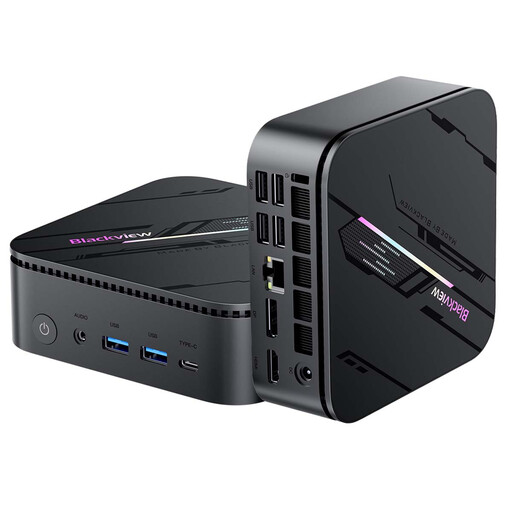
Why it’s a good fit for this user: Its compact design and specifications make it a good choice for students, home users and anyone looking to replace an old desktop tower for office work, web browsing or watching media.
The product details clearly list the RAM, SSD and processor, rather than relying on 4K output or WiFi 6 alone.
Windows 11 Pro, 16 Go of DDR4, 512 Go M.2 SSD, WiFi 6 and support for 4K display.
Why it’s a good fit for this user: The Intel Alder Lake i5 processor offers more versatility for multitasking, light content creation and a range of professional uses.
It’s more than just a compact design: the memory, SSD and wireless connectivity are all clearly listed, too.
Intel Alder Lake i5, 16 Go of DDR4, 512 Go SSD, WiFi 6, Gigabit Ethernet and advertised support for up to three 4K screens.
Why it’s a good fit for this user: It could suit a space-saving desktop setup used with multiple apps, a high-resolution screen and a regular network connection.
The detailed specifications help you distinguish a versatile work computer from a PC designed for gaming or advanced graphics processing.
Space-saving desktop design, Windows 11 Pro, 16 Go of RAM, 512 Go SSD and support for up to three screens, depending on the connections and configuration used.
For a mini PC for home working, place the device on a stable, clear surface so you don’t block the ventilation openings. Connect your screen, keyboard, mouse and network before installing the latest Windows updates.
A stand or mount on the back of your screen can free up desk space, as long as you follow the manufacturer’s recommendations. To help protect the SSD, keep enough free space and regularly back up important documents to another device.
Power consumption varies depending on workload, how long the device is used and which peripherals are connected. A mini PC can take up less space and use less power than some desktop towers, but you’ll need to check the exact specifications for a reliable comparison.
Yes. Its advertised specifications — Intel Alder Lake i3, 16 Go of DDR4, 512 Go SSD and Windows 11 Pro — are suitable for everyday tasks such as office work, web browsing, online meetings and document management. More demanding software may, however, require an i5 or higher configuration.
The product listing states that it supports 4K output. The resolution you actually get depends on the port used, the cable, the screen and the system settings. 4K output doesn’t guarantee high performance in games or 3D applications.
It depends on ventilation, how often it’s used, whether updates are kept up to date and the type of software installed. Regular maintenance, a well-ventilated setup and frequent backups all help keep it running reliably. For work use, also check the warranty, returns and support terms offered at the time of purchase.