
Livraison le jour même ou le lendemain

Qualité garantie

Débloquez vos offres de bienvenue: Livraison GRATUITE | Jusqu'à -80 % | 30 jours d'essai gratuits à JoyPlus
Téléchargez l'application
A cable that disconnects at the slightest movement, a charger advertised as "fast" but poorly suited to your device, or a station that hogs a single socket: not all iPhone charging accessories are created equal. When kitting out an iPhone, an Apple Watch, AirPods or several USB-C devices, it's worth checking real compatibility, available power and build quality.
Here are the criteria to consider before buying, along with a selection of products suited to different uses in the UK.
A fast USB-C charger might display 65 W or 100 W, but this figure usually refers to the maximum power delivered by a single port. As soon as you plug in multiple devices, the power is shared across the outputs. So check the detailed charging profiles rather than relying solely on the number printed on the casing.
For a phone, a compact mains charger of 30 to 45 W is generally sufficient. If you also want to power a laptop, a tablet or a Nintendo Switch, a 65 to 100 W model will give you more headroom.
A USB-C to Lightning cable doesn't serve the same purpose as a USB-C to USB-C cable. The connector on your phone, the one on your charger and the supported protocols all need to be compatible. A 4-in-1 cable can be handy in a household with several formats, provided you check what each tip can do: charging only, or data transfer too.
Length also deserves your attention. A one-metre cable is perfect for a bedside table, while a model around two metres gives you more freedom on a desk or in the car.
A Qi2 charger or a MagSafe-compatible charger relies on precise magnetic alignment. A case that's too thick, lacks magnets or is poorly designed can reduce stability and slow down wireless charging. The word "compatible" doesn't necessarily guarantee that all features will work with every iPhone model.
For a 3-in-1 wireless charging station, also check compatibility with your Apple Watch generation and the type of case your AirPods have.
Look for USB-C Power Delivery (PD) and, if your device supports them, PPS or QC. These protocols allow the charger and device to adjust power automatically. A 65 W GaN charger is usually fine for a phone, a tablet and some ultraportables. A 100 W GaN model will handle a more demanding setup, provided the power distribution between ports is clearly stated.
Gallium nitride, or GaN, makes it possible to design relatively compact chargers. That doesn't mean you can skip checking ventilation, operating temperature and the manufacturer's recommendations.
The Qi2 standard adds a magnetic alignment system to compatible devices. The advertised performance, such as 15 W, depends on the phone, the case, the mains adapter and the conditions of use. For a station designed to charge an Apple Watch and AirPods, check whether the mains adapter is included: some models require a USB-C power brick sold separately.
Finally, a 20,000 mAh power bank offers plenty of battery life on the go, but it will be heavier than a lower-capacity model. For daily use in a bag, compare its weight, its ports and whether it supports USB-C charging.
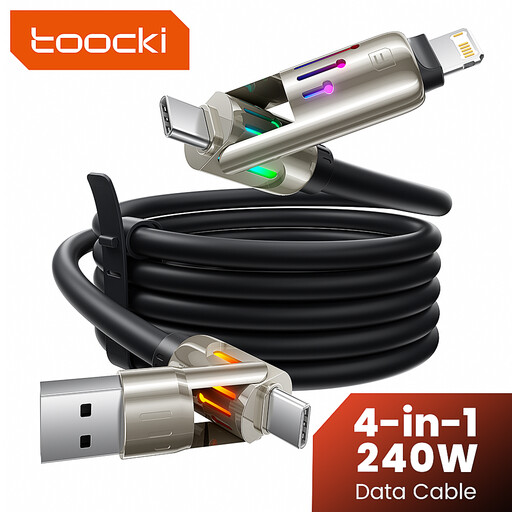
Why this choice suits this profile: A single cable can serve several devices at home, in the office or while travelling, with USB-A, USB-C and Lightning connectors depending on the configuration stated.
It saves you from buying several separate cables. However, it's still essential to check what each tip does before starting a data transfer.
4-in-1 format, stated length of around 2 m and compatibility indicated with iPhone, iPad, MacBook, Samsung devices and Nintendo Switch.
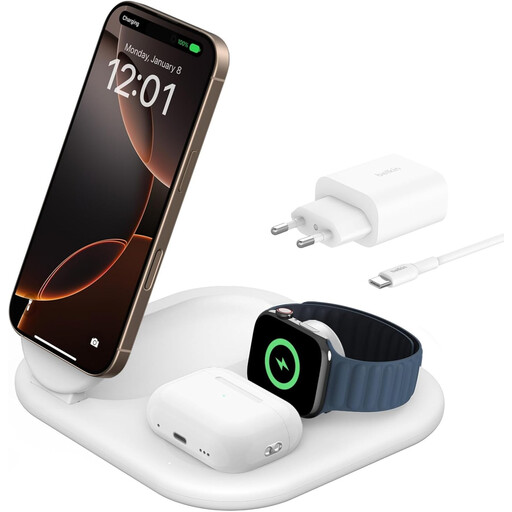
Why this choice suits this profile: This station brings together charging for your iPhone, Apple Watch and AirPods on a single stand. Its foldable design makes it handy at the office and on the move.
Qi2 certification, magnetic alignment and the included 36 W adapter minimise nasty surprises related to compatibility or missing accessories.
Qi2 charging up to 15 W, foldable stand, 1.5 m USB-C cable included and stated support for compatible Apple devices.
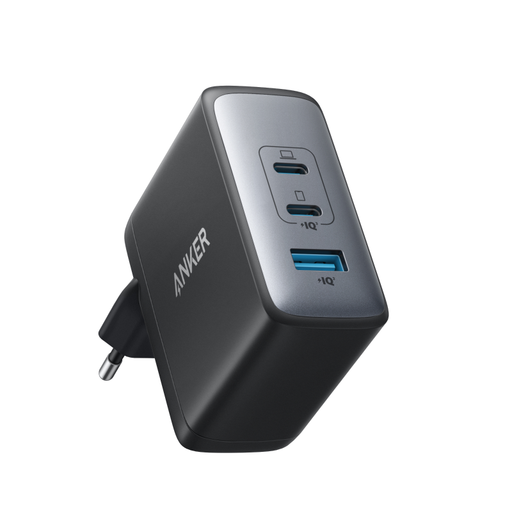
Why this choice suits this profile: Its three ports let you power a MacBook, an iPhone and AirPods simultaneously – a setup particularly well suited to remote working and mobile configurations.
The maximum power of 100 W and the distribution between the two USB-C ports and the USB-A port are detailed separately, making comparison easier.
GaN II technology, stated maximum power of 100 W and a format claimed to be more compact than a 96 W MacBook power brick.
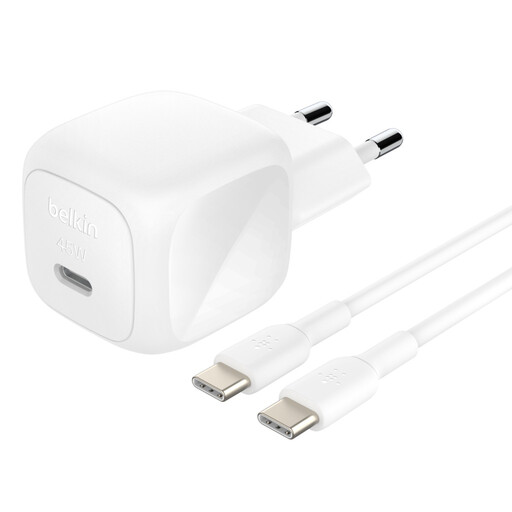
Why this choice suits this profile: At a stated 58 g, with its supplied USB-C to USB-C cable and 100-240 V input, it's particularly well suited to travel and sockets used abroad.
The cable is included and USB-C PD 3.1 compatibility is specified – so you avoid buying a separate adapter or an unsuitable cable.
45 W, stated compatibility with phones, tablets, USB-C computers and Nintendo Switch, with a one-metre cable supplied.
We've put together a comprehensive, real-time updated selection of products that meet these strict criteria and European safety requirements.
A 65 W USB-C PD charger is often suitable for a combination of a phone, a tablet and an ultraportable. For a more demanding computer or several devices used at the same time, a 100 W GaN charger will offer more capacity. Always remember to check the power actually available when multiple ports are in use.
Wireless charging is very convenient on a desk or bedside table, but it's less suitable if you want to use your phone while charging or benefit from consistent power. A Qi2 station therefore generally complements a wired charger rather than replacing it.
A cable's lifespan depends on the quality of its connectors, repeated twisting and how it's stored. Avoid bending it near the plug, pulling on the cord, and continuing to use it if the sheath is damaged, if it gets unusually hot or if charging stops. A certified, properly specified cable is always preferable to one chosen purely for its price.