
Livraison le jour même ou le lendemain

Qualité garantie

Débloquez vos offres de bienvenue: Livraison GRATUITE | Jusqu'à -80 % | 30 jours d'essai gratuits à JoyPlus
Téléchargez l'application
An iPad keyboard case can transform your tablet into a true mini-computer, combining the protection of a case with the comfort of a proper typing experience. But with a sea of options and sometimes vague promises, it's easy to make the wrong choice. As a product expert at Joybuy, my mission is to demystify this market for you, helping you find the perfect accessory for your needs and, most importantly, avoid the most common pitfalls.
To avoid buyer's remorse, here are the three most common mistakes to steer clear of.
To make an informed decision, scrutinise these three technical criteria. They are crucial for the quality and ergonomics of your future case.
This is the non-negotiable starting point. Never rely solely on the screen size. For 100% guaranteed compatibility, the process is simple: find your iPad's model number (it starts with an "A" followed by four digits) on the back of the device or in Settings > General > About. Then, compare this number with the list provided by the case manufacturer. Whether you're looking for an iPad Air keyboard case or an iPad Pro 11 keyboard case, this simple check will save you from a nasty surprise.
Two technologies compete on the market:
Beyond simple typing, certain details can radically improve your experience:
Here are a few options that meet specific needs, taking our objective selection criteria into account.
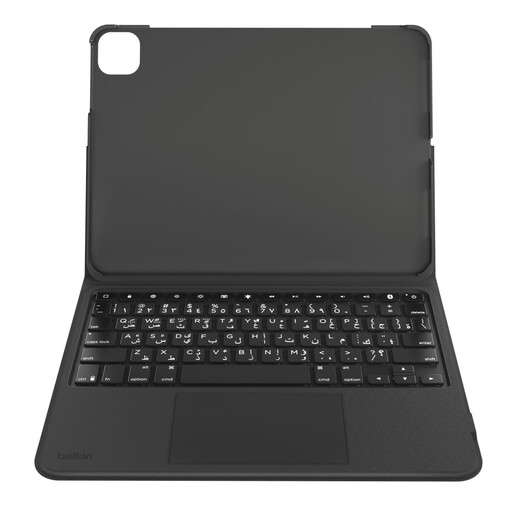
Why we love it: Ideal for students juggling note-taking in lectures and reviewing PDFs. Its detachable design lets you switch from "laptop" mode to "tablet" mode in a flash, without any extra weight.
It avoids the rigid "all-in-one" trap thanks to its detachable keyboard. The iPad remains protected by the case even without the keyboard, which is perfect for reading or watching a video.
Backlit keyboard, large Multi-Touch trackpad, and a magnetic slot for the Apple Pencil. Its battery life, advertised as excellent by Belkin, makes it a reliable companion for long days on campus.
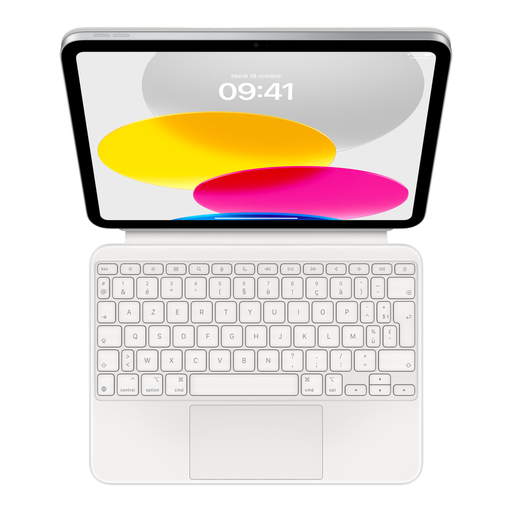
Why we love it: For those who demand perfect integration and a frictionless user experience. It's Apple's official solution, designed for total symbiosis with the iPad.
Say goodbye to connection and battery woes thanks to the Smart Connector. No Bluetooth pairing, no battery to recharge. The connection is instant, and power is managed by the iPad. It's that simple.
Exceptional typing comfort (scissor mechanism), an ultra-precise trackpad, a handy function key row, and a modular design. The build quality is, unsurprisingly, up to Apple's standards.
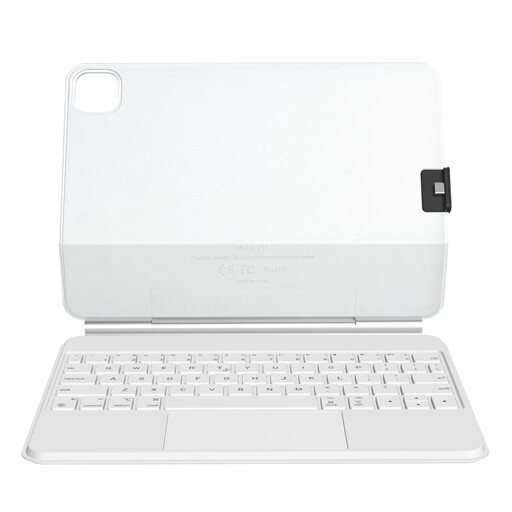
Why we love it: Ideal for designers, architects, and other creatives who use their iPad Pro or Air for both drawing and productivity. Its "floating" design ensures a perfect viewing angle every time and a decidedly modern look.
Its two-part design, with a detachable magnetic back cover, provides maximum versatility. You can detach the keyboard to draw or give a presentation while keeping the iPad fully protected.
The magnetic floating design allows for one-handed angle adjustment. Its large glass trackpad and scissor-switch keys offer a typing and navigation experience worthy of a high-end laptop.
Explore our full selection of keyboard cases, all approved by our experts for their quality, ergonomics, and compliance with standards.
It all depends on the technology. A Smart Connector keyboard is powered by the iPad, so its consumption is negligible and perfectly optimised. A Bluetooth model has its own battery, but its life is typically measured in weeks, if not months. Only the backlighting is a bit more power-hungry, but it can, of course, be turned off.
The foolproof method: check your tablet's model number (e.g., A2696 for a 10th generation iPad). You'll find it engraved on the back of the device or in Settings > General > About. A reputable manufacturer will always list the compatible model numbers on its product page. Never rely on the screen diagonal alone!
If your goal is to turn your iPad into a workstation for office tasks (emails, spreadsheets, presentations), a case with a trackpad isn't an option—it's essential. It dramatically boosts your productivity and streamlines navigation. However, if you only need an auxiliary keyboard for occasional typing, a more compact and affordable model without a trackpad will do the job perfectly.