
Livraison le jour même ou le lendemain

Qualité garantie

Débloquez vos offres de bienvenue: Livraison GRATUITE | Jusqu'à -80 % | 30 jours d'essai gratuits à JoyPlus
Téléchargez l'application
The iPad is a fantastic tool, but a keyboard case is what unlocks its full potential. Whether for taking class notes, drafting reports, or simply browsing more comfortably, this accessory transforms your tablet into a credible laptop alternative.
The problem? The market is flooded with options, each promising more than the last. As a result, many users end up disappointed by an accessory that falls short. To help you avoid a bad purchase, here are the most common pitfalls to watch out for.
To make the right choice, you need to rely on objective criteria, not on marketing hype.
For your iPad to become a true mobile workstation, some technical aspects are simply non-negotiable. Here are the three elements to examine closely before you buy.
The label "compatible with iPad Air keyboard" is far from enough. The dimensions, camera placement, ports, and magnets for the Apple Pencil vary subtly from one generation to the next.
The way the keyboard connects to the iPad directly impacts your user experience.
The goal is to replicate the typing comfort of a real laptop.
Every user has different needs. We've identified a few options that cater to different user profiles, based on the objective criteria mentioned above.
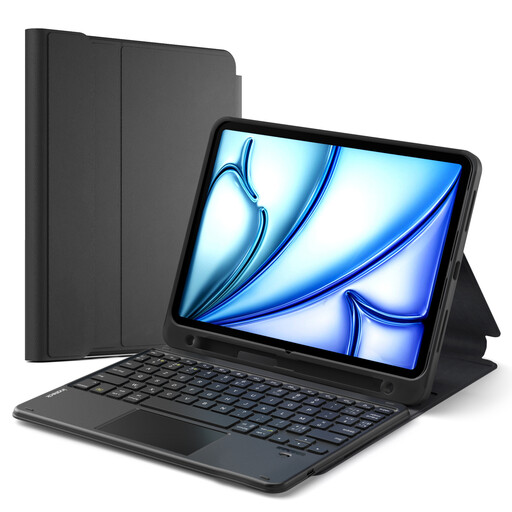
Why we love it: Perfect for students and mobile professionals who juggle multiple uses. Its detachable keyboard lets you switch from "laptop" mode to "tablet" mode in an instant for reading or drawing, without the extra weight of the keyboard.
Its detachable design immediately eliminates the risk of a fragile hinge. Its ultra-detailed compatibility list (including Axxxx model numbers) and support for Apple Pencil 2 charging prevent any unpleasant surprises upon delivery.
Maximum Versatility: Its two-part design provides full protection while allowing you to carry just the back shell to travel light.
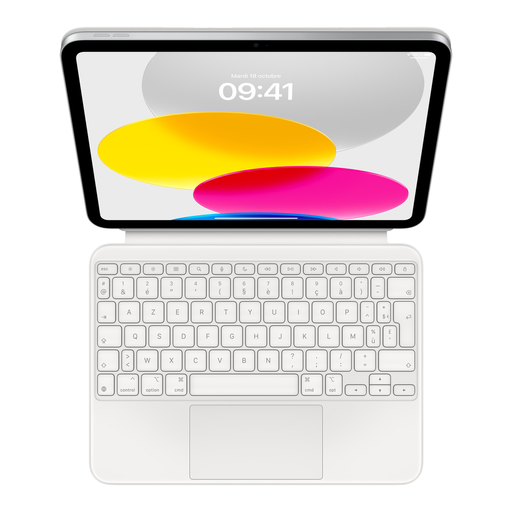
Why we love it: For those who demand a no-compromise experience that's perfectly integrated into the Apple ecosystem. Its build quality, typing comfort, and ultra-responsive trackpad make it the gold standard for intensive professional use.
Thanks to the Smart Connector, the pitfalls of battery life and Bluetooth connectivity are eliminated. Pairing is instant, and power is supplied by the iPad. Its design is robust and built to last.
Seamless Integration: Instant connection via the Smart Connector, a trackpad optimized for iPadOS gestures, and a 14-key function row for direct access to shortcuts.
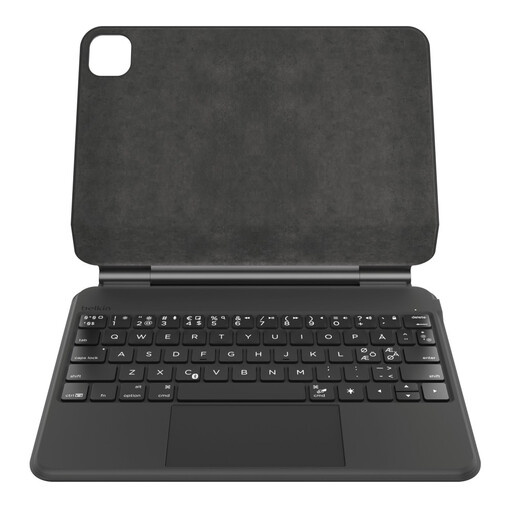
Why we love it: The perfect balance between advanced features and an accessible price point. It offers a premium experience (backlit keyboard, large trackpad, floating magnetic design) without the prohibitive price tag of Apple's solution.
It counters the battery life pitfall with a high-capacity battery (600 mAh) promising up to 365 days of standby time. Its magnetic design, from a brand known for its durability, mitigates the risks associated with fragile hinges.
Battery Life and Comfort: Its long-lasting battery, backlit keyboard, and large trackpad make it a reliable companion for intensive daily use.
Explore our complete, up-to-date selection of products that meet our strict selection criteria and European safety standards.
Technically, no, since iPadOS allows you to switch the software keyboard layout. In practice, however, it's a different story. For optimal typing comfort, an iPad keyboard case with a physical QWERTY layout (or the correct layout for your language) is highly recommended. This saves you the headache of hunting for characters that aren't printed on the keys, especially for punctuation and special symbols.
It varies dramatically. While "standby" time can be measured in months, it's the active use battery life that really matters. The biggest power drain? The backlighting. Activating it can drop the battery life to just one or two weeks with moderate use (a few hours per day). For heavy use, expect to recharge it weekly. Models with a large battery capacity (over 500 mAh) will naturally offer more peace of mind.
The level of protection varies significantly from one model to another. A folio-style iPad keyboard case made of PU leather effectively protects against everyday scratches and minor bumps. For better drop absorption, look for models with an inner shell made of TPU (thermoplastic polyurethane), a flexible material that is much more effective at absorbing impacts than rigid plastic. Reinforced corners are also a significant plus. However, keep in mind that no case will make your iPad indestructible against a major fall.