
Livraison le jour même ou le lendemain

Qualité garantie

Débloquez vos offres de bienvenue: Livraison GRATUITE | Jusqu'à -80 % | 30 jours d'essai gratuits à JoyPlus
Téléchargez l'application
The iPad is a fantastic tool for creativity and entertainment. But when it comes to writing long emails, taking notes in class, or juggling spreadsheets, its virtual keyboard quickly shows its limitations. A well-designed iPad keyboard case can transform your tablet into a true mobile workstation, combining effective protection with a comfortable typing experience.
The market is flooded with options, making it easy to get lost. This guide is here to help you see things more clearly, identify the criteria that truly matter, and discover our selection of the best models of 2026 to turn your iPad into a productivity powerhouse.
Before you take the plunge, review these key points. It's the best way to ensure you make a purchase you won't regret.
This is the starting point, the one that leaves no room for error: the case's compatibility with your iPad model. From one generation to the next, dimensions, thickness, and connector placement can change dramatically. So, take the time to identify the exact model of your tablet (e.g., iPad Pro 11-inch M4, iPad Air 5th generation, iPad 10th generation) before you check out. An iPad Pro keyboard will never fit an iPad Air, and vice versa. When in doubt, the manufacturer's spec sheet is your best friend to avoid any unwelcome surprises.
The purpose of an external keyboard is simple: to recapture the efficiency and feel of a real laptop. To achieve this, there are several key things to look for:
How the keyboard attaches to and protects the iPad is another decisive factor. A magnetic iPad keyboard provides a simple yet secure attachment, often offering multiple viewing angles. The connection is almost always via Bluetooth, which has the added benefit of leaving the iPad's port free for charging or connecting other accessories. Finally, a good iPad keyboard cover must offer protection worthy of the name against everyday scratches and bumps, for both the screen and the tablet's aluminium back.
We've scoured the market to unearth some gems for you, whether you're a mobile professional, a student, or a creative.
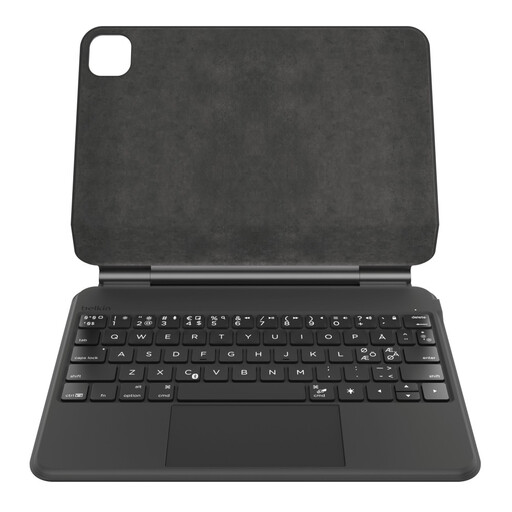
Why it stands out: This Belkin model is tailor-made for the latest iPad Pro 11-inch (M4). Its "floating" magnetic design is not only elegant but also offers a highly ergonomic viewing angle and a rock-solid attachment. Its battery life is its main advantage: with up to 365 days of standby time advertised, it's a real bonus for nomads who won't have to worry about recharging it.
Highlights:
Who is it for? Professionals and creatives with the latest iPad Pro 11" (M4) who want a high-end, durable solution capable of rivalling the experience of an ultra-portable.
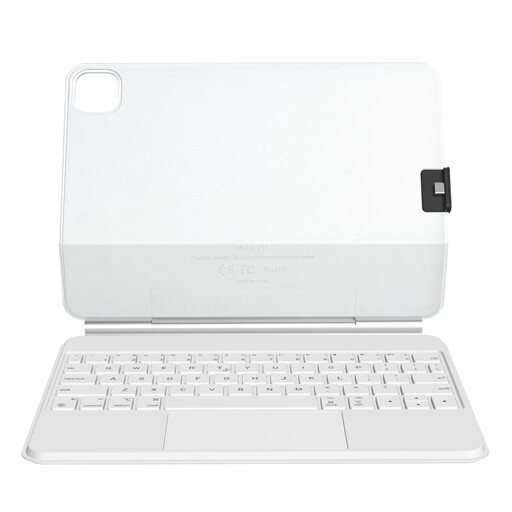
Why it stands out: The defining feature of this Rexsun model is versatility. It's compatible with a wide range of iPad Pro 11" and iPad Air (10.9" & 11") models. Its two-part detachable design is particularly clever: you can separate the keyboard from the case to switch to pure tablet mode without ever sacrificing protection.
Highlights:
Who is it for? iPad Pro or Air owners who love having options. Perfect for those who constantly juggle between a "laptop" mode for work and a tablet mode for relaxing, all without compromising on protection.
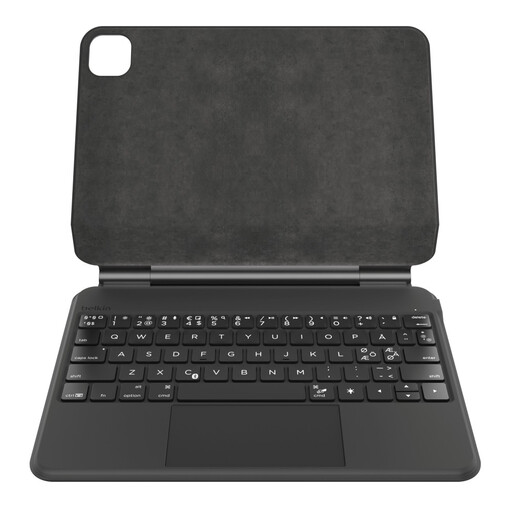
Why it stands out: This keyboard brings all the expertise of Belkin's Pro line to the "classic" 10.9-inch iPad (10th generation). It incorporates thoughtful details, like an auto sleep/wake function for the tablet when the case is opened and closed, which helps conserve battery life for both the iPad and the keyboard.
Highlights:
Who is it for? Students and anyone who uses their 10th generation iPad daily and is looking for a reliable, efficient all-in-one solution for taking notes, writing, and browsing the web.
Our selection highlights some highly versatile models, but your needs might be different. Whether it's design, colour, connectivity, or compatibility with an older iPad model... the choice is vast.
To discover a wider range, check out our complete selection of magnetic keyboards.
Rest assured, modern keyboards that use Bluetooth Low Energy technology are very energy-efficient. Most models, including those in our selection, have their own rechargeable battery, so the impact on your iPad's battery life is virtually nil. Better yet, the majority of them automatically go to sleep after a few minutes of inactivity to preserve their own battery.
The most reliable way is to find your iPad's model number. You can find it engraved on the back of the device (a code starting with A) or in Settings > General > About. Simply compare this reference with the compatibility list provided by the manufacturer on the keyboard's product page.
Essential? No. But highly recommended! A trackpad radically improves the user experience if your goal is to get closer to a laptop. It simplifies everything: selecting text, precise cursor movement, scrolling through pages, and using iPadOS navigation gestures. All your productivity tasks instantly become smoother and faster.