
Livraison le jour même ou le lendemain

Qualité garantie

Débloquez vos offres de bienvenue: Livraison GRATUITE | Jusqu'à -80 % | 30 jours d'essai gratuits à JoyPlus
Téléchargez l'application
The iPad is a fantastic tool. But to unlock its full potential, one accessory is a game-changer: the keyboard case with a trackpad. Its promise? To turn your tablet into a true mini-laptop, combining the productivity of a physical keyboard with effective protection. The catch is that the market is flooded with models that all look alike, but whose flaws can quickly turn the dream into a nightmare. To avoid buyer's remorse, you need to know the common pitfalls.
As a product specialist at Joybuy, I analyze dozens of accessories every day. Let me guide you toward making an informed choice and avoiding any unpleasant surprises.
Too many users regret their purchase over what seemed like a minor detail, but which proves to be a deal-breaker in daily use. Here are the three classic mistakes that turn a good investment into guaranteed disappointment.
protective iPad keyboard case must cover the corners and feature a raised bezel to protect the screen when placed face down.To avoid these setbacks, focus on a few non-negotiable technical points. They are what will make all the difference in your daily use.
This is the absolute first step. Before you even consider the design, you must identify your iPad's model number. It's located on the back of the device (an "A" followed by four digits, like A2588) or in Settings > General > About.
Once you have this number, meticulously check it against the compatibility list provided by the case manufacturer. Whether you're looking for an iPad 10th generation keyboard or an iPad Air keyboard case, this simple check will save you from 99% of return hassles.
For English-speaking users, it's a no-brainer: a QWERTY keyboard is non-negotiable for intuitive typing. Always double-check that the key layout matches the one you're used to.
Beyond the layout, typing comfort is paramount. Look at the key size and spacing. A keyboard that's too compact is a surefire way to increase typos. Modularity is a huge plus: a detachable iPad keyboard offers maximum flexibility, allowing you to lighten the load when you just want to read or draw.
If you're an Apple Pencil user, a case with an Apple Pencil holder is an almost essential convenience. The best-designed models not only store the stylus securely but also support magnetic charging (for the 2nd generation Apple Pencil).
Finally, check the advertised battery life for Bluetooth keyboards. A good battery will save you the chore of frequent recharging and ensure your accessory is always ready when you need it.
To illustrate these criteria in action, here are a few models that meet specific needs while successfully avoiding the pitfalls we've discussed.
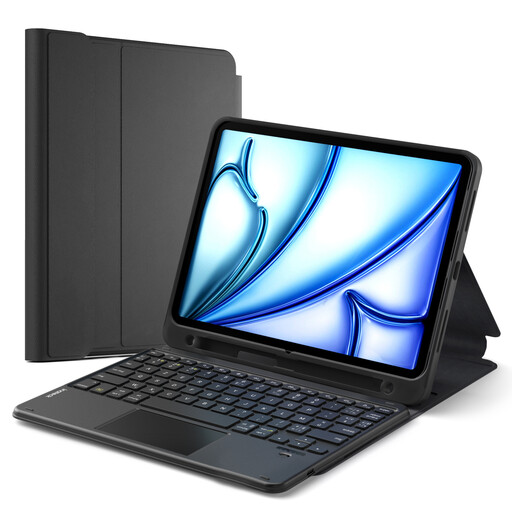
Who is it for? Ideal for those who juggle taking notes in meetings, presenting to clients in tablet mode, and reading on their commute. Versatility is the key word here.
Its soft TPU back shell provides effective 360° protection against drops and scratches. Its trackpad, optimised for iPadOS, handles multi-touch gestures flawlessly. Finally, its compatibility list is exhaustive and precise (including Axxxx model numbers).
The detachable magnetic keyboard allows you to separate the case from the keyboard in an instant. It includes a holder for the Apple Pencil (for both charging and storage) and offers multiple viewing angles.
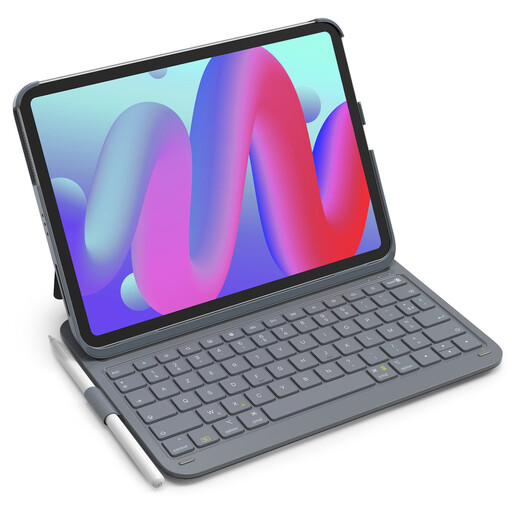
Who is it for? Perfect for students and professionals who are always on the move. For them, a lightweight design isn't an option—it's the number one priority to keep their bag from getting heavy.
Its slim profile doesn't sacrifice the essentials: it includes a stylus slot and a protective shell. Its long-lasting battery (150 days on standby!) frees you from charging anxiety. Once again, the compatibility is clearly detailed.
Weighing in at just 427g, it's a true featherweight. It features a row of handy shortcut keys (lock, volume, etc.) and a comfortable QWERTY keyboard.
Explore our full selection of products that meet our strictest quality and safety standards.
The only foolproof method: find your iPad's model number (it starts with an "A" and is on the back of the device) and compare it to the list provided by the case manufacturer. Never rely on the commercial name alone, like "iPad Air" or "10.9-inch iPad".
Absolutely. It's ideal if you're looking for versatility. You can use it like a laptop for work, then detach the keyboard in a second to read, draw, or watch a video, without the extra weight and bulk.
It all depends on the quality of the accessory. Good models use Bluetooth Low Energy and smart sleep/wake functions to preserve the battery. Some keyboards, like those in our selection, can last for several months on standby on a single charge, making them virtually seamless to use.