
Livraison le jour même ou le lendemain

Qualité garantie

Débloquez vos offres de bienvenue: Livraison GRATUITE | Jusqu'à -80 % | 30 jours d'essai gratuits à JoyPlus
Téléchargez l'application
The iPad is an incredibly versatile tablet, but to truly unlock its potential and turn it into a credible laptop alternative, a keyboard is almost essential. Whether you're a student, a mobile professional, or a content creator, the right accessory can skyrocket your productivity. The problem? The market is flooded with options, and it's easy to make the wrong choice.
My role as a product expert at Joybuy is to help you navigate the options. Let's review the most common pitfalls and the criteria that truly matter to make the right decision.
To make the right call, focus on the few technical details that make all the difference.
This is the essential starting point. The first, non-negotiable step: precisely identify your iPad model (you can find this in Settings > General > About). Next, check the connection type offered:
A good keyboard is, first and foremost, one that feels good to type on.
Rather than an endless list, we've matched leading products to specific user profiles. Each model was chosen for its quality, relevance, and adherence to our criteria.
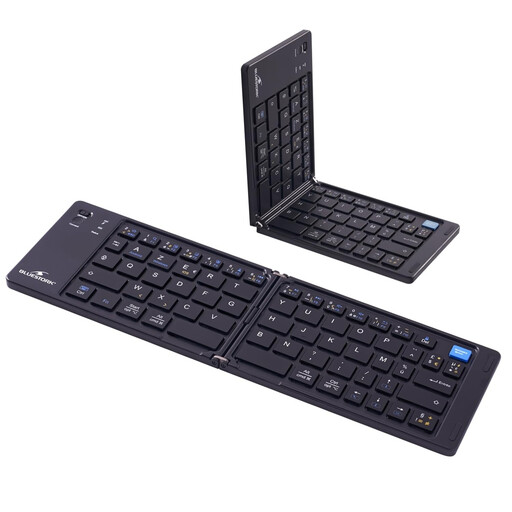
Why we chose it: Ideal for those who juggle commuting, cafés, and the office, or who need an ultra-discreet secondary keyboard. Once folded, it slips into any bag.
This model is natively AZERTY, which is perfect for French typists. Its universal Bluetooth also makes it compatible with a myriad of devices, well beyond the iPad.
Its foldable design makes it ultra-portable. It offers maximum compatibility (iOS, Android, Windows).
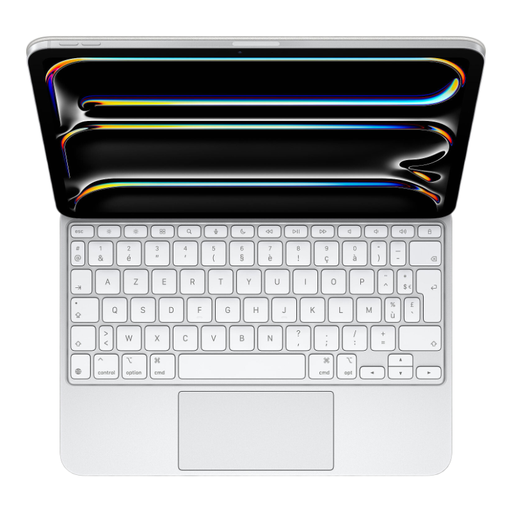
Why we chose it: The no-compromise solution for turning an iPad Pro into a true mobile workstation. Perfect for long-form writing, coding, design, or any task that demands precision.
Thanks to the Smart Connector, you can forget about latency, pairing, and charging. Compatibility is guaranteed by Apple, offering absolute peace of mind. Note that this model is the French AZERTY layout.
Exceptional typing and trackpad experience, seamless software integration, and a convenient pass-through USB-C port for charging the iPad.
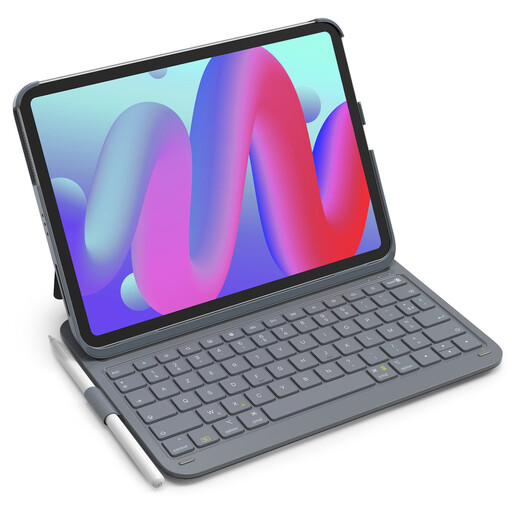
Why we chose it: The perfect compromise for students or professionals who want to both protect their iPad and boost their productivity without breaking the bank. A smart, all-inclusive package.
The manufacturer provides an ultra-detailed compatibility list (including the "Axxxx" model numbers), making it impossible to go wrong! It also avoids the fragility trap by integrating full protection, something standalone keyboards don't offer.
The all-in-one package: keyboard, case, and even a stylus holder. All in a lightweight format with solid battery life.
Our complete, up-to-date selection features products that meet our demanding selection criteria and comply with local regulations.
The first step is to find your iPad's model number. Go to Settings > General > About. Tap on the "Model Number" line to reveal the "Axxxx" reference (for example, A2588 for a 5th-generation iPad Air). Then, simply compare this code with the keyboard manufacturer's compatibility list. It's foolproof.
Absolutely. It's non-negotiable for typing comfortably in your native language. Even if iPadOS can simulate a different layout, the physical keys on your keyboard won't match (for example, on an AZERTY keyboard, the A is where the Q should be, and the M is next to the L...). This is a guaranteed source of errors and frustration. Always insist on a physical keyboard with your native layout, such as QWERTY for English.
It all depends on your priorities and budget.