
Livraison le jour même ou le lendemain

Qualité garantie

Débloquez vos offres de bienvenue: Livraison GRATUITE | Jusqu'à -80 % | 30 jours d'essai gratuits à JoyPlus
Téléchargez l'application
The 10th generation iPad is a powerful tablet, but to get the most out of it, an iPad 10th gen keyboard case is almost essential. It can transform your tablet into a true mobile workstation. But be warned: the market is saturated with options that, despite their appealing looks, often hide deal-breaking flaws.
As a product expert at Joybuy, my mission is to help you navigate this jungle and make the right choice. Here are the 3 most common pitfalls to avoid and the essential criteria to check before you buy.
The scenario is a classic one: after a few weeks, buyer's remorse sets in. The cause? Design flaws that aren't obvious at first glance.
To make the right call and ensure an optimal user experience, focus on these three technical aspects. They are what separate a mere gadget from a true productivity tool.
The first and most important criterion is getting the right keyboard layout for your region. Avoid models with the wrong layout that just come with stickers to "fix" it. Beyond the layout, the key technology is paramount. Scissor-switch mechanisms provide a stable, precise, and quiet typing experience, worthy of a high-quality laptop. This is a non-negotiable feature for long typing sessions.
A Bluetooth 5.0 (or higher) connection is a guarantee of stability and low power consumption. The smartest models include an auto sleep/wake function: the case wakes the iPad when opened and puts it to sleep when closed. Another crucial point is the charging system. Opt for keyboards that charge independently to avoid draining your tablet's battery. A backlit keyboard for iPad is a nice bonus, but make sure its battery can handle it.
Let's not forget a case's primary function: protection. It must offer effective iPad 10 keyboard protection against bumps and scratches. Faux leather or rigid polymers are good options. Finally, if you're an Apple Pencil user, an Apple Pencil holder for iPad 10 is essential. The best cases offer a magnetic slot that not only stores the stylus securely but also keeps it charged.
Rather than overwhelming you with an endless list, we've matched specific models to user profiles based on the strict criteria defined above.
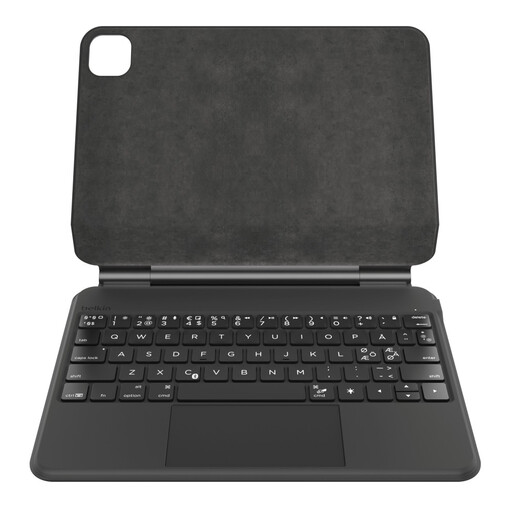
Why we chose it: For those who demand the best. This case transforms the iPad into a true laptop thanks to its floating magnetic stand, large Multi-Touch trackpad, and premium finish.
Its custom design for the iPad 10 ensures a perfect fit. The 600 mAh battery and independent charging tackle the battery life issue, while the large trackpad provides exceptionally smooth navigation.
Floating magnetic design for an adjustable viewing angle. Up to 365 days of standby battery life (manufacturer's data). Backlit keyboard and a compartment for the Apple Pencil.
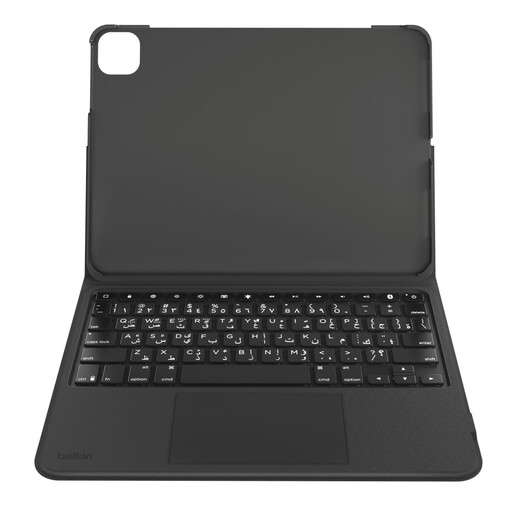
Why we chose it: The ideal choice for juggling work and leisure. The detachable keyboard lets you switch from "productivity" mode to "tablet" mode in an instant for reading or drawing.
Its detachable design offers maximum flexibility while fully protecting the iPad. The self-contained battery preserves the tablet's power, thus bypassing the overstated battery life trap.
Detachable keyboard for maximum versatility. Vegan leather exterior and anti-scratch interior lining. Secure magnetic storage for the Apple Pencil.
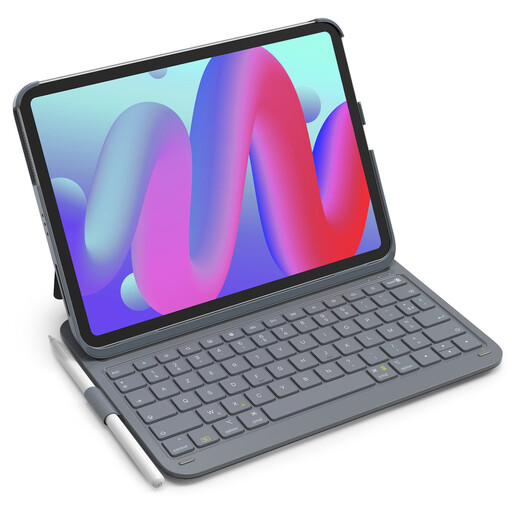
Why we chose it: Its ultra-lightweight design (427g) makes it the perfect companion for those who are constantly on the move and want to keep their bag as light as possible.
Despite its slim profile, it includes a stylus holder and flawless cutouts. Its 150-day standby battery life (manufacturer's data) is concrete information that cuts through the vagueness of some marketing promises.
Extremely lightweight and slim. Near-instant automatic startup upon attachment. Dedicated row of function keys for quick access to shortcuts.
Explore our full selection of products, all validated by our experts using these same demanding criteria.
Yes, as long as the trackpad is up to the task. A responsive trackpad that perfectly handles iPadOS Multi-Touch gestures transforms the user experience. It allows you to navigate, select text, and switch between apps without ever touching the screen. It truly brings you closer to the ergonomics and productivity of a laptop.
It varies wildly. Entry-level models will barely last a week, especially with the backlight on. In contrast, higher-performance models like those from Belkin include more generous batteries and better power management, allowing them to achieve several months, or even a year, of standby time (according to manufacturers). Our advice: always check the battery capacity (in mAh) and look for estimates of real-world usage, not just standby time.
It's very simple; the connection is made via Bluetooth in just a few seconds: